

Write, organize and share Markdown. Your files stay on your machine.
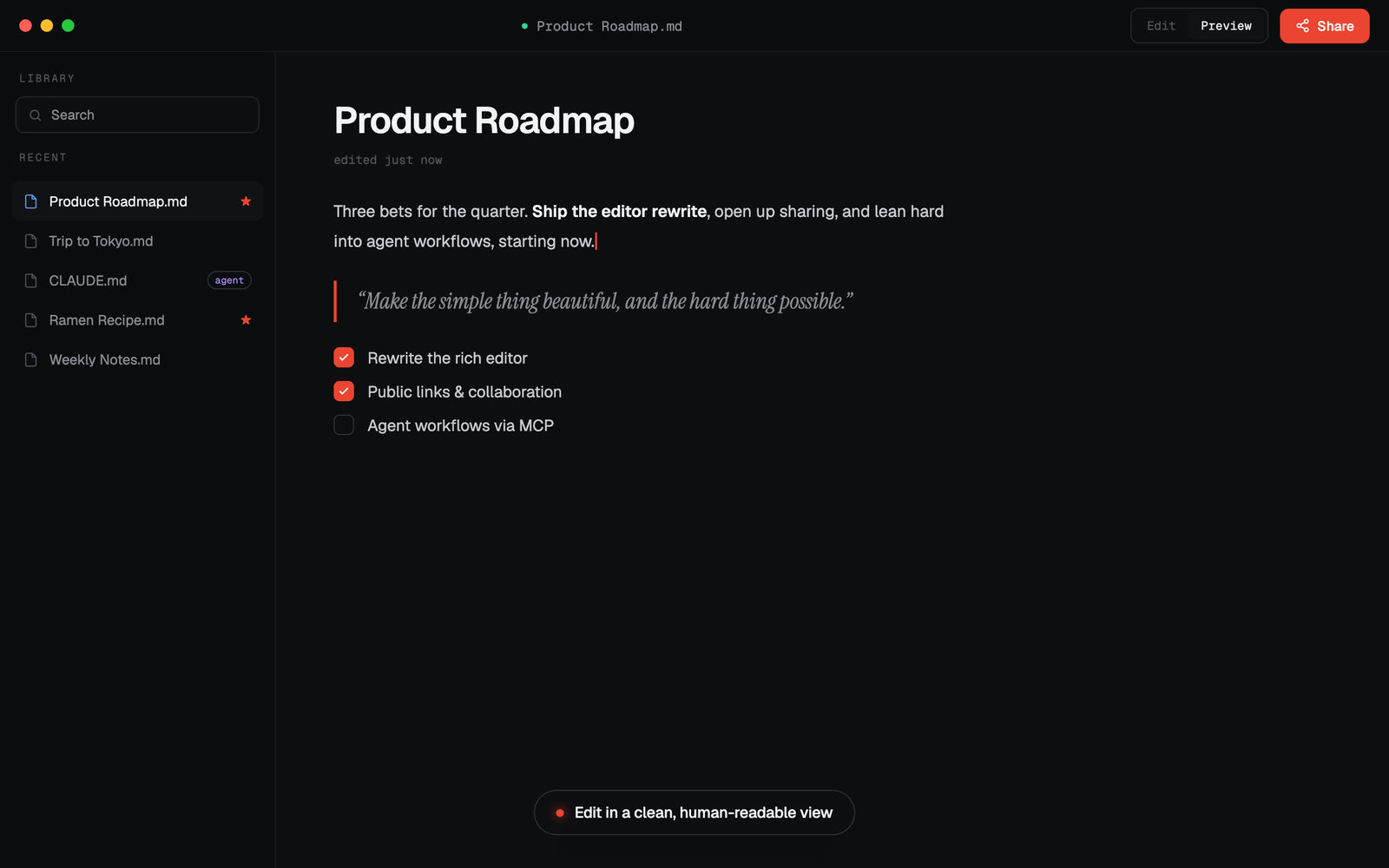
Markie is a desktop markdown app that gets out of your way: a clean editor with live preview, a device-wide index of every markdown file you own, painless sharing, and a built-in MCP server so any AI agent (Claude Code, Codex, or a local model) can find, read, and write your markdown right alongside you.
- Editor + live preview: edit, preview, or split view; GitHub-flavored markdown, tables, code highlighting, and KaTeX math.
- Pictures, clips and video:
orbeside the document just works; double-click a picture to see it full size, drag a corner to resize it, and a YouTube or Vimeo link on its own line becomes a playable card. The file stays plain markdown throughout. - Browse: a device-wide index of every
.mdon your machine, so your notes and docs are one search away. - Agent & skill files: surfaces
CLAUDE.md,AGENTS.md,GEMINI.md,~/.claude/skills,~/.codex, and Cursor rules, grouped by tool. - Sharing: share a doc via a public link or by email; recipients open it in one click, no account required.
- Markie MCP: let Claude Code / Codex work with your markdown (see below).
The current public downloads are Apple Silicon macOS and Intel macOS
(signed and notarized) and Windows x64 (signed through Azure Trusted
Signing). Linux x64 ships from the release flow as an AppImage and a .deb,
starting with the first release that promotes it to stable; the download page
offers it from that moment. Every platform updates itself from its own feed.
Linux packages are not code-signed, by design: the updater checks each
package's SHA-512 before installing it, and each release publishes a
SHA512SUMS file. Server download routes and Electron Builder both read
server/download-manifest.json, so storage, updater feeds, and platform status
cannot drift apart.
Release integrations can read the current stable version and platform URLs from
/download/latest.json.
On Linux, make the AppImage executable and run it
(chmod +x Markie-*-x86_64.AppImage && ./Markie-*-x86_64.AppImage); on its first
run it adds itself to your applications menu and registers for Markdown files
and markie:// links. Or install the .deb with
sudo apt install ./Markie-*-amd64.deb.
Markie ships a dependency-free MCP server that
gives an AI agent a document workspace on your machine: markdown, plain text,
CSV, JSON, YAML, XML, Darkmown, Word, RTF, OpenDocument and HTML. Its tools are
markie_find_documents, markie_search_documents (the same full-text search as
the app's ⇧⌘F), markie_read_document, markie_write_document,
markie_check_md, markie_check_wd, markie_list_skills, markie_guide, and
markie_open_in_markie, plus the original markdown-only markie_find_md,
markie_read_md and markie_write_md. It runs locally and needs no API key.
Four optional tools (markie_cloud_status, markie_cloud_sync,
markie_cloud_public_link, markie_cloud_revoke_public_link) ask the running
Markie app to put a file in your Markie Cloud and return its link, with your
sign-in and your approval. Reads and writes are fenced to your home folder
(symlink-guarded), so an agent can "find my notes and add a section" and
actually do it. Writes are limited to text formats: Word, RTF, OpenDocument and
HTML come back to an agent as extracted, read-only text, and legacy .doc only
opens in the app.
Connecting also hands the agent Markie's organization conventions, so it says where a document belongs as it writes:
---
markie:
  project: bevrly
  block: checkout-redesign
---
New documents then arrive filed under that project and block in Markie, and
nothing moves on disk to make it happen. Claude Code users get the same
conventions as a plugin skill; every other MCP client receives them through the
server's initialize instructions.
It also teaches the agent to write rich documents: which format to pick
(markdown, or a Darkmown .wd when the reader should click, tick or calculate),
the elements Markie actually renders, how a picture, a clip or a recording is
written, where those files have to live to display at all, and which inline HTML
survives a save. markie_guide and the markie://guide/markdown resource serve
the whole of it, and markie_check_md reads a finished document back and names
anything in it that will not show up. markie_check_wd does the same for a .wd,
with the compiler the preview uses.
Claude Code — plugin (easiest):
/plugin marketplace add zvndev/markie
/plugin install markie@markie
Codex or any other MCP client — point it at the bundled server. The installed app's Agents dialog shows the exact command; it looks like:
# ~/.codex/config.toml
[mcp_servers.markie]
command = "node"
args = ["/Applications/Markie.app/Contents/Resources/mcp/markie-mcp.mjs"]
(Running from source instead? Use node /path/to/markie/mcp/markie-mcp.mjs.)
Requires Node ≥ 22.
npm install
npm run electron:dev     # run the app in development
npm run electron:pack    # build an unsigned local macOS app
npm run electron:pack:mac:arm64
npm run electron:pack:mac:x64
npm run electron:pack:win
npm run electron:pack:linux
npm run electron:smoke:mac:arm64
npm run electron:smoke:mac:launch # macOS Apple Silicon host only
npm run electron:smoke:mac:x64
npm run electron:smoke:win
npm run electron:smoke:win:launch # Windows host only
npm run electron:smoke:linux
npm run electron:smoke:linux:launch # Linux host only, under a display or xvfb-run
The local pack/build scripts use a certificate-free electron-builder wrapper and
pass --publish never. Signed releases go through the guarded release runner:
release:prepare:mac, release:prepare:win or release:prepare:linux, then an early-access publish, then
release:promote to stable. docs/RELEASING.md is the full
runbook. The Windows unpacked package also installs the matching
Electron better-sqlite3 Windows prebuild before electron:smoke:win runs.
Native macOS and Windows launch evidence includes launch-smoke.json plus a
captured screenshot.png. Windows launch evidence is handled by
electron:smoke:win:launch or the Windows launch smoke workflow on
windows-latest; it is not claimed from a Mac structure check.
After cross-architecture local packaging, the wrapper restores the development
better-sqlite3 native module for your current Electron host. If Library or
Files ever get stuck after packaging, run npm run native:restore.
Other scripts: npm run build (typecheck plus the Vite bundle into out/),
npm test (renderer + Electron unit tests), node --test mcp/lib.test.mjs
(MCP tests), and npm run release:preflight (safe local release-readiness
checks, no publishing).
Electron · Vite · React · TypeScript · Tailwind · TipTap · CodeMirror · a unified/remark/rehype render pipeline.
MIT © ZVN