
Self-hosted cold email with the deliverability guardrails built in. Warmup, bounce circuit breakers and send-cadence limits run on your own server, with your own Google Workspace or Microsoft 365 mailboxes. There are no per-seat, per-mailbox or per-send fees.
Website · Docs · Bounce-code dictionary · Cold-email cost calculator · Free domain checker
⭐ If WarmHawk is useful to you, star the repo. It helps other self-hosters find it.
This repo is the free, fully functional Tier 0 engine: the API server, BullMQ worker, Prisma schema and install/update scripts, with direct API endpoints and no web UI. The web dashboard is a separate, licensed product. The code is source-available under BSL 1.1 (see License).
| Guardrail | What happens |
|---|---|
| Warmup before campaigns | New mailboxes warm up for at least 14 days and graduate only when their measured inbox rate reaches 90%. |
| Campaign ramp | After warmup, campaign sends start at 5 a day and grow 20% a day, up to each mailbox's own daily cap. |
| Bounce circuit breaker | A mailbox whose bounce rate passes 5% (after at least 20 sends) is paused and flagged before it damages the domain. |
| Hard vs. soft bounces | Hard bounces mark the lead as bounced. Temporary failures retry with backoff and are suppressed after 4 attempts. |
| Human send cadence | An 8-minute floor between sends, plus jitter, so a mailbox never bursts. |
| Domain auth checks | SPF, DKIM and DMARC are checked against live DNS. |
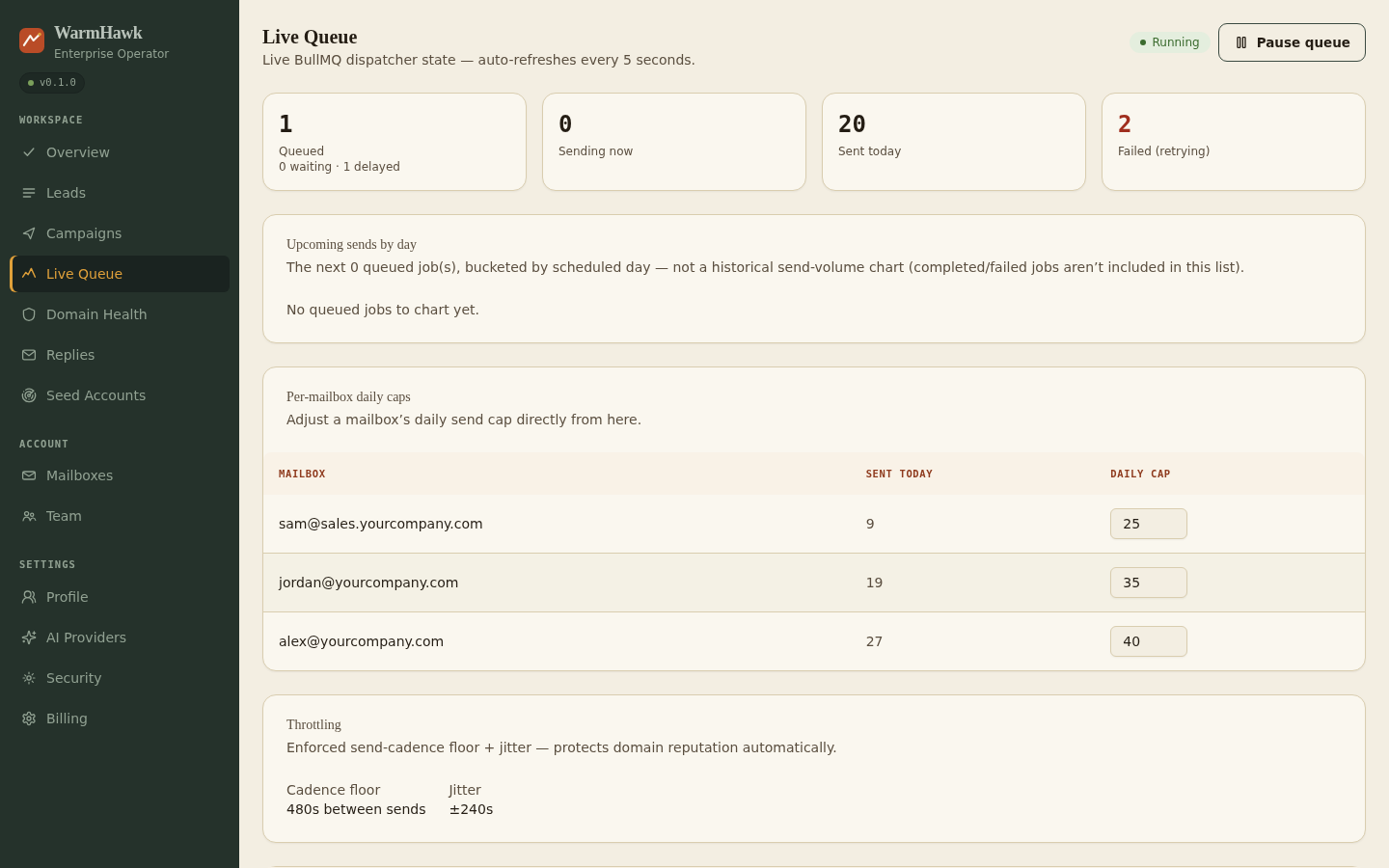
The licensed dashboard (Tier 1) is shown above. This free engine is API-only, and the guardrails above run in it either way.
curl -fsSL https://warmhawk.com/install | bash -s -- \
  --domain yourcompany.com
Pass your bare company domain, not a hostname — the installer derives api.yourcompany.com
for this engine (and dashboard.yourcompany.com if you add the licensed dashboard later). Passing
api.yourcompany.com here would get you api.api.yourcompany.com.
No license is needed: with no --license, the installer brings up this engine and stops. See
docs/quickstart.md for the Tier 0 (API-only) 5-minute first-send walkthrough, and
docs/backup-and-restore.md before you need either.
| Path | What's in it |
|---|---|
docker/ |
docker-compose*.yml + Dockerfile.* — production stack + test/local/e2e overlays |
apps/api |
Fastify API server — routes, lib (encryption, license, spintax, spam score, OAuth, DNS checks) |
apps/worker |
BullMQ dispatch worker — cadence/jitter, weighted rotation, reconciliation cron |
packages/db |
Prisma schema + generated client |
packages/tier-config |
Single source of truth for Tier 0/1/2 feature gating |
ops/redis.conf |
AOF-durable Redis config |
nginx/ |
Bundled nginx config template + Dockerfile (the only published ports in this package) |
scripts/ |
install.sh, update.sh, backup-postgres.sh, and warmhawk — the CLI install.sh links into PATH (warmhawk update / backup / status / logs) |
tests/e2e-install/ |
Fast-tier install regressions (port fallback, idempotent rerun, restart/upgrade data-safety — no scratch VM needed) + the release-gated run.sh (real VM/DNS) |
docs/ |
Quickstart, backup/restore, and other self-serve docs |
n8n/workflows |
Dispatch/warmup n8n workflow JSON |
Requires Node 22+ (see engines.node in package.json).
npm install
cp .env/.env.example .env/.env  # local dev only — a real install never needs this, install.sh generates it
docker compose --env-file .env/.env -f docker/docker-compose.yml -f docker/docker-compose.test.yml up -d postgres redis
npm run db:migrate
npm test                    # fast unit suite, no external dependencies
npm run test:integration    # against the real Postgres/Redis above
--env-file .env/.env is required — Compose only auto-discovers a .env next to the compose file
itself, and docker-compose.yml lives in docker/, not the repo root.
Fast-tier install regressions (tests/e2e-install/test-*.sh) run anywhere Docker runs, no VM or
DNS needed:
bash tests/e2e-install/test-port-fallback.sh      # falls back to 8080/8443 when 80/443 are taken
bash tests/e2e-install/test-idempotent-rerun.sh   # re-running install.sh reuses secrets, doesn't regenerate them
bash tests/e2e-install/test-restart-persistence.sh  # docker compose down/up survives with data intact
bash tests/e2e-install/test-upgrade-in-place.sh # update.sh's rebuild/migrate/restart cycle is data-safeBusiness Source License 1.1 — non-compete Additional Use Grant blocking resale as a competing hosted service, converts to Apache 2.0 four years after each version's release date.