



An unofficial Python client, command line tool and MCP server for the Bakaláři REST API v3. Read timetables, marks, homework, absence and Komens messages using the same account as your school's Bakaláři website. The client handles login and token renewal and returns typed Python objects.
Česky: Neoficiální knihovna, příkazová řádka a MCP server pro Bakaláře. Rozvrh, známky, úkoly a zprávy na jednom místě, bez dalších běhových závislostí. Český úvod a příklady.
- Python 3.9 or newer, standard library only, with type hints and
py.typed. - Timetables, substitutions, marks, absence, subjects, homework, messages, events, GDPR consents, class fund payments and teacher endpoints.
- School search and published timetables without an account.
- CLI commands with JSON output, saved sessions and runnable example scripts.
- MCP server over stdio: 50 read tools, plus 11 write tools enabled explicitly with
--allow-writes. - Typed models, automatic token renewal, configurable retries and raw API access.
- Reading a message leaves it unread; passwords and tokens are excluded from logs and error messages.
Available modules and permissions depend on your school and account type.
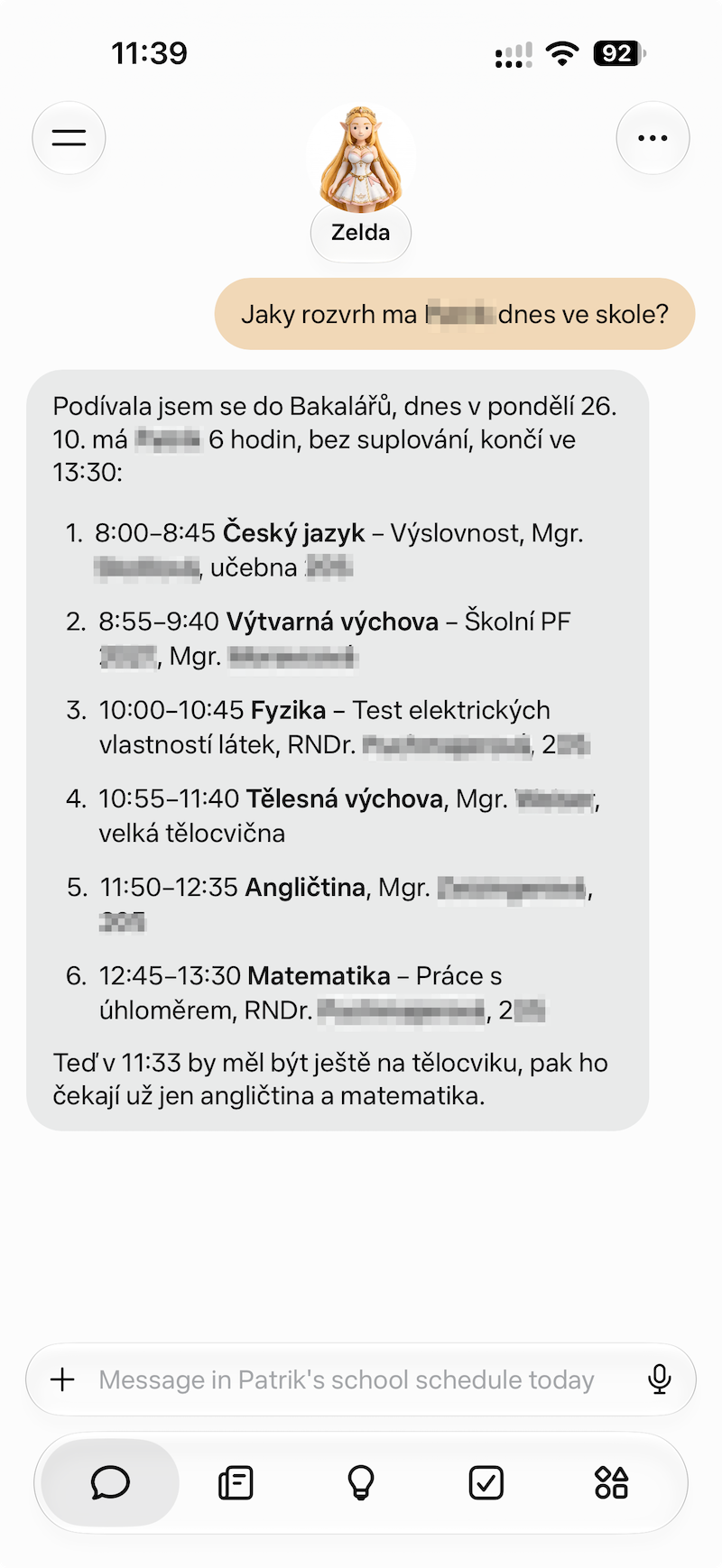
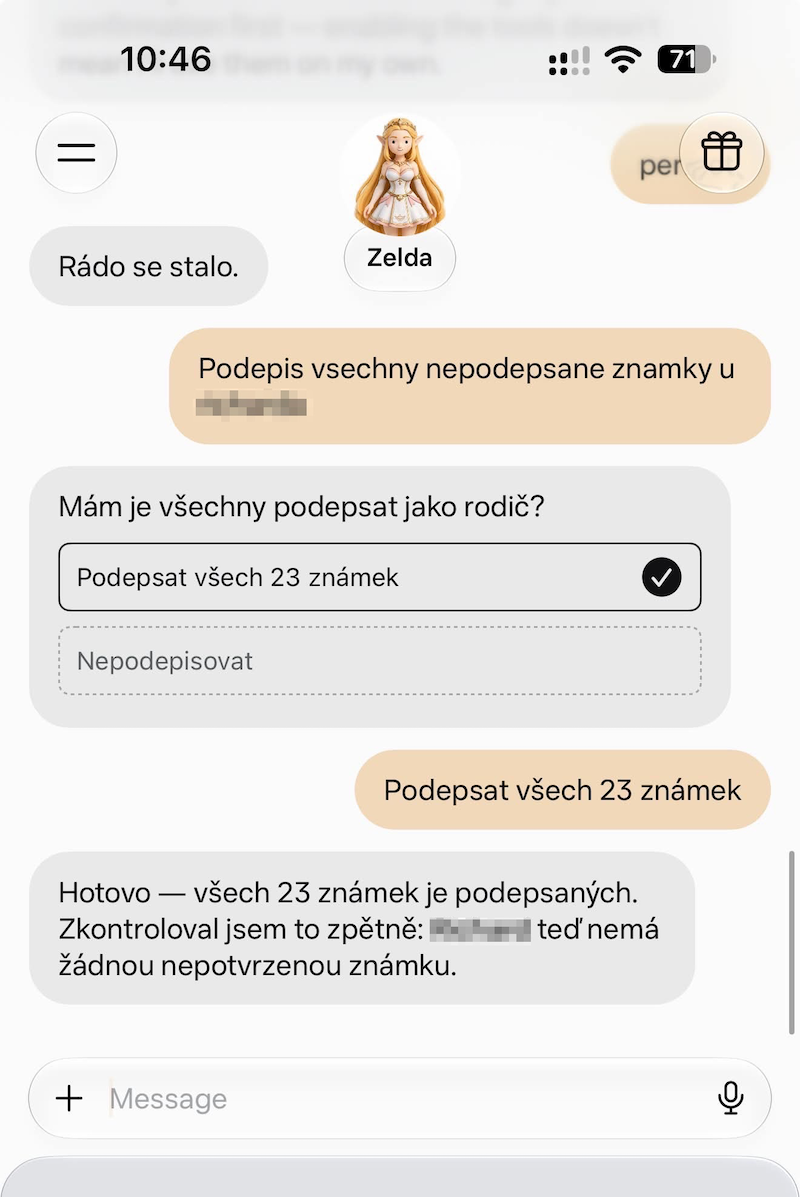
Ask your AI assistant in everyday language once you have connected the MCP server. These real conversations in Czech show how school data can become a daily overview, a study plan or an action you approve. Click any screenshot to view it at full size.
| Check today's timetable | Make a study plan |
|---|---|
 |
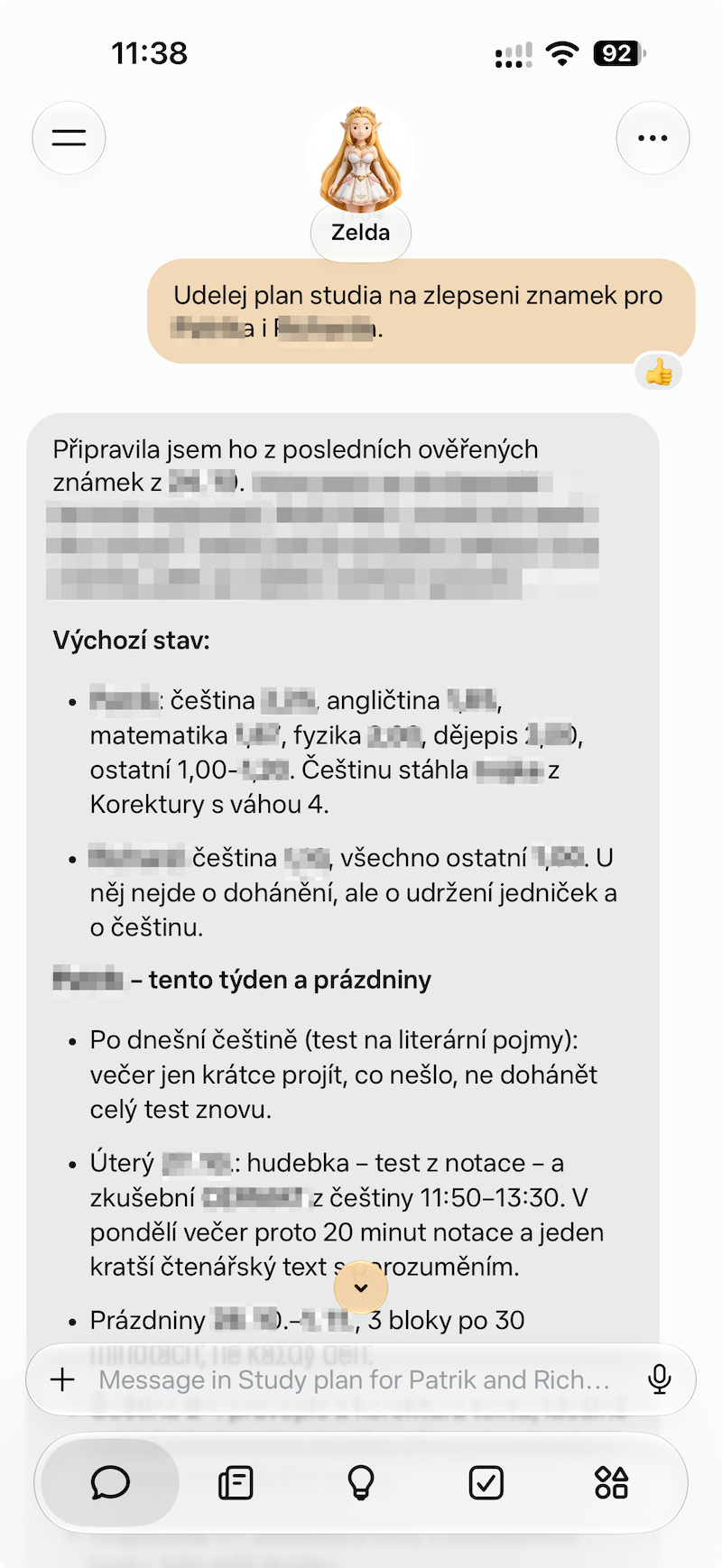 |
| “What lessons does my child have today, and when do they finish?” | “Use the latest marks to suggest what each child should practise this week.” |
| Sign unconfirmed marks | Handle school messages |
 |
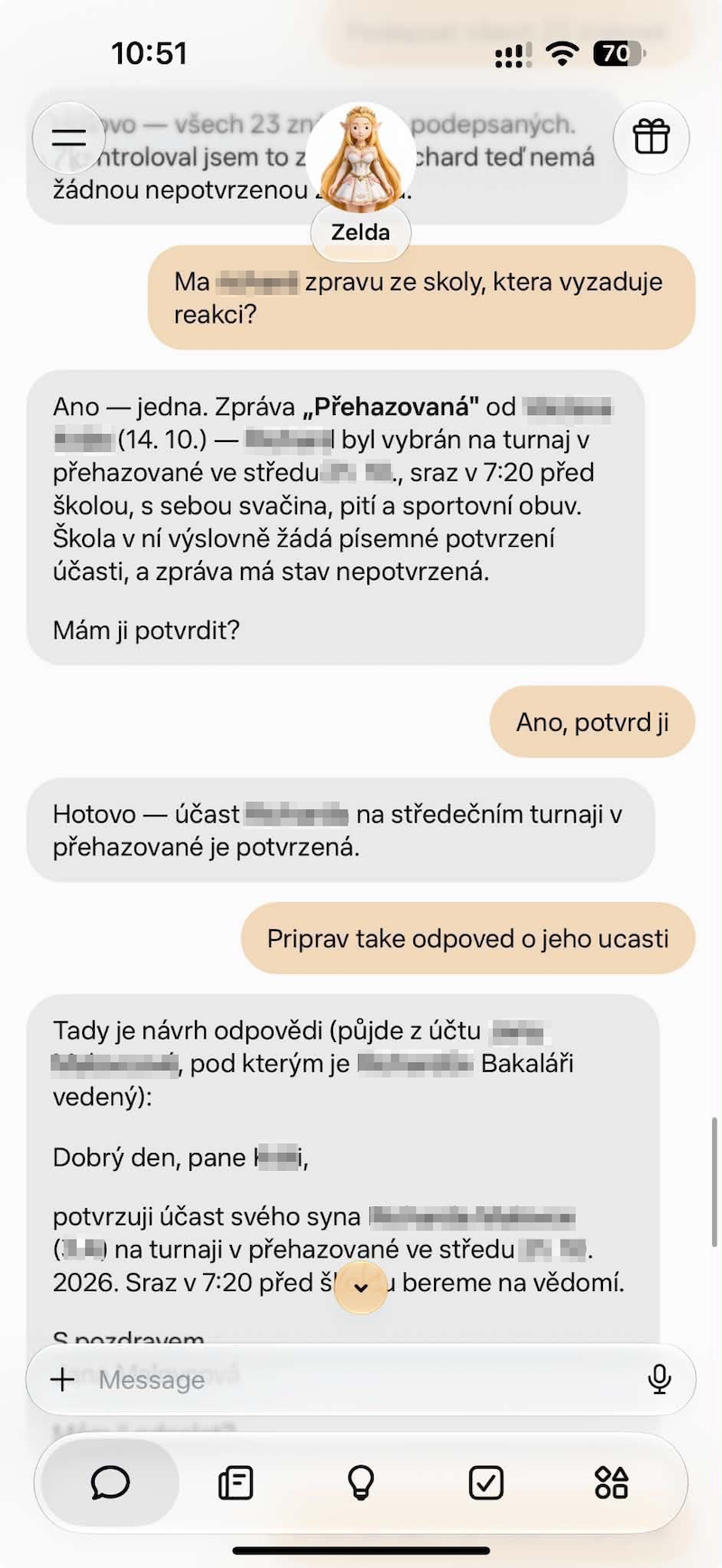 |
| “Show the unsigned marks, then ask me before signing them.” | “Which school messages need a response? Help me acknowledge one and draft a reply.” |
Reading and planning work with the default read tools. Signing marks, acknowledging messages and sending
replies require --allow-writes and the appropriate account permissions. The assistant provides the chat UI,
summaries and plans; the MCP server provides access to Bakaláři data and actions.
Explore all four examples, with Czech and English prompts →
| Guide | Contents |
|---|---|
| Usage guide | Detailed walkthrough, sessions, practical workflows and troubleshooting |
| Python library | Client methods, models, errors and transports |
| Command line | Commands, options, exports and configuration |
| MCP server | AI host setup, tool catalog and examples |
| AI assistant examples | Real screenshots, Czech and English prompts, and the tools behind each workflow |
| API coverage | Supported endpoints and known limitations |
| Example scripts | Timetables, marks, attachments, calendars, sessions and school search |
Install from PyPI in a virtual environment:
python3 -m venv .venv
source .venv/bin/activate
python -m pip install -U bakalari
On Windows, create the environment with py -m venv .venv and activate it in PowerShell with
.\.venv\Scripts\Activate.ps1.
To install from source (including before a release is available on PyPI):
git clone https://github.com/robco/bakalari.git
cd bakalari
python -m pip install .
Both install the library and the bakalari and bakalari-mcp commands. Check the installation with
python -m bakalari --version or python -m bakalari --help.
Set your school's Bakaláři address and account credentials in your environment:
export BAKALARI_URL='https://skola.bakalari.cz'
export BAKALARI_USERNAME='your-username'
export BAKALARI_PASSWORD='your-password'
In PowerShell, use $env:BAKALARI_URL = 'https://skola.bakalari.cz' and the same syntax for the other variables.
Use your own school's address and credentials. bakalari schools Praha searches the school directory without
logging in.
| Variable | Purpose |
|---|---|
BAKALARI_URL |
School's Bakaláři address, including /bakaweb if applicable |
BAKALARI_USERNAME |
Bakaláři web username |
BAKALARI_PASSWORD |
Bakaláři web password |
BAKALARI_SESSION_FILE |
Optional CLI session file for subsequent commands without the password |
For a saved session, run bakalari --session-file ~/.bakalari-session.json login, then set
BAKALARI_SESSION_FILE to that path. Protect the session file like a password and keep it out of version control.
See the authentication guide
for refresh tokens and multiple accounts.
bakalari profile
bakalari timetable                  # this week's lessons and changes
bakalari marks --new                # new marks
bakalari messages --unread          # unread messages, left unread
bakalari homeworks --open           # open homework
bakalari --json absence             # JSON for scripts
Use bakalari <command> --help for options. Commands that change school data are identified in the
CLI reference.
from bakalari import BakalariClient

client = BakalariClient.from_env()
print(client.actual_timetable().format())

for subject in client.marks().subjects:
    print(subject.format_summary())

print(client.unread_messages_count(), "unread message(s)")
Models expose to_dict() for JSON-ready data and raw for the original response. See the
library reference for the complete API.
Configure an MCP host to launch bakalari mcp (or python -m bakalari mcp) with the environment above:
{
  "mcpServers": {
    "bakalari": {
      "command": "/absolute/path/to/.venv/bin/bakalari",
      "args": ["mcp"],
      "env": {
        "BAKALARI_SESSION_FILE": "/absolute/path/to/bakalari-session.json"
      }
    }
  }
}
Create the session first using bakalari --session-file /absolute/path/to/bakalari-session.json login.
On Windows, use the virtual environment's Scripts/bakalari.exe path. The host must support stdio MCP servers;
its exact configuration format can vary. Read tools are enabled by default; add --allow-writes only when you
want tools that change school data. The MCP guide
covers setup and practical workflows.
bakalari/             Python package, CLI and MCP server
unittests/            Offline tests, shared helpers and synthetic fixtures
tests/                Optional MCP SDK and read-only live integration tests
docs/                 User guides and API references
examples/             Runnable scripts
.github/workflows/    Python Package CI and Python Package Publish
.github/scripts/      CI report summaries and distribution checks
The package stays at the repository root. Each Bakaláři area has its own module; client.py combines the
endpoint mixins. Packaging and tool settings live in pyproject.toml, and _version.py is the version source.
python -m pip install -e ".[dev]"
python -m pytest
python -m ruff check .
python -m mypy bakalari
python -m build
python -m twine check --strict dist/*
Default tests run offline, even when account credentials are present. CI checks supported Python versions, coverage (at least 90%), lint, types, MCP interoperability and installable distributions, and uploads reports. See CONTRIBUTING.md for integration tests, code conventions and the release process. Publishing a GitHub release starts the Python Package Publish workflow, which builds the package and publishes to PyPI using trusted publishing. Tests and distribution checks run separately in Python Package CI. The publish workflow can also be run manually from a branch or tag.
If this project is useful to you, you can support its development through Buy Me a Coffee or Revolut. You can also star the repository, report issues, improve documentation or contribute code.