
🎉 v0.3.1 is out — one MCP server for every project, and a security fix worth upgrading for. See what changed →
We don't make AI smarter. We make it experienced.
Coding agent memory — the local-first memory + judgment layer for AI coding agents. One MCP server for every project. Save up to 50%+ of AI tokens. Stop repeating yesterday's bug.





Website • Guide • Demo • Changelog • Paper
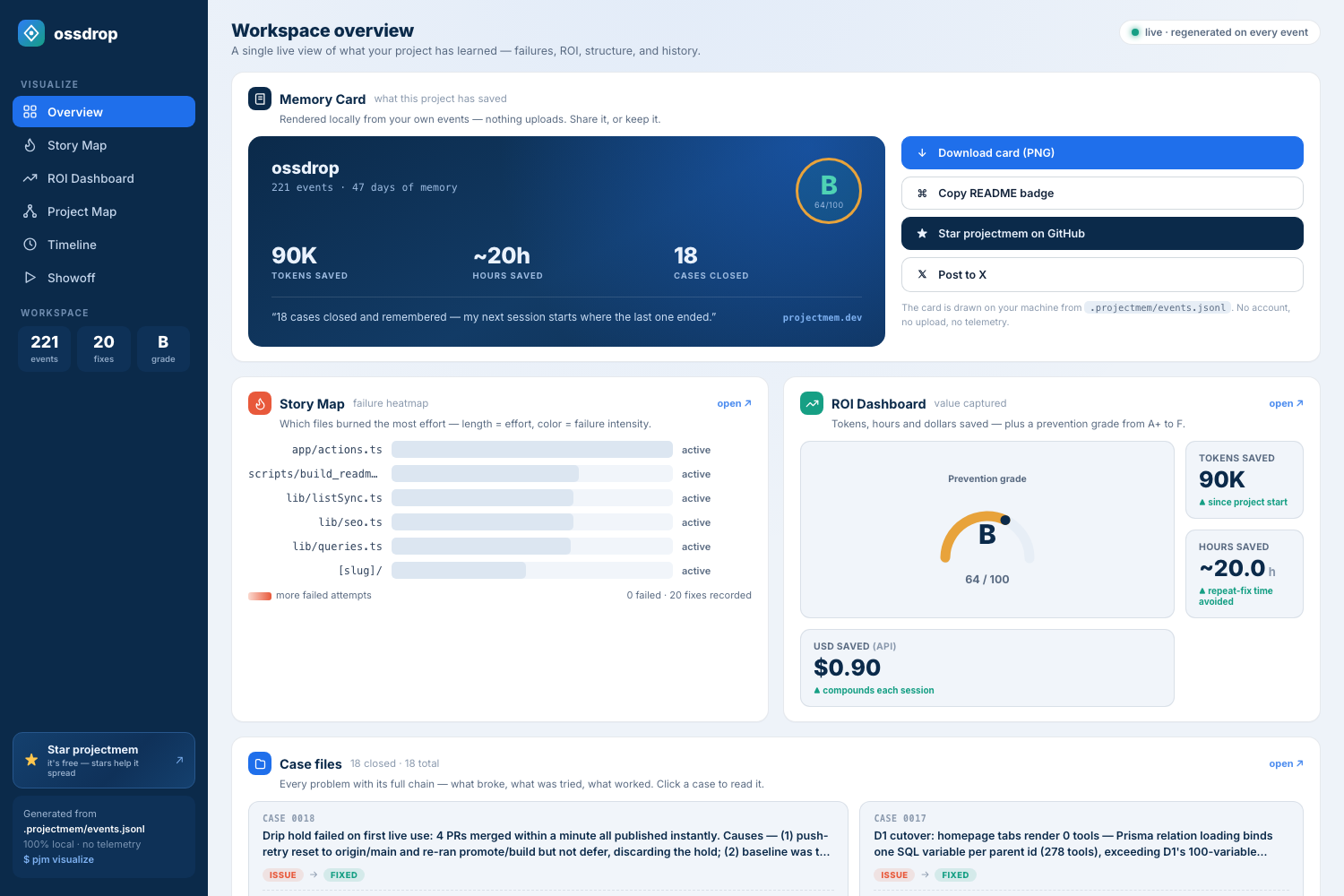
pjm visualize — every case your project solved, what failed on the way, and what it saved. Generated locally from .projectmem/events.jsonl.
Five minutes if you follow along here. Want to be shown instead — every command, the exact output it prints back, and the dashboards at the end? Take the complete setup guide.
New to projectmem, or upgrading from 0.1.x / 0.2.x? Since 0.3.0 one MCP server serves every project, so this is the last time you configure anything.
1. Install or update
pip install -U projectmem2. Find the projects you already have
pjm doctorIt looks where code lives —
~/Developer,~/code,~/projects, your cloud folders, and every drive on Windows — and lists projects with memory that aren't registered yet. Anything it missed, add by hand:pjm project register "/Users/you/Developer/repos/ossdrop"3. Register them
pjm doctor --fix4. Point your AI at all of them with one config
"mcpServers": {
  "projectmem": {
    "command": "/absolute/path/to/python",
    "args": ["-m", "projectmem.mcp_server"]
  }
}
No
--root, nocwd— that's what makes it serve everything. Per-client instructions (Claude Desktop, Claude Code, Cursor, Antigravity, Codex) are in MCP Integration;pjm initprints this block with your own Python path filled in. Then fully restart the client — MCP servers only load on a cold start.5. Check your work
pjm doctorAdd
--onlineif you also want it to tell you when a newer projectmem is out — projectmem makes no network calls otherwise, and--autoturns that into a once-a-day check if you prefer.Run it again after editing the config. It flags any client still pinned to a single repo — the most common reason a new project is invisible to your agent.
All green? You're done. From here on it is one command per repo:
pjm initYour agent reads what the project already learned instead of rediscovering it, and writes down what it finds. Fewer tokens, no repeated dead ends, memory that outlives the session.
Coding agent memory is a persistent record of what happened while building a project — the issues hit, the approaches attempted, the fixes that worked and the decisions made — stored so an AI coding agent can read it at the start of a new session. Without it every session begins from zero.
projectmem is an open-source agent memory layer built for that job. It is
local-first: memory lives in a plain .projectmem/ directory inside your
repository, with no cloud, no account and no telemetry — the only network call
it can make is an update check you turn on yourself. A native MCP server
exposes 17 tools to Claude Code, Claude Desktop, Cursor, Antigravity and Codex,
so your agent reads memory and logs its work on its own.
Unlike chat-history memory tools, projectmem stores typed events — issues, attempts, fixes, decisions, notes — which is what makes the one thing no other tool does possible: a pre-commit warning that fires before you repeat an approach that already failed.
pip install projectmem
cd your-project && pjm init
Full screen-recorded tutorial- watch on YouTube
| Doc | What's in it |
|---|---|
| Complete setup guide | The full walkthrough on the web — install, MCP setup per client, pjm doctor, your first logged issue, and both dashboards. Every terminal output is captured from a real run. |
| TUTORIAL.md | 15-minute step-by-step walkthrough — set up projectmem on your own project, watch the lifecycle, see the pre-commit warning fire. |
| CHANGELOG.md | Release history. Latest: v0.3.1 — opt-in update checks, on top of 0.3.0's global MCP mode, project registry and rebuilt dashboard. |
| Research paper (arXiv:2606.12329) | PROJECTMEM: A Local-First, Event-Sourced Memory and Judgment Layer for AI Coding Agents — the peer-readable version: design, Memory-as-Governance framing, capability comparison, and the 207-event dogfooding study. |
| LICENSE | MIT |
Every new AI session starts from zero. Claude, Cursor, Aider — they all forget yesterday's decisions, repeat failed debugging attempts, and burn millions of tokens reconstructing context from raw source files.
The model isn't the problem. The architecture is. Stateless models need a memory cortex.
projectmem is the local-first memory + judgment layer that sits above your AI tools. It captures every failed attempt, decision, and gotcha — then injects that experience back into future AI sessions. Git tracks what changed. projectmem tracks why it changed, what was tried, and what failed.
First time here? → The complete setup guide walks the whole path end to end: install, connecting Claude Desktop, Claude Code, Cursor, Codex or Antigravity, checking it with
pjm doctor, and reading your memory back through the dashboards — with the real terminal output at every step.
Three commands to a project that remembers:
pip install projectmem
cd your-project
pjm init
That's it. pjm init installs three git hooks (pre-commit warnings, post-commit classification, post-merge tracking), auto-starts a real-time file watcher, inherits cross-project memory if available, and creates .projectmem/. Capture is active from minute one.
The canonical command is
projectmem. Apjmalias is installed for speed.
Both dashboards now show which version generated the page, with a check for
updates link beside it. The page makes no request until you click — PyPI's
public JSON is fetched straight from your browser and nothing about your machine
is sent. On the command line, pjm doctor --online checks once and
pjm doctor --auto remembers to check daily; both are off unless you ask.
Until now an MCP config was tied to one repository: eleven projects meant eleven
server entries and eleven restarts. 0.3.0 serves every registered project from
a single server. Paste the config once; every repo you pjm init afterwards is
reachable from it.
pjm project list          # what this server can reach
pjm project use ossdrop   # the default when a call names no project
log_issue(summary="stars come back empty", project="ossdrop")
→ Logged issue #0019 → ossdrop: stars come back empty
Every write names the project it landed in — in a shared server, the dangerous
failure is not "nothing works", it is a write that succeeds against the wrong
repo. Existing --root configs keep working untouched, and a pinned server now
refuses to write anywhere else even when asked.
Also in 0.3.0:
- Fixed: the MCP server was broken on fresh installs. mcp 2.0 renamed
FastMCPand left the old import path raising — since 2026-07-28 every newpip install projectmemgot a server that died at import. Caught and fixed by @VIVAAN-DHAWAN. - Security: stored XSS in
pjm visualize. Event summaries reached the DOM unescaped, and git commit messages become event summaries — so a crafted commit in a branch you pulled could run script in your dashboard. Every sink is escaped now. - A rebuilt dashboard — a shareable Memory Card, case files with the full issue → attempt → fix chain, an effort treemap, per-file dossiers, and a global view that opens with where you left off.
Registry migration is automatic: the 0.2.x list of paths is converted on first
read, with a .bak kept beside it.
0.1.6 made one project's memory something you could watch. 0.2.0 lifts that to your whole workspace — and closes the gap between what happened (memory) and what your code is (structure).
- 🌐 Global dashboard —
pjm dashboardis one page over every project you'vepjm init-ed: total issues captured, fixes confirmed, dead-ends prevented, tokens saved, a grade per project, and a "needs attention" list. Click any card to open that repo's own dashboard, generated fresh. It's a global view, not a global store — each repo's.projectmem/is aggregated at read time and never leaves its folder. Default is serverless (a static snapshot); add--servefor a tiny, ephemeral live server where the Refresh button re-reads your files — no background daemon, Ctrl+C stops it. - 🧬 Structure & relations —
pjm map --build(run automatically atpjm init) walks your codebase and, for Python, resolves imports into a real dependency graph. The Project Map's Graph and Flow views now render actual files and the import edges between them. The cache (structure.json) is derived from code, gitignored, and never committed — code is only ever read. - 🔥 Failure heat on structure (the combo) — the one view a pure code-grapher can't draw and a pure memory tool can't either: files with repeated failed attempts glow red, laid directly over the real import graph. Structure comes from the code, heat comes from your memory, and they meet only in the renderer.
- 🗂️
plan.md— a new editable intent file: ideas and plans, what you mean to do — deliberately not the event log.events.jsonl → summary.mdrecords what happened;plan.mdrecords what you intend. The AI reads it at session start and edits it directly; a plan never becomes an event.pjm plan/pjm plan "idea"/ MCPget_plan().
Everything stays 100% local — the global dashboard is a read-time aggregate, never a central honeypot of your code's history.
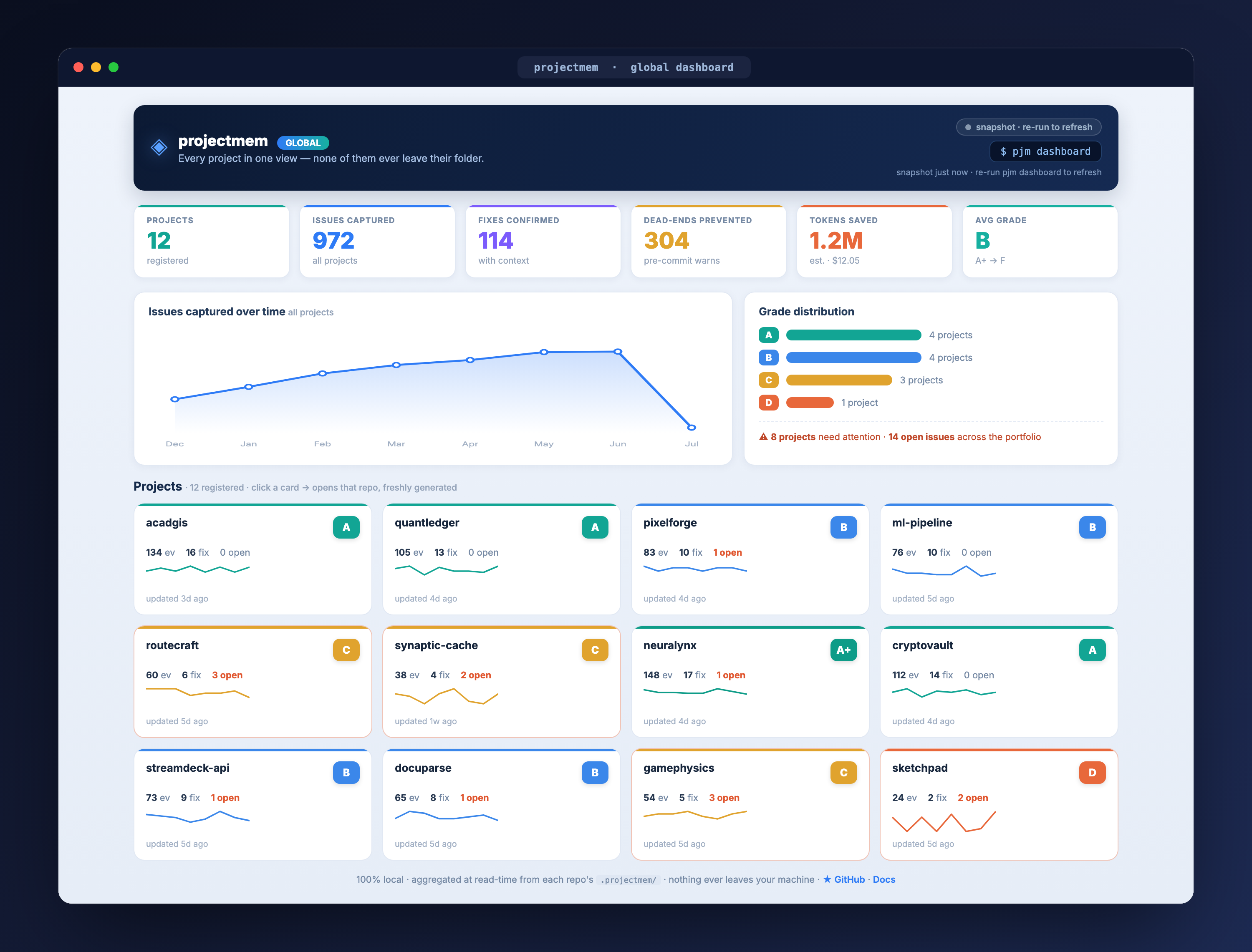
Global Dashboard — every pjm init-ed project in one view: grades, issues, savings, and a "needs attention" list, aggregated at read time. Each card opens that repo's own dashboard.
Your project's memory is also something you can watch — and share.
- 🎬 Showoff — a dashboard tab with three animated story scenes, all rendered from your real event log: Story Replay (watch your project's history build itself, node by node), Orbit (files orbit the project, events orbit their file), and Universe (your project as a rotating galaxy — every bright star is a real issue, attempt, fix, or decision; click one for its full details).
- ⏺ Built-in recorder — hit REC (10–60 s) and Showoff downloads a
.webmclip of the animation, rendered 100% locally with a "made with projectmem" badge. Your debugging story, ready for a tweet or a standup. - 🗺️ Flow — the Project Map's default view: a layered flowchart reading
PROJECT → DIRECTORIES → FILES → WHAT HAPPENED → MEMORY. Files with repeated failures glow red along their path, every file shows its outcome chips, and everything flows into theevents.jsonlcylinder. Tree and Graph views are one click away. - 🧵 Time Spine — the Timeline's default view: a real-time axis you scroll, with problems branching left (issues, failed attempts) and knowledge branching right (fixes, decisions, notes). Hover any card and its whole issue thread lights up. The classic list remains as "Details".
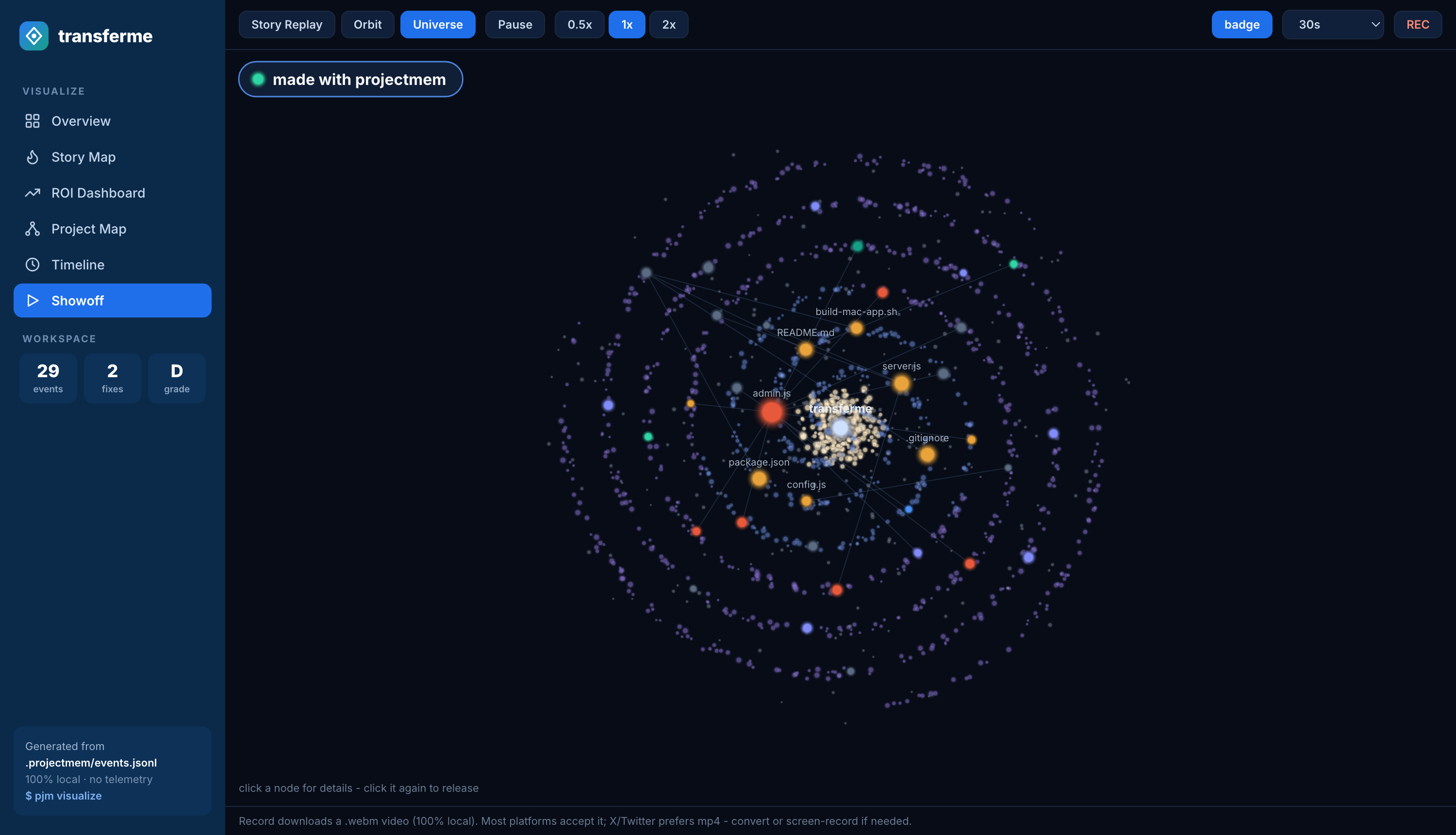
Showoff · Universe — every bright star is a real event from this project's memory
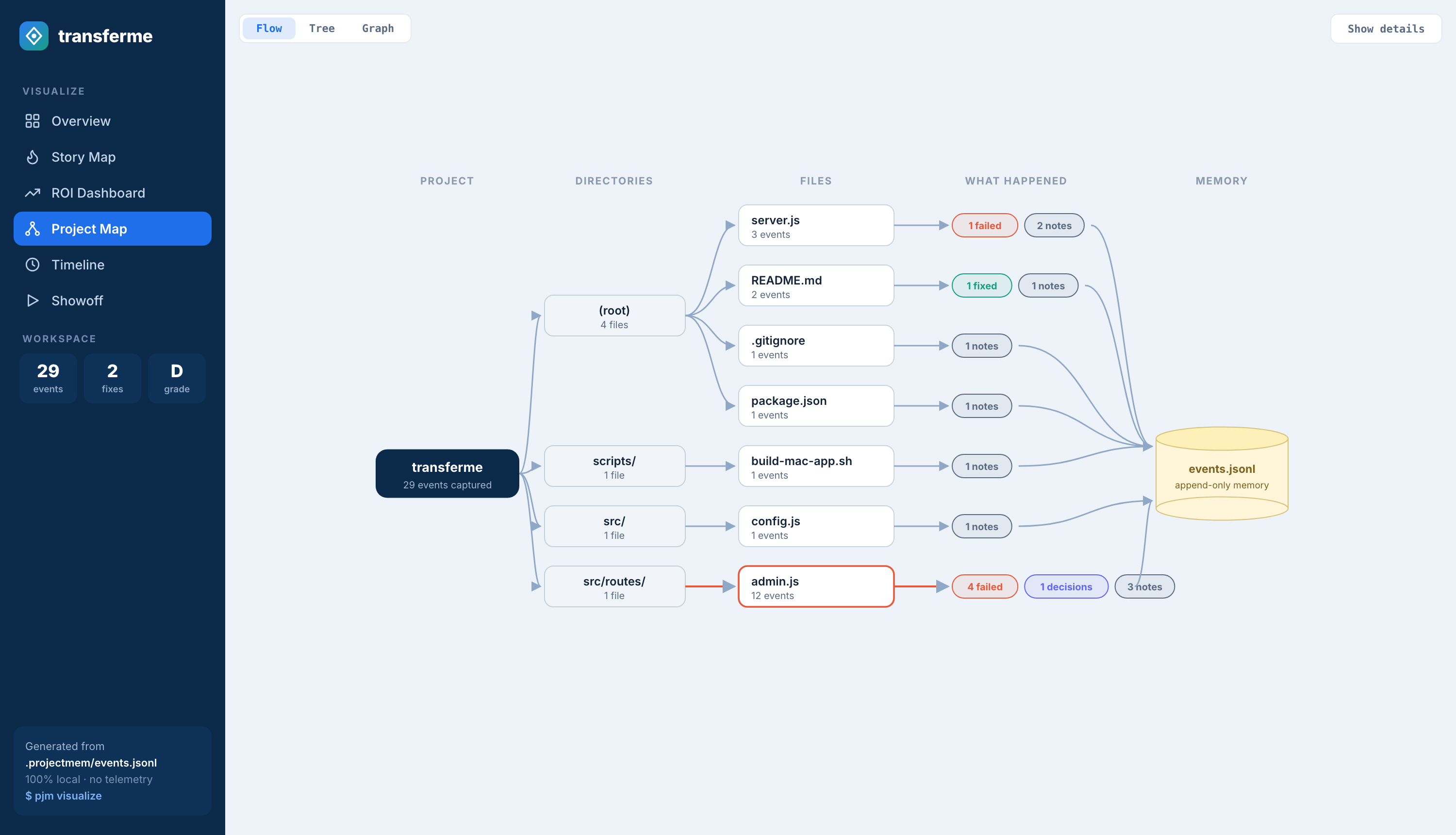
Project Map · Flow — what happened, file by file, flowing into append-only memory
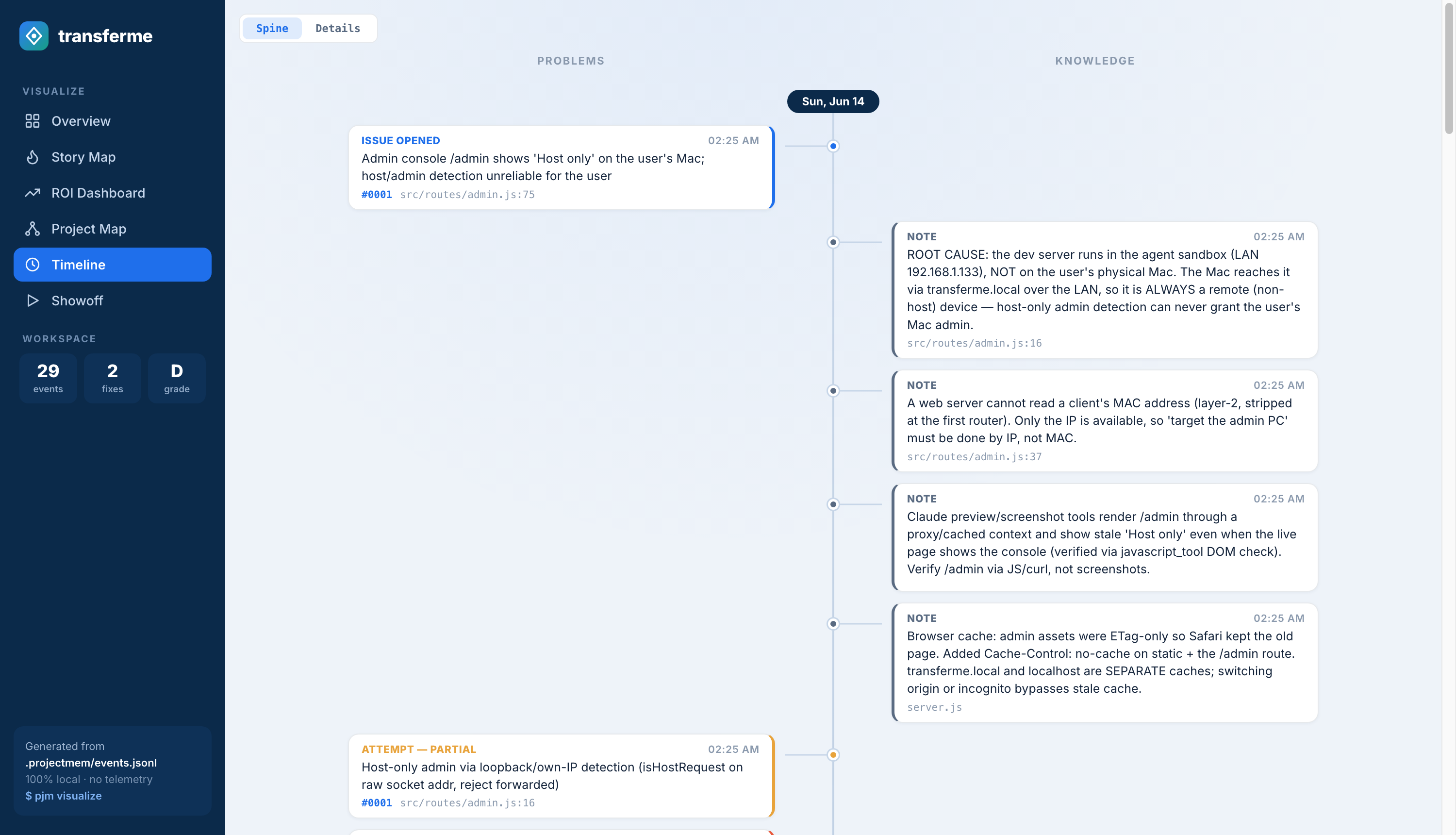
Timeline · Time Spine — problems on the left, knowledge on the right, real time down the middle
- Pre-Commit Warnings —
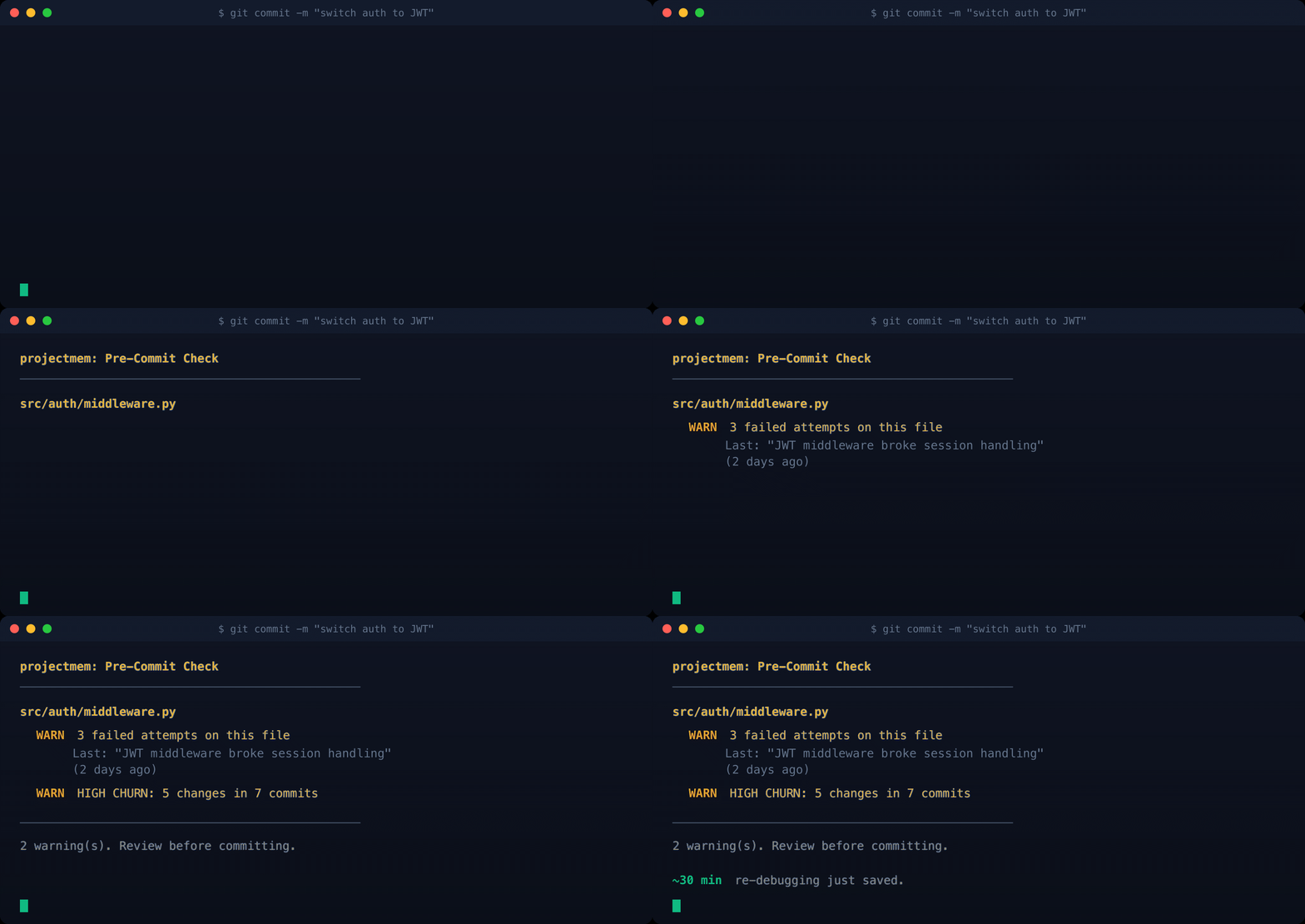
pjm precheckwarns you before you commit if you're about to repeat a failed approach, modify a high-churn file, or touch an unresolved issue. No other AI tool does this — it requires the memory layer underneath. The warning now lists the dead ends themselves ("What already failed here: ✗ tried CSS contain:layout"), andpjm precheck --snooze 2hsilences it politely — the snooze is itself logged, so even the silence is audited. - Stale-Memory Detection (new in 0.1.4) — other memory tools silently decay or delete old memories; projectmem never deletes. Every decision that cites a file is cross-checked against that file's git history — when the file has moved on, the memory is flagged ("predates 7 commits to auth.py — confirm or supersede") and a human decides. Retire it cleanly with
pjm decision "new way" --supersedes <id>: the old event stays in the log, tagged, forever. - Session-Start Briefing (new in 0.1.4) —
pjm briefanswers "where was I?" in one screen: active warnings, possibly-stale memories, open issues, recent decisions, stack gotchas, and your prevention score with a week-over-week delta. - Memory for agents without MCP (new in 0.1.4) —
pjm export --claude-mdcompiles live decisions, gotchas, and a "Do NOT retry — these already failed" list into a marked block in CLAUDE.md (or.cursorrules). Copilot, plain Claude, any agent that reads the file inherits your project's judgment. - Smart Context Injection —
pjm wrap claude(or cursor/aider) injects a token-budgeted memory block into your AI before the session opens. Your AI starts experienced, not blank. - Provable ROI Score —
pjm scoreoutputs a letter grade (A+ → F) backed by concrete numbers — debugging hours saved, tokens prevented, dollars protected. CI-friendly JSON output and shields.io badge for your README. - Cross-Project Memory — Lessons learned in one repo follow you forever. Library gotchas, decisions, and patterns live in
~/.projectmem/global/and auto-inherit into every new project that matches your stack. - Real-time File Watcher — Background daemon detects rapid edits to the same file (debugging sessions) between commits. Battery-aware, gitignore-aware, auto-started by
pjm init. - Native MCP Server — Plugs into Claude Desktop, Cursor, Antigravity, Codex, and any MCP-compatible tool. 15 native tools force the AI to read context, check files for known failures, read your
plan.md, and log work automatically. Verified end-to-end against all four clients. - Interactive Dashboard (expanded in 0.1.6) —
pjm visualizeopens a six-tab local dashboard: Overview, Story Map (failure heatmap with collapse/focus controls), ROI Dashboard, Project Map (Flow / Tree / Graph, now over your real code structure), Timeline (Time Spine / Details), and Showoff — animated story scenes with a built-in video recorder. - One MCP server for every project (new in 0.3.0) — configure your client once instead of once per repository. Calls name their project (
project="ossdrop"), or fall back to the active one; every write reports which repo it landed in, and a pinned--rootserver refuses to write outside its own. Existing single-project setups are untouched. - Global Dashboard (new in 0.2.0) —
pjm dashboardis one cross-project view over every repo you'vepjm init-ed: grades, issues, savings, and per-project drill-in. A global view, never a global store — each repo's memory is aggregated at read time and never leaves its folder. Serverless by default;--servefor an ephemeral live server (Ctrl+C to stop). - Code Structure + Judgment (new in 0.2.0) —
pjm map --buildreads your codebase into a real import graph, and the Project Map overlays failure heat from your event log on top: the files that keep breaking, glowing red over the structure that actually connects them. The structure cache is derived from code and gitignored — never committed. - Intent, separate from memory (new in 0.2.0) —
plan.mdholds ideas and plans (what you mean to do), kept deliberately apart from the append-only event log (what happened).pjm plan, or the MCPget_plan(); the AI edits it directly and a plan never becomes an event. - 100% Local — No cloud, no telemetry, no accounts. Your code, your memory, your machine.
| Capability | projectmem | claude-mem | agentmemory | mem0 | Letta (MemGPT) |
|---|---|---|---|---|---|
| Core focus | Memory + Judgment | Session capture | Memory engine | Chat memory | Agent framework |
| Pre-commit failure warnings | ✅ unique | ❌ | ❌ | ❌ | ❌ |
| Stale memory: flag, never delete | ✅ new in 0.1.4 | ❌ | ❌ silent decay | ❌ | ❌ |
| Supersede without losing history | ✅ new in 0.1.4 | ❌ | ❌ | ❌ | ❌ |
| Captures development history | ✅ typed events | 🟡 | 🟡 | 🟡 | 🟡 |
| Records architectural decisions | ✅ | ❌ | 🟡 | ❌ | ❌ |
| Memory for agents without MCP | ✅ CLAUDE.md export | ❌ | ❌ | ❌ | 🟡 |
| Cross-project memory | ✅ library-scoped | 🟡 | 🟡 | 🟡 | 🟡 |
| Provable ROI score | ✅ A+ → F + $ | ❌ | ❌ | ❌ | ❌ |
| Plain-text, greppable store | ✅ events.jsonl | ❌ | ❌ | ❌ | 🟡 |
| No persistent server or DB | ✅ stdio + files † | ❌ | ❌ | ❌ | ❌ server + DB |
| No telemetry, no accounts | ✅ | ❌ default-on | ✅ | ❌ | 🟡 |
| Native MCP server | ✅ 15 focused tools | ✅ | 🟡 53 tools | 🟡 | 🟡 |
| Global dashboard (all repos) | ✅ read-time, local | ❌ | 🟡 central store | ❌ | ❌ |
| Editable intent (plan ≠ memory) | ✅ plan.md |
❌ | ❌ | ❌ | 🟡 |
| Price | ✅ Free · MIT | Free + paid tier | Free | Freemium | Free + cloud |
✅ yes · 🟡 partial · ❌ no — snapshot June 2026; design capabilities, not benchmark results. claude-mem runs a background worker (port 37777) and enables telemetry by default (v13.5+); agentmemory down-ranks and prunes old memories via decay, mem0 rewrites facts on update, Letta's memory blocks self-edit in place — projectmem never deletes: it flags staleness and lets you decide. Letta requires a running server (Postgres or cloud).
† There is no database and nothing you have to keep running: the MCP server is a stdio subprocess your AI client spawns, and everything else is plain files. The only server anywhere is the optional pjm dashboard --serve, an ephemeral local viewer you start and stop with Ctrl+C — never a background service.
- Import your existing memory —
pjm import(planned for 0.3.3) will migrate history from mem0, agentmemory, Letta, and Claude session logs into projectmem. It maps only to the core event vocabulary — issues, attempts, fixes, decisions, notes — so signal comes in and another tool's clutter stays out. Your judgment history moves with you.
Want a source supported? Open an issue and tell us what you're migrating from.
The architecture is built around one rule: AI reads small, distilled files. Tools generate them from the big raw log.
| Access mode | Tokens / session | How it works |
|---|---|---|
| No projectmem (baseline) | 5,000 – 20,000+ | AI re-reads source files every session |
| Universal Mode (markdown) | ~2,500 | AI reads 3 small distilled files once |
| MCP Mode (recommended) | ~800 – 1,500 | AI calls get_summary(), then get_issue(id) only when relevant |
pjm wrap (pre-injection) |
500 – 2,000 | Pre-generated, you set the budget |
AI never reads events.jsonl directly. That file is for tools (pjm score, pjm context, pjm wrap). Tools distill the raw log into compact AI-readable summaries.
Since 0.3.0 a single MCP server serves every project you have registered. Paste
the config once and every repo you pjm init afterwards is reachable from it —
no second entry, no restart.
pjm project list # what this server can reach
pjm project use ossdrop # the default when a call names no project
pjm project alias ossdrop odYour agent picks the project per call:
log_issue(summary="stars come back empty", project="ossdrop")
→ Logged issue #0019 → ossdrop: stars come back empty
Every write says where it landed. That echo is the point: in a one-project setup a misconfigured server simply fails, but a shared server can succeed against the wrong repository, which corrupts two audit trails at once. If the name in the reply is not the project you meant, stop.
How a call is routed, highest first:
| Source | Notes | |
|---|---|---|
| 1 | --root at startup |
A boundary, not a default. A pinned server refuses to write elsewhere, even when asked. |
| 2 | project="…" on the call |
id, alias or path. An unknown name is an error. |
| 3 | The client's workspace root | Only when exactly one resolves. |
| 4 | The active project | pjm project use <name>. |
| 5 | The working directory | Walks up looking for .projectmem/, like git. |
| 6 | — | Refuses, and lists what is registered. It never guesses. |
Client roots outrank the active project on purpose: the root is where you are now, the active project is a mode you set days ago. When they disagree, the stale one is the wrong answer.
Single-repo setups are untouched — pjm init --mcp-config-single still prints
the pinned config, and an existing --root entry keeps working exactly as before.
For: Claude Desktop, Cursor, Antigravity, Codex — and any tool with native MCP support. The MCP server forces the AI to read memory and log every action automatically.
Since 0.3.0 you configure this once, not once per repository. The block below has no --root: the server serves every project you have registered, and each call resolves its own. Paste it, and every repo you pjm init from then on is reachable — no second entry, no restart.
"mcpServers": {
  "projectmem": {
    "command": "/opt/anaconda3/bin/python",
    "args": ["-m", "projectmem.mcp_server"]
  }
}
Upgrading with projects you already have? The registry only ever recorded
projects you ran pjm init on since it existed (0.2.0), so anything older is
missing — and global mode routes through the registry. One command sorts it out:
pjm doctor          # what's unregistered, what's stale, what's still pinned
pjm doctor --fix    # register what it found
It looks in the places code actually lives — ~/Developer, ~/code, ~/src,
~/projects and friends, plus every fixed drive on Windows, where projects sit
on D:\ and E:\ as often as under your home folder. To point it somewhere
specific:
pjm doctor --path ~/work --path /Volumes/ssd --fix
pjm project scan D:\ E:\ --depth 3     # the same walk, without the other checks
Nothing is scanned until you run it, and nothing is written without --fix.
After an upgrade the CLI mentions pjm doctor once — a wheel install can't run
code, so the first command you type is the only place to say it.
With one project registered, that is the whole setup — there is only one place a call can go. With several, your AI passes project="<name>", or you set a default with pjm project use <name>. pjm init prints this block with your own Python path already filled in.
Upgrading from 0.2.x? Your existing --root entry keeps working exactly as before, and a pinned server now refuses to write outside its own repo even if asked. Replace it with the block above when you want one server for everything.
- Install + init.
pip install projectmem, thencdinto your project and runpjm init— or simply ask your AI to run it. - Ask your AI to set up the projectmem MCP server for you — it can edit the client's config file itself. (It needs permission to do that: use Auto / accept-edits mode, or approve the file edit when asked. The exact config per client is in the sections below if you'd rather paste it by hand.)
- Restart the AI tool so the MCP server loads, then start your session with this prompt:
Hi — I use projectmem as this project's memory. Before anything else,
call get_instructions(), then get_summary(), then get_project_map() to
load what we already know. As we work, log issues, attempts
(failed/worked), fixes, decisions, and notes with the projectmem tools,
and call precheck_file(path) before you edit a file. Ideas and plans go
in plan.md via get_plan() — never as events.
Strictly speaking this prompt is optional — with the MCP server installed correctly the AI discovers the memory on its own. But saying it makes capture noticeably more consistent, so we recommend it.
- Repeat for every project:
pjm init+ the same kickoff prompt. - Coming back after closing the window? Open with a one-line reminder — "Reminder: we use projectmem as memory here." — and the whole setup carries on where you left off.
Prefer to wire it up by hand? The exact, verified config for each client follows.
Easiest — open the config from the UI:
- macOS: Claude menu →
Settings…→Developertab → Local MCP servers → Edit Config. - Windows / Linux: same path expected (
Settings → Developer → Edit Config) — open an issue if your platform differs and we'll update this.
If you prefer the raw file path: ~/Library/Application Support/Claude/claude_desktop_config.json on macOS, %APPDATA%\Claude\claude_desktop_config.json on Windows, ~/.config/Claude/claude_desktop_config.json on Linux (or $XDG_CONFIG_HOME/Claude/ if you have moved it). pjm init prints the right one for the machine you run it on.
Paste this block:
"mcpServers": {
  "projectmem": {
    "command": "/opt/anaconda3/bin/python",
    "args": ["-m", "projectmem.mcp_server"]
  }
}
Two things to know about this block:
- Use the absolute path to
python(e.g./opt/anaconda3/bin/python, or runwhich pythonto find yours). Claude Desktop subprocesses don't inherit your shellPATH, so bare"python"often fails. - You no longer need the
cwdfield, and you never could rely on it. Claude Desktop's current build (with the Epitaxy / Cowork workspace system) silently ignorescwd— the server ends up running withcwd=/and can't find.projectmem/. That is why older releases needed--root. The registry replaces it: the server finds projects by name, not by where it happens to be running.
Pin this server to a single repo instead
"mcpServers": {
  "projectmem": {
    "command": "/opt/anaconda3/bin/python",
    "args": [
      "-m", "projectmem.mcp_server",
      "--root", "/absolute/path/to/your/project"
    ]
  }
}
A pinned server serves exactly that repository and refuses to write anywhere else, even when asked — the stricter choice if you want a hard boundary. pjm init --mcp-config-single prints this form.
Then fully quit Claude Desktop (Cmd+Q on Mac) and reopen — MCP servers only initialize on cold start.
Two ways to register the MCP server — pick whichever fits your workflow:
- Global (recommended): Cursor menu →
Settings…→ left sidebar Tools & MCPs → Installed MCP Servers → Add Custom MCP. Paste the JSON below. - Per-project: drop the JSON into
<project-root>/.cursor/mcp.json— only active when that project is open.
{
  "mcpServers": {
    "projectmem": {
      "command": "/opt/anaconda3/bin/python",
      "args": ["-m", "projectmem.mcp_server"]
    }
  }
}
Two things to know about this block (same gotchas as Claude Desktop):
- Use the absolute path to
python(runwhich pythonto find yours). Cursor subprocesses don't reliably inherit your shellPATH. - Don't bother with the
cwdfield. Cursor — like Claude Desktop — silently ignores it: the server ends up running withcwd=~. Since 0.3.0 that no longer matters, because projects are found by name in the registry rather than by where the server runs.
Registered globally, one entry covers every project. Per-project .cursor/mcp.json still works if you prefer the server to exist only when that repo is open — add "--root", "/absolute/path/to/your/project" to args there to pin it.
Then fully quit Cursor (Cmd+Q on Mac) and reopen. projectmem also auto-discovers .projectmem/ by walking up from CWD (like git does for .git/), and honors PROJECTMEM_ROOT and a --root <path> CLI argument.
Antigravity (Google's AI IDE) speaks standard MCP.
Easiest — open the config from the UI:
- Open the Agent window (the chat panel on the right).
- Click the ⋯ Additional Options button in the panel header.
- Choose MCP Servers → Manage MCP Servers → Add new (or Edit Config).
The raw file is at ~/.gemini/antigravity/mcp_config.json if you prefer editing it directly.
Paste this block:
{
  "mcpServers": {
    "projectmem": {
      "command": "python",
      "args": ["-m", "projectmem.mcp_server"]
    }
  }
}
Antigravity does honor the cwd field, so adding "cwd": "/absolute/path/to/your/project" works — but it ties the server to that one repo. Leave it out and the same entry serves every registered project.
Then fully quit Antigravity (Cmd+Q on Mac) and reopen — MCP servers only initialize on cold start. All 17 projectmem tools register identically to Claude Desktop / Cursor.
Codex stores MCP config as TOML (not JSON) in ~/.codex/config.toml. There's a UI form at Settings → MCP Servers → Add MCP Server, but during cross-client verification the form's Save button didn't reliably persist — the file-edit path is faster and more reliable.
Easiest — edit ~/.codex/config.toml directly:
Append this block (preserves any existing config):
[mcp_servers.projectmem]
command = "/opt/anaconda3/bin/python"
args = ["-m", "projectmem.mcp_server"]
cwd = "/absolute/path/to/your/project"
Three things to know about this block:
- Use the absolute path to
python(runwhich pythonto find yours). Codex subprocesses don't reliably inherit your shellPATH. - You no longer need
--rootorcwd. Earlier releases passed--rootas defense in depth (thecwdfield does appear to work in Codex, unlike Claude Desktop and Cursor). Since 0.3.0 the registry makes both unnecessary — add"--root", "/absolute/path/to/your/project"toargsonly if you want this server locked to a single repo. - Set your reasoning effort to
mediumor higher. On low-reasoning Codex skipsget_instructionsfrom the session-start trio, which can cause the AI to miss the Setup Mode workflow rules. Medium+ honors the full trio automatically.
Validate the TOML:
python -c "import tomllib; tomllib.load(open('/Users/<you>/.codex/config.toml','rb')); print('OK')"Should print OK. If not, the parser tells you the offending line.
Then fully quit Codex (Cmd+Q on Mac) and reopen. Same cold-start rule as every other MCP client. Codex MCP servers spawn lazily on the first tool call in a chat session — if you don't see the process in ps aux right after reopening, send any message to a Codex chat and check again.
Reasoning-effort note: Codex's mode selector is at the bottom of the chat input. Set it to medium (not low) for the full session-start trio behavior. Once set, it persists per-session.
On first use in any MCP-capable client (Claude Desktop, Cursor, Antigravity, Codex), your AI will ask permission before each projectmem tool call. This is expected security behavior — MCP clients require explicit consent for every new tool. Approve each tool once and the prompt won't reappear for that session.
Any MCP-compatible client works — point your tool at
python -m projectmem.mcp_server and either set cwd to your project
root or rely on the parent-walk auto-discovery.
All 17 tools your AI can call. Every repo tool takes an optional
project argument — see One server, many projects:
Read-side (10 tools):
| Tool | When to use |
|---|---|
get_instructions() |
Start of every session — load workflow rules |
get_summary() |
Start and end — distilled project memory |
get_project_map() |
Start — understand repo structure |
get_plan() |
Read plan.md — the ideas + plans (intent), separate from the event log |
precheck_file(path) |
Before editing any file — surface failure history |
get_issue(id) |
Read one specific issue's full history by ID |
search_events(query) |
Plain-text search across all logged events |
get_context(tokens, focus) |
Token-budgeted memory block with optional focus filter |
get_score() |
A+→F prevention score + ROI numbers |
get_global_gotchas(library) |
Cross-project library lessons inherited from past repos |
Write-side (5 tools):
| Tool | When to use |
|---|---|
log_issue(summary, location) |
Immediately when encountering a bug |
record_attempt(summary, outcome) |
Immediately after each fix attempt (outcome: failed/partial/worked) |
record_fix(summary) |
After confirming a fix resolves the issue |
add_decision(summary, supersedes?) |
When making architectural / design decisions; pass supersedes to retire a stale decision without losing history |
add_note(summary) |
When discovering gotchas, setup details, or constraints |
| Command | Purpose |
|---|---|
pjm init |
Initialize memory + auto-install hooks + inherit global memory |
pjm log <text> |
Start a new issue / debugging session |
pjm attempt <text> [--failed|--worked] |
Record a fix attempt outcome |
pjm fix <text> [--issue <id>] |
Record the confirmed fix and close the issue — --issue targets a specific one (new in 0.1.5) |
pjm decision <text> [--supersedes <id>] |
Record an architectural decision; optionally retire a prior one (old event stays in the log, tagged) |
pjm note <text> |
Record durable context or a gotcha |
pjm plan ["idea"] |
Print plan.md (ideas + plans); with text, append an idea. Intent, not an event (new in 0.2.0) |
pjm show |
Print the current summary |
pjm search <query> [--failed-only] |
Plain-text search across all events; --failed-only lists the project's dead ends |
pjm brief |
One-screen session-start briefing: warnings, stale memories, open issues, decisions, score |
pjm export [--claude-md|--cursor] |
Compile live memory into CLAUDE.md / .cursorrules for agents without MCP |
| Command | Purpose |
|---|---|
pjm watch [--daemon|--stop|--status] |
Real-time file churn watcher |
pjm precheck [--snooze 2h|--unsnooze] |
Warn about repeating failed approaches before commit; snooze politely (audited) when needed |
pjm wrap <agent> |
Inject token-budgeted memory into Claude/Cursor/Aider |
pjm context [--tokens N] |
Generate token-budgeted project context |
pjm score [--format text|json|badge] |
Letter-grade prevention score |
pjm global <action> |
Manage cross-project memory |
| Command | Purpose |
|---|---|
pjm doctor [--fix] [--path P] [--online] |
Find unregistered projects, stale entries and pinned client configs. --online also asks PyPI for the newest release; --auto remembers to check daily (new in 0.3.0) |
pjm project list |
Every project this server can reach, and which one is active (new in 0.3.0) |
pjm project scan <dirs> [--depth N] [--dry-run] |
Walk for projects with memory and register them |
pjm project register [path] [--alias a] |
Add a project that already has memory (pjm init registers automatically) |
pjm project use [name] |
Set the default project for calls that name none; omit the name to clear it |
pjm project alias <name> <alias> |
Give a project a shorter name |
pjm project tag <name> <tag> [--remove] |
Tag a project |
pjm project remove <name> |
Forget a project — its repo and .projectmem/ are untouched |
| Command | Purpose |
|---|---|
pjm visualize |
Open the six-tab local dashboard (Overview, Story Map, ROI, Project Map, Timeline, Showoff) |
pjm dashboard [--serve] [--port N] |
Cross-project global dashboard over every pjm init-ed repo; default writes a static snapshot, --serve runs an ephemeral live server (Ctrl+C to stop) (new in 0.2.0) |
pjm map [--build] |
Print the Project Map; --build (re)builds the code structure + import graph into structure.json (a derived, gitignored cache) (new in 0.2.0) |
pjm stats |
Token ROI summary in the terminal |
pjm backfill |
Auto-populate memory from git history |
pjm hooks install|uninstall |
Manage git hooks manually |
pjm regenerate |
Rebuild summary.md from events.jsonl |
Use
--at "file.py:42"with any logging command to attach precise location metadata.
pjm init scaffolds a .projectmem/plan.md: your ideas and plans — what you mean to do, in plain Markdown (Ideas · Active plans · Next · Someday · Shipped). It's the one file that is deliberately not the event log:
events.jsonl → summary.mdrecords what happened (append-only, never rewritten).plan.mdrecords what you intend — and you (or the AI) edit it directly, likePROJECT_MAP.md.
Your AI reads it at session start via get_plan() and updates it in place: adding ideas, checking items off, moving finished work down to Shipped. A plan is never logged as an event, so intent stays cleanly out of your memory's audit trail. pjm plan prints it; pjm plan "auto-batch the exporter" appends an idea. It's committed (not gitignored) so intent is shared with your team.
$ git commit -m "switch auth to JWT"

projectmem: Pre-Commit Check
─────────────────────────────────────────────
  src/auth/middleware.py
    WARN  What already failed here (2 attempts):
           ✗ tried switching to JWT middleware (2d ago)
           ✗ patched session timeout to 60min (5d ago)
    WARN  HIGH CHURN: 5 changes in last 30 days
    WARN  1 possibly-stale memory cites this file
           decision [evt_9db5a3f8…] "auth uses session
           cookies, 30min timeout" — predates 7 commits
           Confirm it still holds, or retire it:
           pjm decision "..." --supersedes <id>
─────────────────────────────────────────────
3 warning(s). Review before committing.

~30 min re-debugging just saved.
Need it quiet for a refactor sprint? pjm precheck --snooze 2h — warnings pause, the pause itself is logged, and every commit shows one dim line so silence is never mistaken for a clean check.
By default, projectmem commits the distilled files (summary.md, PROJECT_MAP.md, AI_INSTRUCTIONS.md, issues/) and gitignores the raw log + runtime files (events.jsonl, watch.pid, watch.log). This means your teammate's AI inherits your team's knowledge automatically — just git clone and the AI already knows what your team learned.
Want total privacy? Add a single line .projectmem/ to your .gitignore. Nothing leaves your machine.
Full security policy and threat model: SECURITY.md · Privacy & Security guide
- Local-first — No network calls, no cloud, no telemetry. Your data never leaves your machine.
- Project-scoped — Memory lives in the repo. When the code moves, the memory moves.
- AI-tool-agnostic — Works natively via MCP, or universally via Markdown instructions. Any AI tool, any workflow.
projectmem stands on the shoulders of these excellent open-source projects:
- Typer — the CLI framework that makes
pjmfeel ergonomic - Model Context Protocol — Anthropic's open spec that lets AI agents talk to local tools
- watchdog — cross-platform filesystem event monitoring (the heart of
pjm watch) - D3.js — the interactive visualizations in
pjm visualize
projectmem is described in a peer-readable research paper:
PROJECTMEM: A Local-First, Event-Sourced Memory and Judgment Layer for AI Coding Agents Ripon Chandra Malo, Tong Qiu — University of Utah arXiv:2606.12329 · cs.SE (cross-list cs.AI)
The paper introduces the Memory-as-Governance framing — memory that doesn't merely answer the agent but acts on its next action — and reports the design, the deterministic pre-commit judgment gate, a capability comparison against 12 contemporary memory systems, and a two-month, 207-event dogfooding study across 10 real projects.
If projectmem is useful in your research or writing, please cite:
@misc{malo2026projectmem,
  title         = {PROJECTMEM: A Local-First, Event-Sourced Memory and
                   Judgment Layer for AI Coding Agents},
  author        = {Malo, Ripon Chandra and Qiu, Tong},
  year          = {2026},
  eprint        = {2606.12329},
  archivePrefix = {arXiv},
  primaryClass  = {cs.SE},
  url           = {https://arxiv.org/abs/2606.12329}
}MIT — free for personal, commercial, and enterprise use forever.
We don't need money. We need you.
projectmem is built by one developer for the open-source community. Every star, every share, and every contribution helps the project survive and grow.
- Star the repo — takes one click, helps massively with discovery
- Share on X / LinkedIn — tell other devs they don't have to keep paying AI to relearn their codebase
- Open an issue — bug, feature request, or just feedback
- Contribute code — PRs welcome, see contributing guide
- Using
projectmemat work or in a commercial product? Reach out to support@projectmem.dev so we know who's shipping with us. It's free — we just love hearing about it.
Stars and shares matter more than money — but if you really want to: sponsor on GitHub →