Repository navigation
Linking.getInitialURL() returns the task's first link after a link relaunches a reclaimed Android app #59006
Description

Description
When Android ends a backgrounded app's process but keeps its task, a link to the app relaunches it into that task: Android recreates the activity from the task's first intent and passes the link to onNewIntent. The link never reaches JavaScript. Linking.getInitialURL() answers the task's first link, and no url event fires.
IntentModule.getInitialURL() reads currentActivity.intent, and getIntent() keeps returning the task's first intent until the activity calls setIntent() (Activity.onNewIntent). ReactActivity.onNewIntent hands the intent to its delegate without calling setIntent.
Calling setIntent(intent) first in ReactActivity.onNewIntent fixes it: with that line in the reproducer's MainActivity (its verify/set-intent branch), every round below answers reproducer://second. I'm happy to open a PR with it.
Steps to reproduce
- Build and install the reproducer's release APK:
cd ReproducerApp/android && ./gradlew assembleRelease && adb install -r app/build/outputs/apk/release/app-release.apk. - Open the first link:
adb shell am start -a android.intent.action.VIEW -d reproducer://first com.reproducerapp. The screen showsgetInitialURL(): reproducer://first. - Background the app and let Android end its process while the task stays in Recents:
adb shell input keyevent KEYCODE_HOME,adb shell am start -a android.settings.SETTINGS,adb shell input keyevent KEYCODE_HOME, thenadb shell am kill com.reproducerappuntiladb shell pidof com.reproducerappprints nothing. - Open the second link:
adb shell am start -a android.intent.action.VIEW -d reproducer://second com.reproducerapp.
Expected: getInitialURL(): reproducer://second, or a url event carrying it.
Actual: getInitialURL(): reproducer://first and last url event: null.
A cold start on the second link (adb shell am force-stop com.reproducerapp, then step 4) shows reproducer://second.
React Native Version
0.87.1
Affected Platforms
Runtime - Android
Output of npx @react-native-community/cli info
System:
  OS: Windows 11 10.0.26200
  CPU: "(32) x64 AMD Ryzen 9 9950X3D 16-Core Processor          "
  Memory: 170.35 GB / 255.67 GB
Binaries:
  Node:
    version: 26.5.0
    path: C:\Program Files\nodejs\node.EXE
  Yarn:
    version: 1.22.22
    path: C:\Users\<user>\AppData\Roaming\npm\yarn.CMD
  npm:
    version: 12.0.1
    path: C:\Program Files\nodejs\npm.CMD
  Watchman: Not Found
SDKs:
  Android SDK:
    API Levels:
      - "35"
      - "35"
      - "35"
      - "36"
      - "37"
    Build Tools:
      - 35.0.0
      - 36.0.0
      - 36.1.0
      - 37.0.0
    System Images:
      - android-36.1 | Google Play Intel x86_64 Atom
      - android-36.1 | Pre-Release 16 KB Page Size Google Play Intel x86_64 Atom
    Android NDK: Not Found
  Windows SDK: Not Found
IDEs:
  Android Studio: AI-252.27397.103.2522.14617522
  Visual Studio: Not Found
Languages:
  Java:
    version: 17.0.20.1
    path: C:\Program Files\Microsoft\jdk-17.0.20.101-hotspot\bin\javac.EXE
  Ruby: Not Found
npmPackages:
  "@react-native-community/cli":
    installed: 20.2.0
    wanted: 20.2.0
  react:
    installed: 19.2.3
    wanted: 19.2.3
  react-native:
    installed: 0.87.1
    wanted: 0.87.1
  react-native-windows: Not Found
npmGlobalPackages:
  "*react-native*": Not Found
Android:
  hermesEnabled: true
  newArchEnabled: true
iOS:
  hermesEnabled: Not found
  newArchEnabled: Not found
Stacktrace or Logs
Galaxy S23 (SM-S911B), Android 14 (API 34), release build, three rounds of steps 2–4:
round 1: cold [getInitialURL(): reproducer://first] · relaunched [getInitialURL(): reproducer://first] [last url event: null]
round 2: cold [getInitialURL(): reproducer://first] · relaunched [getInitialURL(): reproducer://first] [last url event: null]
round 3: cold [getInitialURL(): reproducer://first] · relaunched [getInitialURL(): reproducer://first] [last url event: null]
cold start on the second link: [getInitialURL(): reproducer://second]

With setIntent(intent) first in MainActivity.onNewIntent, same device and steps:
round 1: cold [getInitialURL(): reproducer://first] · relaunched [getInitialURL(): reproducer://second] [last url event: null]
round 2: cold [getInitialURL(): reproducer://first] · relaunched [getInitialURL(): reproducer://second] [last url event: null]
round 3: cold [getInitialURL(): reproducer://first] · relaunched [getInitialURL(): reproducer://second] [last url event: null]
MANDATORY Reproducer
https://github.com/YevheniiKotyrlo/rn-relaunch-link-repro
Screenshots and Videos
The screen after step 4, release build on an Android 16 (API 36) emulator:
| stock | with setIntent(intent) in MainActivity.onNewIntent |
|---|---|
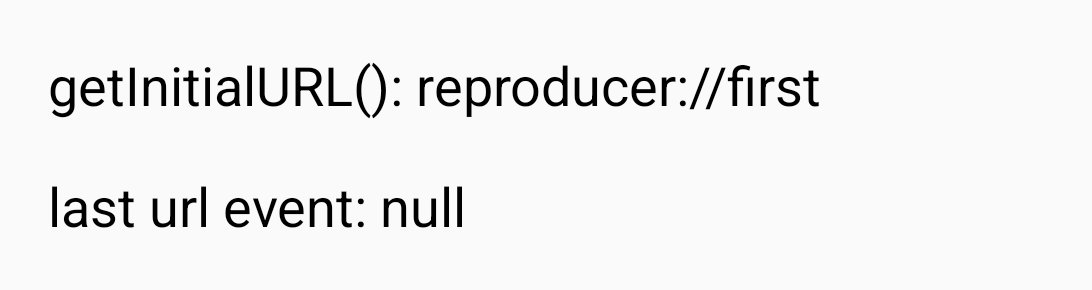 |
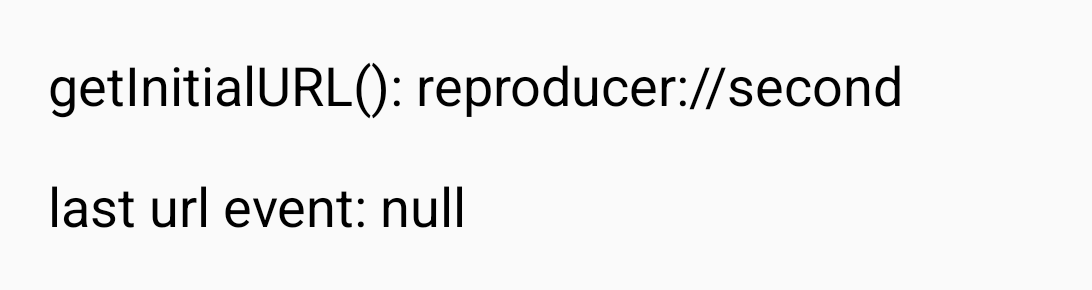 |
Activity
Nishant-96 commentedon Oct 13, 2026
Reproduced this independently with the reproducer on RN 0.87.1 (release build, arm64, Pixel_8 emulator, API 37). After
am killwith the task kept in Recents,reproducer://secondleavesgetInitialURL()atreproducer://firstand nourlevent fires. A cold start on the second link showssecond, as described.The code matches the analysis:
ReactActivity.onNewIntentpasses the intent to the delegate and never callssetIntent(), soIntentModule.getInitialURL()keeps reading the task's first intent.@YevheniiKotyrlo are you still planning to open the PR for the
setIntent(intent)fix? If you would rather not, I am happy to send it. Otherwise I will leave it with you.YevheniiKotyrlo commentedon Oct 14, 2026
Thanks for reproducing it on 0.87.1. I've opened #59053 with the
setIntent(intent)change, Robolectric tests and an RNTester before/after.