Intent2Motion is a voice-controlled robotic manipulation system built using ROS2, local LLM planning, retrieval-based skill routing, dialogue management, and robot arm execution.
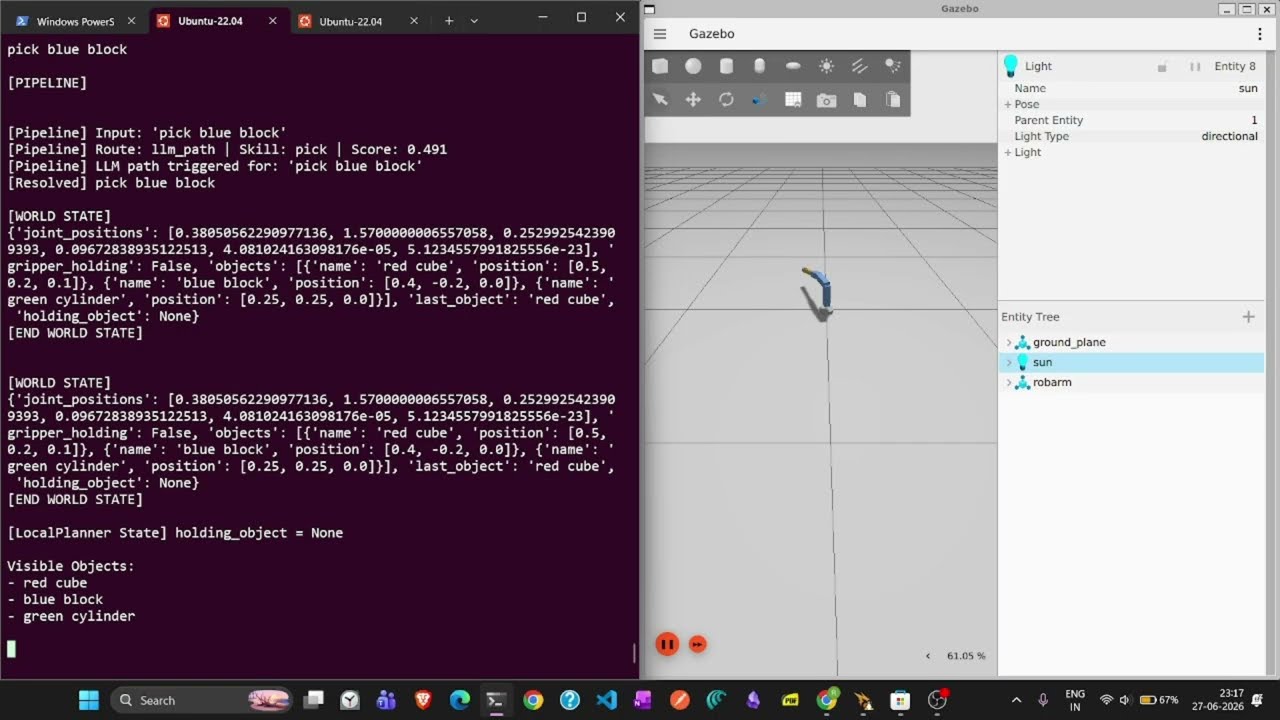
The system converts natural language commands such as:
- "pick up the red cube"
- "place it on the shelf"
- "wave hello"
- "go home"
into executable robot actions.
The project supports:
- Voice input
- Local speech-to-text transcription
- Local LLM planning using Ollama
- Dialogue-based clarification
- Pronoun resolution ("pick it up", "place it there")
- Object grounding
- Region grounding
- Robot arm execution in Gazebo
- Text-to-speech responses
Speak naturally to the robot.
Examples:
- pick up the red cube
- place it on the shelf
- wave hello
- go home
Intent2Motion uses a local Ollama model for semantic task planning.
Current model:
- qwen2.5:3b
No cloud API is required for normal operation.
The system can ask follow-up questions when information is missing.
Example:
User:
pick it up
Robot:
What object would you like me to pick up?
User:
red cube
Robot:
Picked up red cube successfully.
The robot remembers recently manipulated objects.
Example:
User:
pick red cube
User:
place it on shelf
The robot automatically resolves:
it → red cube
Commands are validated against visible objects.
Example:
User:
pick pizza
Robot:
Could not find object: pizza
Commands are validated against known regions.
Supported regions:
- shelf
- desk
- table
If the robot is already holding an object:
User:
pick blue block
Robot:
I am already holding red cube. Where should I place it first?
User Speech ↓ Whisper STT ↓ Intent Pipeline ↓ RAG Router ↓ Local Planner (Qwen 2.5 3B) ↓ Plan Validation ↓ Dialogue Manager ↓ Plan Executor ↓ ROS2 Interface ↓ Robot Arm
Recommended:
- Ubuntu 22.04
Supported:
- Ubuntu 22.04
- Windows 11 + WSL2 Ubuntu 22.04
Python 3.10
ROS2 Humble
Required for local planning.
git clone https://github.com/octorohan/intent2Motion
cd robarm_llm
conda create -n robarm python=3.10 -y
conda activate robarm
pip install -r requirements.txt
Follow official Ollama installation instructions.
After installation:
ollama pull qwen2.5:3b
Verify:
ollama list
Expected:
qwen2.5:3b
Install ROS2 Humble before running the simulator.
Verify:
ros2 --version
Install Ubuntu 22.04 through WSL2.
Verify:
wsl
Follow ROS2 Humble installation instructions for Ubuntu 22.04.
Inside WSL:
Install Miniconda.
Create environment:
conda create -n robarm python=3.10 -y
conda activate robarm
pip install -r requirements.txt
Install Ollama.
Download model:
ollama pull qwen2.5:3b
ollama list
ros2 --version
python --version
Open Terminal 1:
ros2 launch robarm_sim robarm_sim.launch.py
Wait approximately 15 seconds.
Open Terminal 2:
ros2 control list_controllers
Expected controllers:
joint_state_broadcaster
arm_controller
Open a new terminal:
conda activate robarm
cd ~/ros2_ws/src/robarm_llm
python voice/voice_loop.py
During runtime:
Press ENTER
Start recording.
Press ENTER again
Stop recording.
You can also directly type commands.
Examples:
pick red cube
pick blue block
place it on shelf
wave
go home
status
Shows current dialogue state.
cancel
Clears current pending dialogue and context.
help
Shows available commands.
q
Quit the application.
pick red cube
Robot:
Picked up red cube successfully.
place it on shelf
Robot:
Placed object at shelf.
pick blue block
Robot:
Picked up blue block successfully.
wave
Robot:
Waved successfully.
Start Ollama:
ollama serve
Verify:
ollama list
Download:
ollama pull qwen2.5:3b
Verify:
ros2 control list_controllers
Restart simulator if controllers are not loaded.
Check microphone permissions.
Try typed commands first.
Verify Whisper dependencies installed correctly.
Verify:
- Gazebo is running
- Controllers are loaded
- ROS topics are available
robarm_llm/
├── robarm_llm/
├── planning/
├── skills/
├── rag/
├── dialogue/
├── validation/
├── voice/
├── perception/
├── requirements.txt
└── README.md
- Better ambiguity handling
- Improved dialogue memory
- Multi-object manipulation
- Dynamic perception integration
- Advanced task planning
- Additional robot skills
If you get stuck:
- Read the Troubleshooting section.
- Ask ChatGPT, Claude, Gemini, or another LLM.
- Open a GitHub issue.
Most setup issues are related to:
- ROS2 installation
- Conda environment activation
- Ollama setup
- Missing voice models
- Controller startup order
Good luck and have fun building with Intent2Motion.