

Built for LLM tokenizer patterns. Pure Rust: lookarounds and JIT compilation need no C toolchain or system library.
Docs · Crate · Engines · Features · Example · Contributing


regexr is a regex engine written from scratch in Rust. It was created as the regex backend for splintr, an LLM tokenizer.
Use regexr when a pattern needs one of these features:
| Feature | regexr |
regex |
fancy-regex |
pcre2 |
|---|---|---|---|---|
Lookarounds ((?=...), (?<=...), (?!...)) |
Yes | No | Yes | Yes |
| Backreferences | Yes | No | Yes | Yes |
| JIT compilation | Yes (x86-64, aarch64) | No | No | Yes |
| No C library dependency | Yes | Yes | Yes | No (links libpcre2) |
regex omits lookarounds and backreferences on purpose. Use it for everything else.
Patterns without backreferences run on automaton engines, which report the match in time linear in the input. Backreferences run on a backtracking engine with a step budget. See Bounded execution.
Add the crate with cargo add regexr. For JIT and SIMD, enable the full feature:
cargo add regexr --features fulluse regexr::Regex;
let re = Regex::new(r"\w+").unwrap();
assert!(re.is_match("hello"));
// Find the first match
if let Some(m) = re.find("hello world") {
println!("Found: {}", m.as_str()); // "hello"
}
// Find all matches
for m in re.find_iter("hello world") {
println!("{}", m.as_str());
}use regexr::Regex;
let re = Regex::new(r"(\w+)@(\w+)\.(\w+)").unwrap();
let caps = re.captures("user@example.com").unwrap();
println!("{}", &caps[0]); // "user@example.com"
println!("{}", &caps[1]); // "user"use regexr::Regex;
let re = Regex::new(r"(?P<user>\w+)@(?P<domain>\w+\.\w+)").unwrap();
let caps = re.captures("user@example.com").unwrap();
println!("{}", &caps["user"]); // "user"
println!("{}", &caps["domain"]); // "example.com"Enable JIT for a pattern that runs many times. JIT needs the jit feature.
use regexr::RegexBuilder;

let re = RegexBuilder::new(r"\w+")
    .jit(true)
    .build()
    .unwrap();

assert!(re.is_match("hello"));For patterns with many literal alternatives, such as keyword lists in tokenizers:
use regexr::RegexBuilder;

let re = RegexBuilder::new(r"(function|for|while|if|else|return)")
    .optimize_prefixes(true)
    .build()
    .unwrap();

assert!(re.is_match("function"));use regexr::Regex;
let re = Regex::new(r"\d+").unwrap();
assert_eq!(re.replace("abc 123 def", "NUM"), "abc NUM def");
assert_eq!(re.replace_all("abc 123 def 456", "NUM"), "abc NUM def NUM");Backreferences can take exponential time. Set a step budget with RegexBuilder::backtrack_limit:
use regexr::RegexBuilder;

let re = RegexBuilder::new(r"(a+)\1")
    .backtrack_limit(1_000_000)
    .build()
    .unwrap();

match re.try_is_match("aaaaaaaaaaaaaaaaaaaaaaaaaaaaaaaaaaaaaaaaaaaaaaaaaaaaaaaaa!") {
    Ok(matched) => println!("matched: {matched}"),
    Err(e) => println!("budget exhausted: {e}"),
}try_find, try_captures, and try_is_match return an error when the budget runs out. find, captures, and is_match do not report that case.
regexr picks one engine for each pattern. Call Regex::engine_name() to read the choice.
Engines without jit (default simd build):
| Engine name | Used for |
|---|---|
ShiftOr |
Patterns up to 64 character positions |
ShiftOrWide |
Patterns from 65 to 256 character positions |
LazyDfa |
Most other patterns |
EagerDfa |
Fully built form of LazyDfa, used when the build fits its budget |
PikeVm |
Lookarounds, non-greedy quantifiers, and boundary-guarded empty matches |
TaggedNfa |
Unicode codepoint classes, such as \p{L} |
BacktrackingVm |
Backreferences |
CodepointClass |
Codepoint-class matching |
With the jit feature on x86-64 or aarch64, the matching JIT engines are Jit, JitShiftOr, TaggedNfaJit, and BacktrackingJit.
Capture extraction uses a one-pass engine when the pattern allows it. docs/architecture.md explains the selection rules in full.
| Feature | Default | Enables |
|---|---|---|
simd |
On | SIMD literal search (AVX2 on x86-64, NEON on aarch64) |
jit |
Off | JIT compilation on x86-64 and aarch64 |
full |
Off | jit and simd |
cargo build                                  # simd (default)
cargo build --features full                  # jit + simd
cargo build --no-default-features            # scalar search, no JIT
cargo check --no-default-features --target wasm32-unknown-unknown- JIT: x86-64 and aarch64. Windows x86-64 uses the Windows calling convention.
- SIMD: AVX2 on x86-64, detected at run time. NEON on aarch64. A scalar fallback runs on every other target.
- WASM:
wasm32-unknown-unknownbuilds with--no-default-features. CI checks this build.
Run cargo bench --bench competitors to compare regexr with regex, fancy-regex, and pcre2. This README does not publish benchmark numbers. Results depend on the machine.
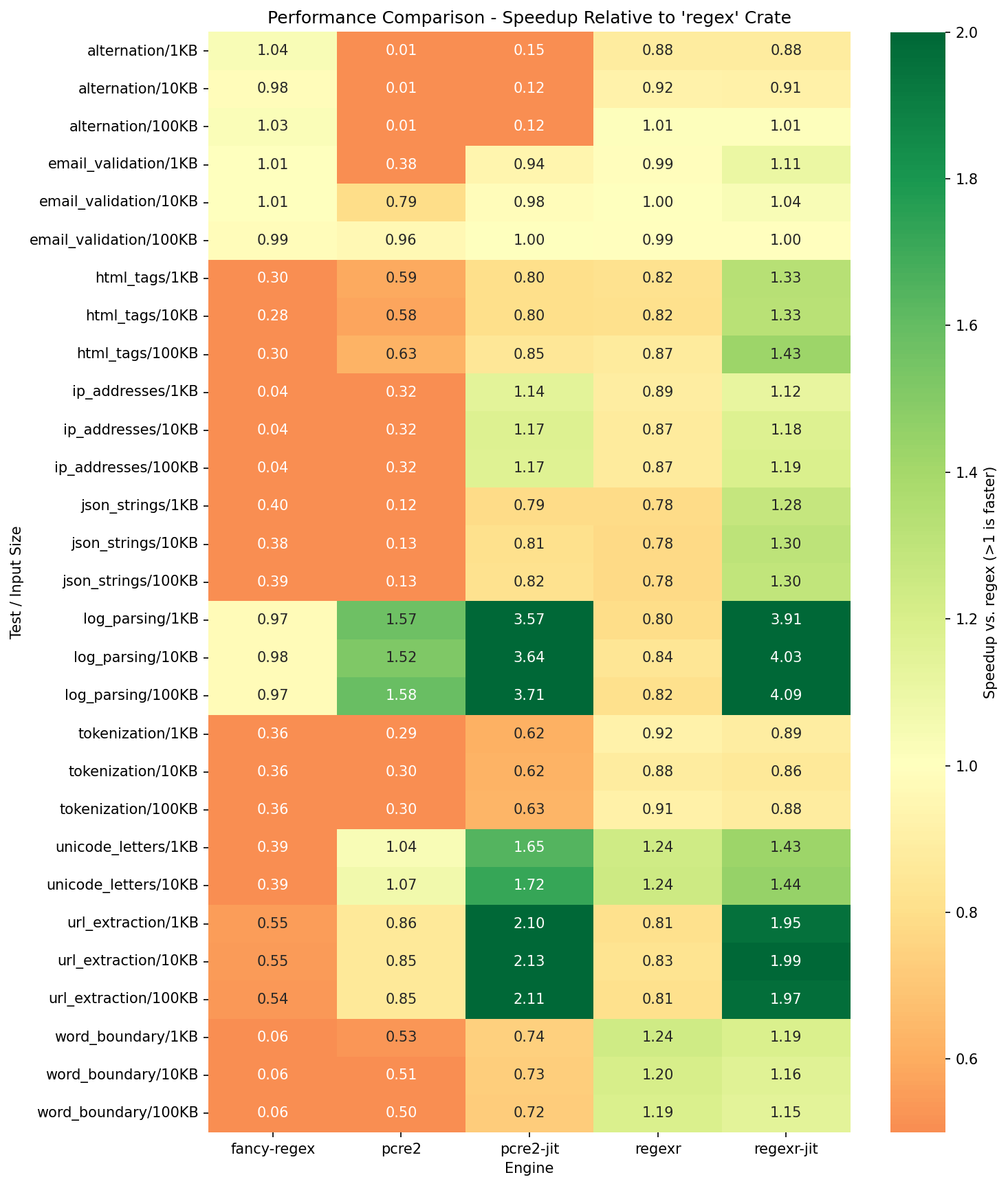
Speedup relative to the regex crate (higher is better):
- docs/architecture.md: engine architecture and selection rules
- docs/features.md: feature reference
- docs/engine_structure.md: engine module layout
@software{regexr2025,
  author       = {Syah, Farhan},
  title        = {regexr: A Rust Regex Engine with JIT Compilation for LLM Tokenization},
  year         = {2025},
  url          = {https://github.com/ml-rust/regexr},
  note         = {Rust regex engine with lookaround support and JIT compilation}
}Contributions are welcome. See CONTRIBUTING.md for conventions and checks.
Questions and design discussion happen on Discord.
Licensed under either of MIT or Apache-2.0, at your option.