The Gran Turismo Kit (GTK) is a specialty installation for your Retroid Pocket Flip2 SM8250 (or sibling device) built on patched forks of ROCKNIX (OS/kernel), RCPS3 (PS3 emulator) and MESA Turnip (Adreno Vulkan video driver) integrated with a custom middleware (the ETK), and all of it is specifically tuned for the Gran Turismo series only. GT HD Concept, GT 5 Prologue Spec II and Spec III, and GT6 are supported. GT5 remains pending. Other game support is incidental at best. The GTK installs easy. Either flash an SD Card and boot into ROCKNIX or run an installer script from your Mac or PC if you already have it.
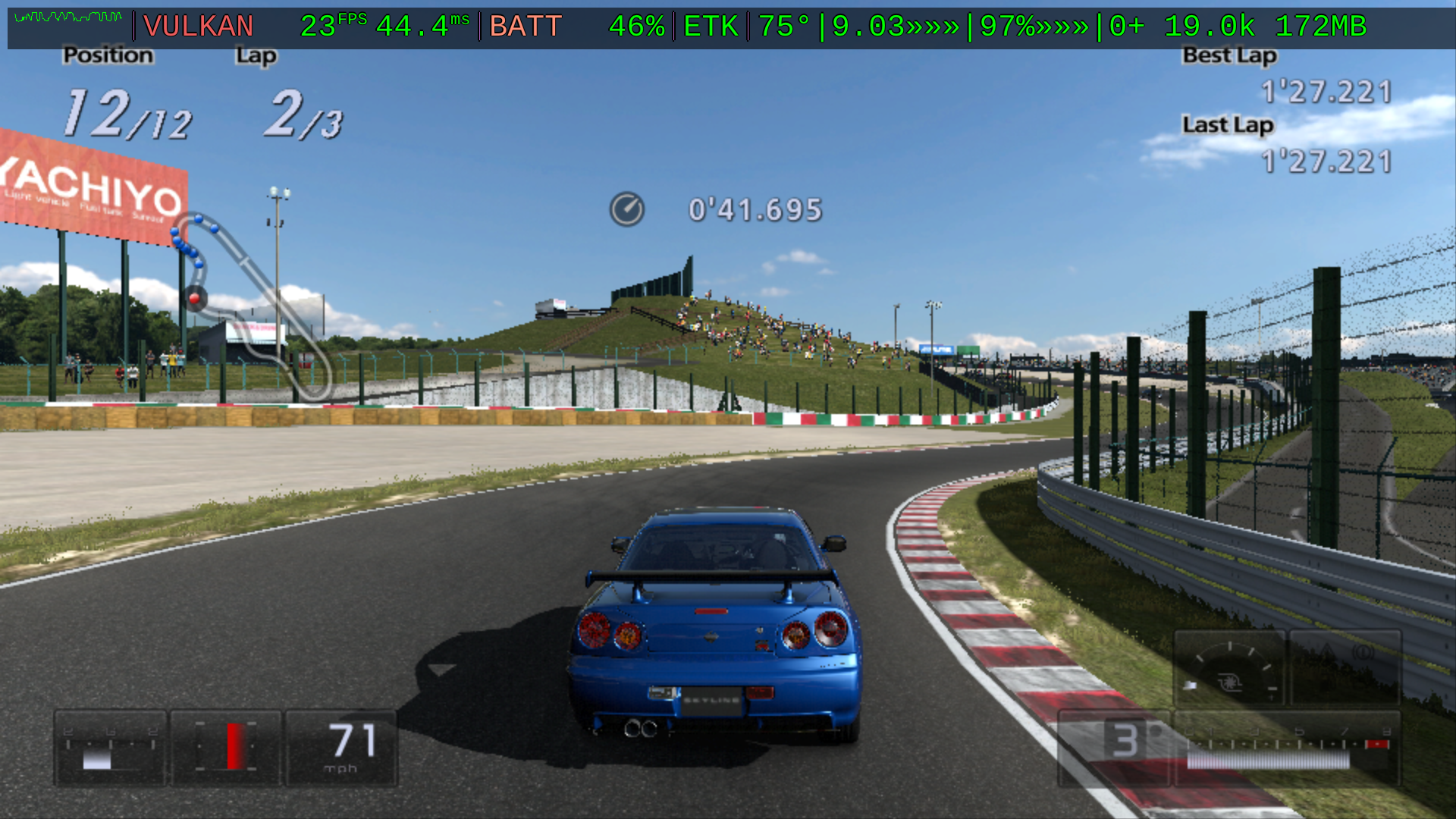
- To flash an SD card, download latest card image
- Or use install commmands to Quick Start an existing ROCKNIX boot
macOS / Linux / WSL:
curl -fsSL https://raw.githubusercontent.com/mercurious/etk/main/get-etk.sh | bashWindows (any PowerShell):
irm https://raw.githubusercontent.com/mercurious/etk/main/windows_installer/get-etk.ps1 | iex- ETK Wiki for full documentation, guides, advanced features
- System Requirements
- Device Support
- Tested Games
- Android-Only Options
House developed Gran Turismo-specific bug fixes and special tunings to the emulator are validated across platforms with executables available for download and testing. Only ROCKNIX offers the complete kit and functionality.
| OS | chipset | vulkan | emulator | fork | download | source | ETK Features |
|---|---|---|---|---|---|---|---|
| Android | arm64 | Adreno 650/Mesa Turnip | aPS3e | ETK-tuned fork | .apk | repo | Shader Manager, Claude Cockpit Skill support |
| Android | arm64 | Adreno 650/Mesa Turnip | RPCSX | ETK-tuned fork of a fork | UI .apk core .so |
UI core |
overlay fixes, GT bug fixes but road surface renders as checkerboard which needs fixing |
| macOS | arm64 | Apple M1 Metal/MoltenVK | RPCS3 | ETK-tuned fork | .app | repo | none, just GT bug fixes |
| ROCKNIX | arm64 (SM8250) | Adreno 650/Mesa Turnip | RPCS3 | ROCKNIX-GTK fork | .img.gz | repo | complete🏁 |
| Windows | x64 | AMD Radeon RDNA/2/native Vulkan | RPCS3 | ETK-tuned fork | .exe | repo | none, just GT bug fixes |
Perhaps you've tried getting a PS3 Gran Turismo game working on Retroid Pocket Flip2 or similar handheld and concluded the device supports GT for PS2 and PSP only.
- HIGH PERFORMANCE RIG: It's faster and more playable than anything I've attempted to get running on the Android boot, including our own aPS3e fork
.apk. - CRASH PREVENTION: By forking and patching the entire stack on the device, we were able to cross-integrate the OS to the emulator with the video driver as a single “chassis” and wire it to the native MangoHUD overlay so you can see in real-time an alert when you’ve just been rescued from a GPU wedge crash
|·«!»·|. The same GTK ANTI-LOCK gauge keeps a live counter|·×03·|for the current boot so you know when it’s time to refresh the rig with a reboot. This “anti-lock” system emulates how Android provides a similar level of stability, enabling the Adreno Kernel Graphics Support Layer (KGSL) but running on the bare metal of linux opens up tremendous performance headroom by comparison. - BUGS FIXED: Owning the chassis allowed us to fix the stubborn “road flicker” bug that affects GT5P on all platforms, solved a glitchy audio card boot sequence in ROCKNIX, and more.
- FEATURES ADDED: We’ve added new core capabilities to the device such as PSRemotePlay streaming, video mirroring, easy firmware & package install, advanced shader management, on-device tuning down to the overclock and Turnip dials, advanced trigger calibration for the top-end, and an advanced telemetry UI/UX to inform your tuning choices.
Every claim above is scored against the ETK telemetry ledger (1,400+ instrumented sessions on the reference rig) — not vibes.
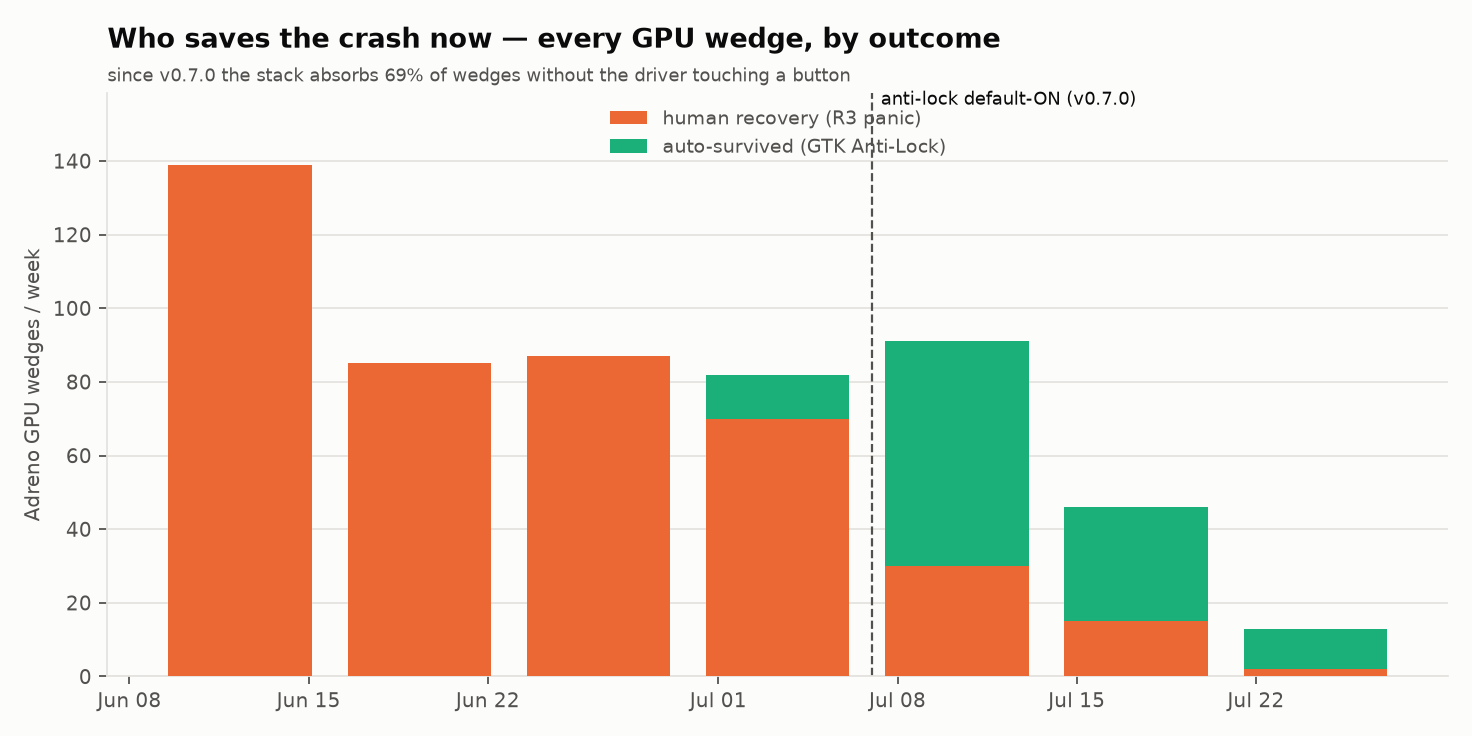
The GTK Anti-Lock flagship: before v0.7.0, every GPU wedge ended with a human pressing the panic chord. Since: 69% absorbed automatically — and total wedges are falling as the next-generation nets land.
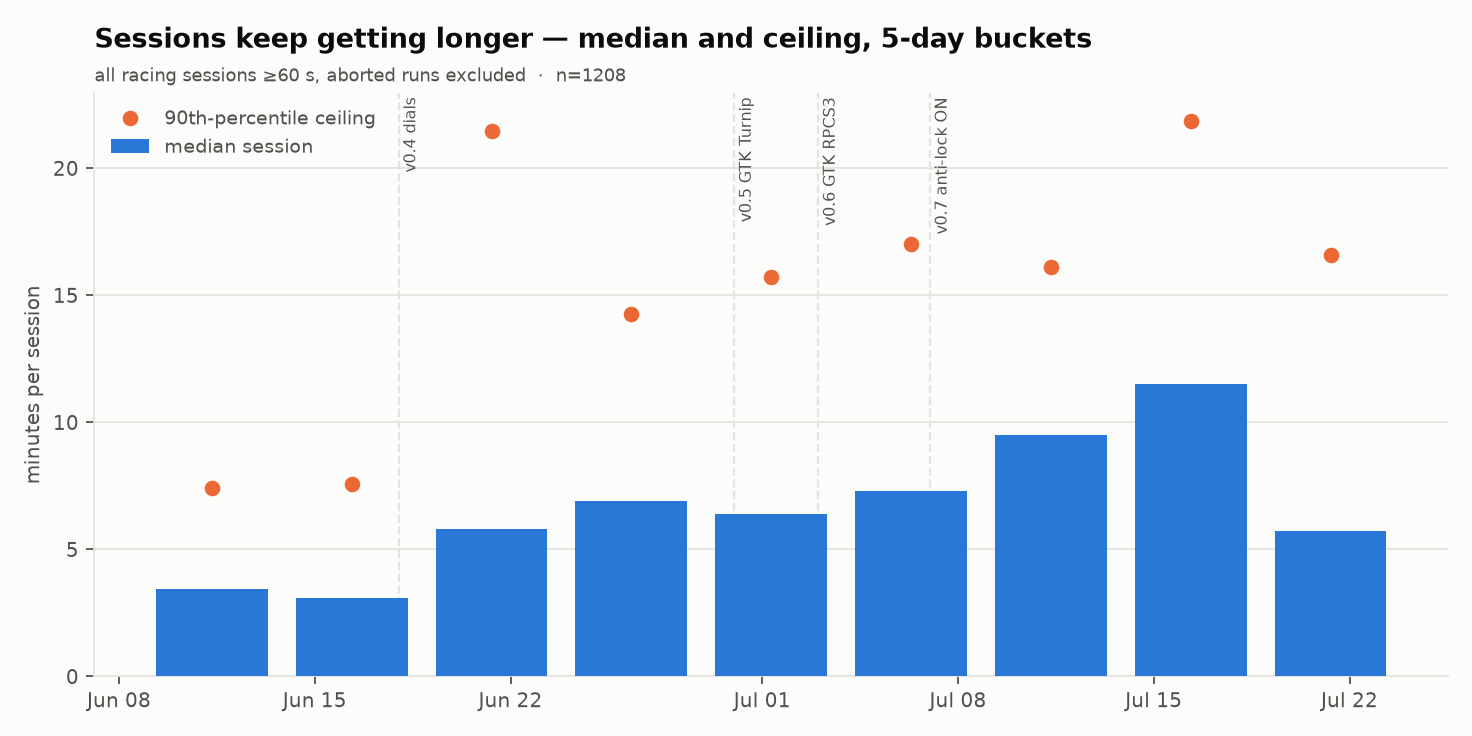
Sessions keep getting longer: median race session up ~3× across the campaign, ceiling up ~3× with it.
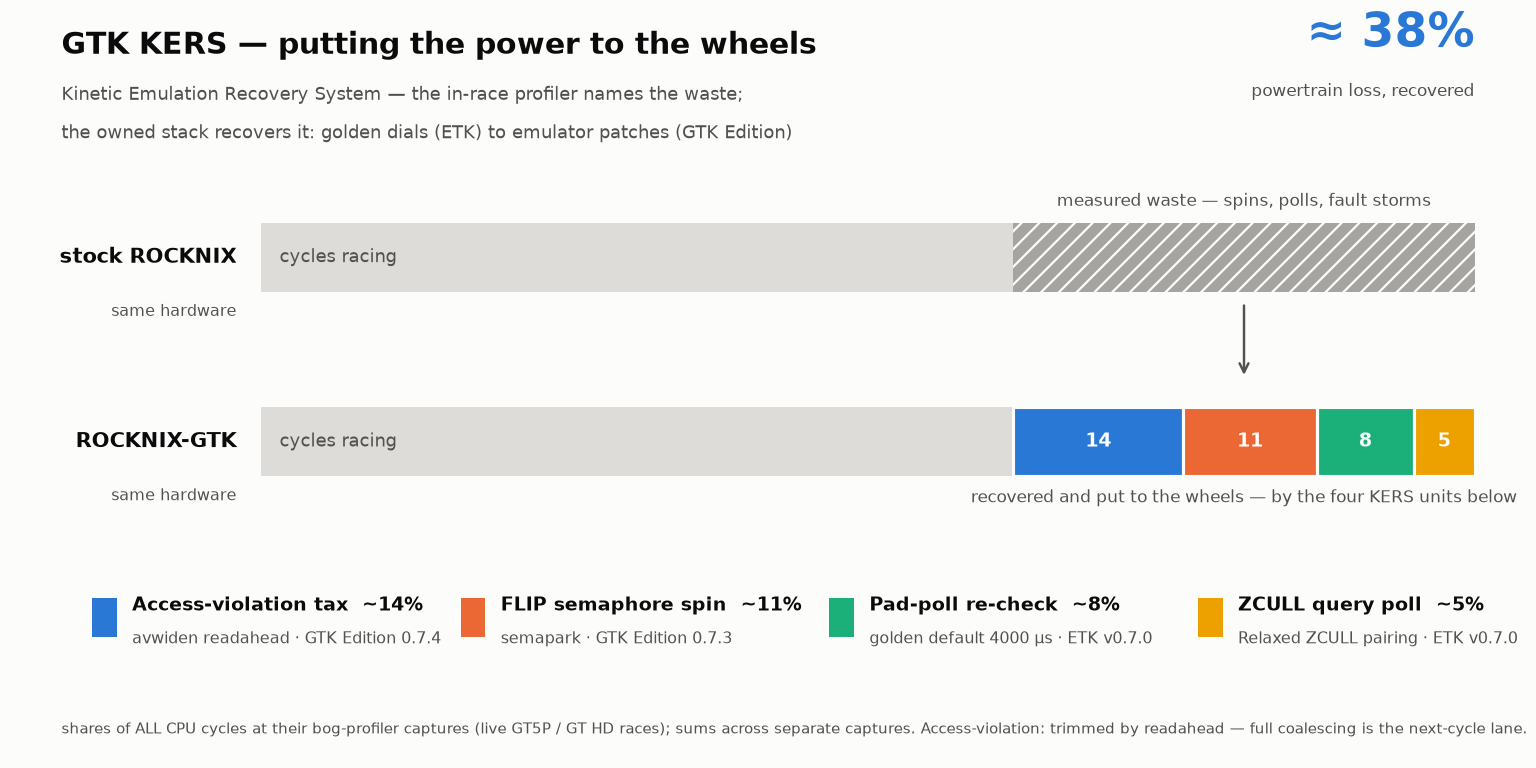
GTK KERS (Kinetic Emulation Recovery System): the in-race profiler found ≈38% of all CPU cycles burning in spins, polls and fault storms — four named thieves, four shipped fixes, same hardware.
It’s easy to try out the kit with a spare SD card and USB card reader, revert back to Android, or standard ROCKNIX anytime.
- Download the ROCKNIX-GTK SD Card image from releases and then use a tool like Balena Etcher to flash a blank card with ROCKNIX-GTK.
- Insert your new flashed card and hold down
Volume-Upbefore the Retroid Pocket logo and release as soon as you see the sideways U-Boot logo. The GRUB menu automatically boots into ROCKNIX-GTK. (In GRUB, you can useVolumeandPowerbuttons to boot into the standard ROCKNIX kernel.) (Recommended: By holdingVolume-downat boot, you can also set the rig to auto-boot in Rocknix instead of Android so you don't have to play race the logos every boot. You can switch back and forth between Android and ROCKNIX very easily once you get the hang of the boot interface.) - Add your WiFi in network settings and enable SSH, etc. once in the ROCKNIX EmulationStation frontend.
- Add the PS3 firmware and a game PKG to the provided etk drop folders, or transfer an ISO to
roms/ps3over SMB or SFTP:/storage/roms/etk/firmware_drop,/storage/roms/etk/pkg_install_drop - Use the ETK Pitstop app TOOLS to install your staged firmware and PKG files and games will automatically appear in the ES carousel and much more.
- Ready to play…but: Beware of shader storms early on, obvious by the shader spinner overlay in the lower-left hand corner. These are one-time compiles that get stashed into your ETK shader vault. TIPS: Let camera pans run fully before races, visit the dealership, and let the demo replay run to pre-harvest shaders for the track. Don't expect playable performance until your shader vault is fairly saturared. You'll keep adding to it as you progress in the game. Your ETK dashboard overlay shows you new shaders as you vault them during play, showing you an attempt was productive, even if you crashed.
See Getting Started to install the ETK and GTK forks into your existing ROCKNIX setup.
| Exclusive Feature or Fix | Description | Interface |
|---|---|---|
| GTK Anti-Lock | Automatic live recovery of GPU wedge crashes | overlay gauge ·«!»· ·×03· |
| GTK Turnip Traction Control | Automatic "limited-slip-differential" holds the Adrendo GPU down | overlay gauge ++··· ===== |
| GTK KERS | Kinetic Emulation Recovery System — recovers CPU cycles lost to spins, polls and fault storms (≈38% measured) and puts them back into frames | dyno-proven: in-race profiler + telemetry ledger |
| ETK Self-Update | Update the kit from the couch — no computer needed | ETK Pitstop TOOLS → Check for ETK Updates |
| G-INSTR Telemetry | Animated jitter gauge in HUD | overlay gauge ··2»» |
| VAULT + PADDOCK | Advanced shader protection and management | overlay gauge 2+ 34.5k 167MB |
| Thermal Guard | Automatically protect silicon from overheats | overlay gauge 89°HOT»»» |
| ETK Pitstop App | Native ROCKNIX tools app for onboard telemetry, tuning, tools, and more | native app in ROCKNIX ES Tools carousel |
| DDU Overlay | Native MangoHUD customized with ETK gauges | R1 + L3 to toggle between top, bottom, default, off |
| Crash Recovery | Safely exit from crash or freeze | L1 + R3 to safely recover to ES frontend |
| ETK Screenshot | One-finger shutter screenshots with overlay | L1 configurable in ETK Pitstop |
| On Device Installations | One-tap, on-device firmware and game installs | Drop .pup in etk/firmware_drop, .pkg in etk/pkg_install_drop, open ETK Pitstop TOOLS tab |
| Golden Tune Seeding | New games (including disc .iso copied into roms/ps3/) start on the ETK golden tune instead of raw RPCS3 defaults |
automatic on next Pitstop open; ETK_GOLDEN_SEED=0 in etk.conf to disable |
| ISO Onboarding | Copy a disc .iso into roms/ps3/ and it becomes a real ES game: launcher generated, ETK overlay enabled and tuned |
automatic on next Pitstop open; ETK_ISO_ONBOARD=0 in etk.conf to disable |
| Video Mirroring | Device screen on while USB-DisplayPort-HDMI out active | turn USB plug upside-down to solve video-out issue |
| Flicker-free Road Surfaces | 5 year emulator old bug solved with non-upstreamable patch | perfectly rendered road surfaces |
| Audio card boot fixed | Sound works reliably vs official release | sound just works now, finally; solving race stutter is a different problem |
| PSRemotePlay Streaming | Custom chiaki-rocknix fork pairs with your PS4 or PS5 | Chiaki-Rocknix app in Tools |
| Make | Model | Chipset | Profile | Status |
|---|---|---|---|---|
| Retroid Pocket | Flip 2 | SM8250 Adreno 650 | SM8250 |
🏁 Verified |
| Retroid Pocket | 5 | SM8250 Adreno 650 | SM8250 |
Expected (untested) |
| Retroid Pocket | Mini | SM8250 Adreno 650 | SM8250 |
Expected (untested) |
| Retroid Pocket | Mini V2 | SM8250 Adreno 650 | SM8250 |
Expected (untested) |
| AYN | Thor Lite | SM8250 Adreno 650 | SM8250 |
Expected (untested) |
| MANGMI | Pocket Max | SM250 Adreno 650 | SM8250 |
Expected (untested |
| Retroid Pocket | 6 | SM8550 Adreno 740 | (needs new profile + vault) | Not yet supported |
The GTK fork was built from ROCKNIX official release 20260801 (the GTK 0.8.0 stack)
| Type | Detail |
|---|---|
| Host System | macOS or Linux native, Windows support via img flash, WLS, PowerShell Port |
| OS | ROCKNIX-GTK |
| Kernel | rocknix-gtk 7.1.2 (anti-lock + audio-fix patches) |
| Emulator | RPCS3 GTK Edition v0.8.1 |
| Driver | MESA Turnip 26.1.6 GTK |
- If you've already installed ROCKNIX, set the update channel to release/stable (
START→UPDATES & DOWNLOADS), and update if necessary. Nightly builds may not be compatible. - Install the ETK onto your handheld rig with ONE line — no git, no manual download; it fetches the kit to
~/etkand runs the installer (re-run the same line anytime to update, repair, or sync):
macOS / Linux / WSL:
curl -fsSL https://raw.githubusercontent.com/mercurious/etk/main/get-etk.sh | bashWindows (any PowerShell):
irm https://raw.githubusercontent.com/mercurious/etk/main/windows_installer/get-etk.ps1 | iex- Prefer a manual checkout?
git clone https://github.com/mercurious/etk(or extract the.zipas~/etk/), then run./install.sh— or on Windowspowershell -ExecutionPolicy Bypass -File .\windows_installer\etk-install.ps1— from the repo root. - Drop your PS3 firmware
.pupinto the approprite drop folder/storage/roms/etk/firmware_drop/on your device and use ETK Pitstop TOOLS to easily install it; a PKG file installed similary from/storage/roms/etk/pkg_install_drop/.
A fresh map of the garage. Entries marked (local) are operator-side lanes, gitignored by design — they dangle in a public clone and that's intentional.
etk/
├── install.sh                  # THE deploy engine: 8-step TUI install/repair/sync to the rig
├── uninstall.sh                # mirror-image teardown (authoritative list of every artifact)
├── get-etk.sh                  # curl-to-bash bootstrap (fetches kit to ~/etk, runs installer)
├── etk.conf.example            # operator config template -> etk.conf (gitignored, yours)
├── README.md · TRACK_MANUAL.md · AI_MANIFEST.md · CHANGELOG.md · CLAUDE.md · LICENSE
│                               # on-ramp, system manual, deep technical laws, history, AI guide
├── bin/                        # rig-side daemons & apps (pushed wholesale to $ETK_ROOT/bin)
│   ├── etk_pitstop.py          #   the Pitstop: curses cockpit (tuning/telemetry/tools/paddock/driver)
│   ├── etk_chiaki_menu.py      #   Chiaki Remote Play menu: console chooser + gamepad pairing wizard
│   ├── etk_chiaki_notify.sh    #   mako toast helper (replace-in-place notifications)
│   ├── etk_modules_inject.py   #   ES Tools-menu registrar (Pitstop + Chiaki; tripwire-driven)
│   ├── input_d.py              #   gamepad chord daemon (screenshots, punchbox, recovery, RSX/bog)
│   ├── thermal_d.sh · vault_d.sh · mango_bridge.sh · dpmirror_d.sh · blackbox_d.py
│   │                           #   thermal guard · shader vault · HUD feed · DP mirror · panic recorder
│   ├── session_postmortem.sh · bog_profile.sh · hud_apply.sh · grid_apply.sh
│   │                           #   telemetry ledger · perf sampler · HUD/power state appliers
│   └── paddock_sync.sh · recovery.sh · screenshot.sh · gamepad_probe.py
├── scripts/                    # rig+host shared plumbing
│   ├── env.sh                  #   LAW #2: the ONLY definer of env/paths — everything sources it
│   ├── profiles/SM8250.sh      #   per-SoC values (thermal zones, CPU policies, fonts)
│   ├── etk_pair.sh             #   idempotent SSH pairing wizard
│   ├── commander.sh · probe.sh · etk_probe.sh · arm_blackbox.sh · career_aggregate.sh
│   └── turnip/                 #   GPU forensics (rd_inspect/rd_repair for cffdump captures)
├── tools/                      # host-side probes, gates & rig-native binaries
│   ├── rocknix-bin/            #   Tier-P builds: build_chiaki.sh / build_wl_mirror.sh are
│   │                           #   STAGERS (build on etk-cloud, stream back, rig-check here);
│   │                           #   binaries committed with .commit/.ldd/.buildinfo provenance
│   ├── etk_dyno.py · etk_drift.py · vault_doctor.sh · vault_sweep.sh
│   │                           #   dyno analytics · OS-drift detector · shader-vault surgeons
│   ├── release_sanity.sh · test_installers.py · test_paddock.py
│   │                           #   the release gates (run at every cut)
│   └── tui.sh                  #   shared install/uninstall TUI engine
├── config/                     # rig-deployed configuration masters
│   ├── etk_pitstop.sh/.svg · etk_chiaki.sh/.svg
│   │                           #   Tools-menu launchers + icons (mirrored into boot-volatile modules/)
│   ├── config_<GAMEID>.yml     #   per-game RPCS3 reference tunes (the golden lab notebook)
│   ├── etk_template.yml        #   golden default seeded for newly installed games
│   ├── MangoHud.conf/.default  #   HUD punchbox masters
│   └── pitstop_fields.json · power_profiles.json · crash_signatures.json · paddock_repos.json.example
├── pro-tuning/                 # Private Paddock lanes: export.sh (host) · install-protune.sh (rig)
├── drivers/                    # Turnip .so catalog (binaries local; README documents the family)
├── windows_installer/          # PowerShell install lane (get-etk.ps1 / etk-install.ps1)
├── docs/                       # guides, dyno charts, screenshots, hero art
├── .claude/skills/cockpit/     # live-rig instrument skill (spotter, padmovie, lap extraction)
├── dossiers/                   # (local) 150+ private design dossiers — the engineering record
├── os-install/                 # (local) Tier-I image lane: build_gtk_image_v2.sh + seeds
├── emulators/ · vault/         # (local) fetched AppImages · harvested shader vault
└── log/                        # sample probe output
The companion repos: chiaki-rocknix (Remote Play client), etk-rpcs3-gtk, etk-turnip-gtk and rocknix-gtk — the tuned forks the kit deploys.
A kernel and its OS are a matched pair: the OS image carries all the drivers (WiFi, sound, storage) keyed to one exact kernel. The kit's one deep modification is that your rig boots our kernel — that's where the ANTI-LOCK crash net and the audio-boot fix live. The ROCKNIX updater doesn't know we exist: it drops its new kernel into the slot the rig booted from (ours) and resets the boot menu to factory. So the first boot after a ROCKNIX update comes up with no WiFi and no sound. This is expected.
The ETK OS Guard (v0.8.3+) repairs it automatically during that same boot — you'll see an on-screen message — and one reboot finishes the job. Don't reflash, don't panic: it's one bad boot, by design.
- Best order: update ETK first (Pitstop
TOOLS→ Check for ETK Updates — it now stages the matching GTK kernel ahead of time), then update ROCKNIX, then reboot when the Guard asks. You end up back on the full GTK stack automatically — no computer needed. - Updated ROCKNIX first? Also fine: the Guard heals to the standard kernel; then run the ETK update (Pitstop or the one-liner) and reboot once more to bring the GTK kernel back.
- On v0.8.2 or older? Update ETK to v0.8.3 before taking a ROCKNIX OS update — older kits can't self-repair; recovery needs a computer.
- Use the provided
uninstall.shto remove the ETK from your system.
No ETK or GTK features, just a house tuned Android fork. Offers stable but low-framerates vs. ROCKNIX+GTK rig.
- Use aPS3e ETK-tuned for more ETK features or RPCSX ETK-tuned for a more recent core. Both Android forks backport fixes for GT related bugs in RPCS3.
- Use the latest ETK MESA Turnip drivers for Android during the aPS3e setup wizard or configuration.
- Use an ETK config tuning from Tested Games.
- Try the ETK Claude Code Cockpit skill for real-time pit-engineering advice, crash forensics, tuning suggestions, track photography analysis and more. Works over USB with any Android device and USB &
sshon ROCKNIX.
This project is intended for expert enthusiasts who maintain fair use/legal digital archives of their own games, not copyright infrigement.
ETK was originally prototyped with Google Gemini and developed/maintained with Anthropic Claude Code.
ETK is released under the GNU General Public License v2.0, matching the licensing of ROCKNIX which it extends.