

Import and export content as JSON or CSV - with relations, components and dynamic zones that actually survive the trip.




Import and export is the most-wanted thing in the Strapi ecosystem that nobody
maintains. The original plugin was last published in December 2023 and requires
Strapi 4, so it does not run at all on Strapi 5. The Strapi 5 fork of it was
written over two days in October 2024, released as 0.0.1, and never touched
again. Between them they still take around 780 downloads a day, and the fork has
24 forks of its own, which is what "I had to patch it myself" looks like from the
outside.
Its open issues say what is broken, and the two that matter are not details:
- relations do not import, because the code carries Strapi 4's numeric
idand a numeric id means a different row in every environment - components do not export, because
populate: '*'stops one level down and a component inside a component comes back empty
Ferry is built around those two, and around the thing neither plugin has: it tells you what it is going to do before it does it.
npm install @qkix/strapi-plugin-ferry// config/plugins.ts
export default {
ferry: {
enabled: true,
},
};Then open Ferry in the main menu.
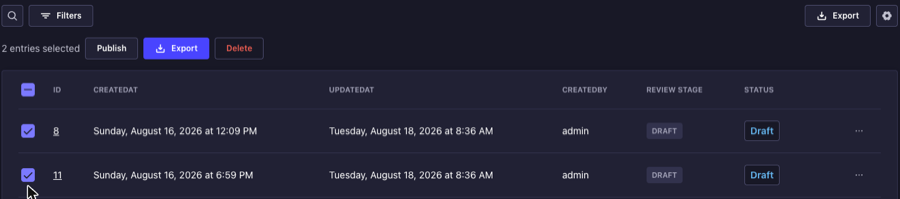
Ferry's own page carries whole content types. The Content Manager is where you usually know which entries you actually want, so the export is there too, in the two shapes that question comes in:
- Tick some rows and Export appears beside Delete. This is the "a copy of the twelve articles I just fixed" case.
- Narrow the list with filters and the Export button next to the view settings takes everything that matches - including what is on the pages you cannot see, which is why ticking rows cannot answer it.
Either way you pick the format and the version, and the file downloads. Both
respect the plugin::ferry.export permission and appear only on the project's
own content types, so nothing offers an export the server would refuse.
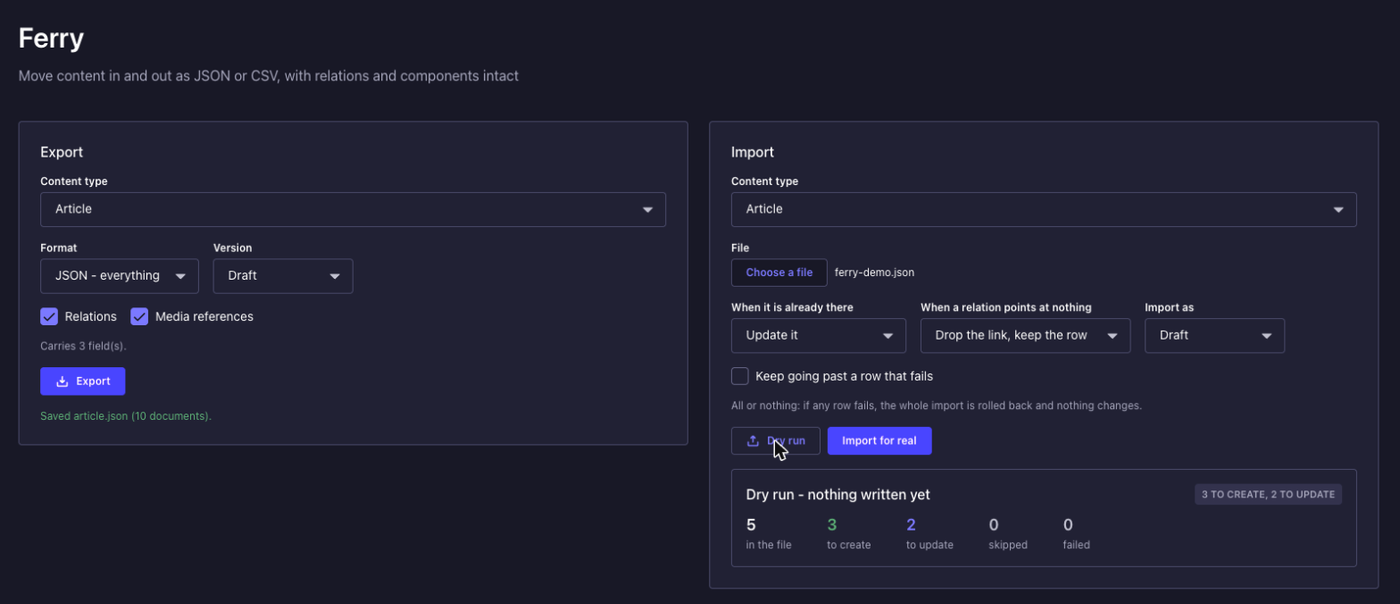
Nothing is written until you have read a report. Upload a file, and Ferry resolves the whole thing against the database first:
- how many documents it will create, update and skip
- every relation that points at a document which is neither in the file nor in
this environment, named by row and by field, including
seo.owner-style paths inside a component - which columns of a CSV it did not recognise, which media it could not find, which fields the format cannot carry
Then you press the button. It is the same request either way with one flag changed, so the preview cannot drift from what the import does.
Ferry keys everything on documentId, which is the one identifier that means
the same thing in your laptop's database and in production. That is what makes an
import an upsert rather than a paste: run the same file twice and the second run
updates in place instead of duplicating the content.
The import runs in two passes - every document is written first, and the links between them second. There is no ordering of a single pass that works, because two documents that refer to each other cannot both be written second. A missing target is reported rather than discovered: Strapi refuses an entire row when one relation points at nothing, so an importer that just tries it loses content it never mentioned.
An import is all or nothing by default. If a row fails, the whole thing rolls back and the database is exactly as it was, because a half-applied import is worse than a refused one - nobody knows which half. You can opt into committing the rest.
Components are exported and imported whole, including a component inside a component, and including a relation inside a component. Component ids are dropped, because a component row belongs to one document and its id means nothing in another database. A dynamic zone keeps its order, because in a dynamic zone the order is the content.
Media travels as a reference, not as bytes. Ferry matches by the file's
hash, which is derived from its contents, so the same image already uploaded to
the target environment is reconnected even though its id and filename differ.
When it is not there, the field is left empty and the report says how many.
An export has no timestamp in it, and documents come out sorted by
documentId with a to-many relation sorted too. Two exports of the same content
are byte-for-byte identical, so the file can live in a repository and a diff
means something changed. Git already knows when the file arrived.
{
  "ferry": 1,
  "contentType": "api::article.article",
  "status": "draft",
  "count": 1,
  "documents": [
    {
      "documentId": "k2n4xk1t9m0q8v7w",
      "title": "The first one",
      "author": "a91xbq2r7t4m0p3z",
      "tags": ["c7h2k9m1p4r8t0w3", "d1f5j8n2q6s9v3y7"],
      "seo": {
        "metaTitle": "Meta title",
        "canonical": { "href": "https://example.com/one", "label": "Canonical" }
      },
      "blocks": [
        { "__component": "shared.quote", "body": "A quote" },
        { "__component": "shared.seo", "metaTitle": "Inside a zone" }
      ]
    }
  ]
}
CSV is a real implementation of RFC 4180, not a split on commas: a comma inside a title, a quote inside a body, a line break inside a paragraph all survive the round trip. It reads a semicolon file, which is what a spreadsheet saves in every locale that uses a comma for decimals, and writes a byte order mark so Excel opens UTF-8 as UTF-8.
CSV carries flat fields and relation keys. Components and dynamic zones are left out, and the export says which ones by name rather than writing a JSON blob into a spreadsheet cell that no one can edit. Use JSON when you want everything.
One rule worth knowing: a blank cell means "leave this alone", not "empty this field". CSV cannot tell the two apart, and the safe reading is the one that does not let a spreadsheet quietly erase content that simply was not in it.
Two, under Settings → Administration panel → Roles:
| Permission | What it allows |
|---|---|
ferry.export |
reading content out, and seeing the list of types |
ferry.import |
the dry run and the import itself |
They are separate because they are different risks. An export is a copy; an import replaces what is there. A role that may take a copy away has no automatic claim on replacing production.
Both directions are plain admin endpoints, so anything with an admin session can drive them - a CI job, a seeding script, a migration between environments:
# Take a copy
curl -X POST http://localhost:1337/ferry/export \
  -H "Authorization: Bearer $TOKEN" \
  -H "Content-Type: application/json" \
  -d '{"uid":"api::article.article","format":"json"}' \
  -o articles.json

# See what importing it would do, without doing it
curl -X POST http://localhost:1337/ferry/import/preview \
  -H "Authorization: Bearer $TOKEN" \
  -F uid=api::article.article \
  -F file=@articles.json
The import endpoints take a multipart upload, which keeps a large file clear of
the JSON body limit, or a content field with the file inline for scripting
convenience.
POST /ferry/export returns the file itself, which is what you want piped into
-o. Pass "envelope": true to get it wrapped in JSON instead, as
{ filename, mime, body, count, warnings } - useful when you want the warnings
alongside the content rather than in the X-Ferry-Warnings header, and what the
admin panel itself uses.
| Route | Method | Does |
|---|---|---|
/ferry/content-types |
GET | what can be carried |
/ferry/plan/:uid |
GET | which fields travel, and which do not |
/ferry/export |
POST | the file |
/ferry/import/preview |
POST | the dry run |
/ferry/import |
POST | the import |
| Option | Default | What it does |
|---|---|---|
exclude |
[] |
Content types Ferry will not carry, in either direction |
maxExport |
10000 |
The most documents one export will read |
export default {
  ferry: {
    enabled: true,
    config: {
      exclude: ['api::invoice.invoice'],
    },
  },
};
An excluded type is refused by the endpoints as well as hidden in the picker: a hidden thing that can still be fetched by typing its uid is not hidden.
A password field is never exported, whatever the configuration says. A hash is
still a credential, and files get mailed around and committed.
Said plainly, because finding out later is worse:
- It does not carry files. Media travels as a reference and is reconnected by hash when the upload already exists in the target.
- One content type per file. Export the types a relation points at first, and import them in that order. Links within a single file work in any order.
- One locale per file. Pass
localeto move a specific one. - No XLSX. CSV opens in the same places.
The test suite boots an actual Strapi against a throwaway database rather than mocking one, and the headline test is the thing people actually do: export a whole environment, delete its content, import the files back, and assert that a second export is byte-for-byte the first.
Nine of the tests are about Strapi rather than about Ferry. They pin down the
behaviour the design rests on, so that a Strapi upgrade that changes it fails a
test here instead of quietly corrupting an import - that documentId can be
assigned on create, that create is not an upsert, that a missing relation
target takes the whole row down, and that a draft is allowed to be incomplete so
required is no guide to what will import.
What is worth building next, what is deliberately not planned, and why: ROADMAP.md.
MIT