
Turn a Pydantic model into a desktop form — declare the shape, get a validated object back.





You already described your data once, in types. brayer reads that description and
builds the dialog for you: one labelled widget per field, your defaults filled in,
your constraints enforced, and a validated model instance handed back on OK.
import datetime
from pydantic import BaseModel
import brayer


class Person(BaseModel):
    name: str
    age: int
    birthday: datetime.date


person = brayer.ask(Person)  # a form appears
if person is not None:
print(person.name, person.age)A slightly larger model, and the form it produces:
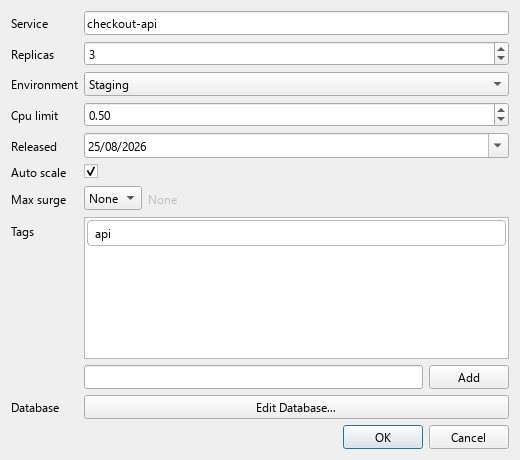
Nothing in that window was written by hand. The spin box range comes from
Field(ge=1, le=50), the two decimal places from decimal_places=2, the drop-down
entries from an Enum, the pre-filled tag from a default_factory, the type
selector from int | None, and the Edit Database… button from a nested
BaseModel.
A brayer is the hand roller a printer uses to lay ink evenly across a forme before taking an impression. This library does the equivalent for a schema: it rolls your model out into a form, and what comes back is a clean impression of it.
- Validated results. The dialog will not close on OK until the values pass
model_validate; failures are shown per field. A non-Nonereturn is always a valid instance. - Cancel is distinguishable. Cancelling returns
None, never an empty dict that looks like a fieldless success. - Embeddable.
ModelDialogis a plainQDialog. It reuses an existingQApplication, so it works inside an app that already runs a Qt event loop — andask()can be called as many times as you like. - Extensible. A type it does not know about is one
@register_handleraway, with no edit to this package.
Primitives, Decimal, bytes, dates and times, timedelta, UUID, Path,
IP addresses, Enum (including IntEnum and auto()), Literal, list, set,
frozenset, tuple, dict, Optional, unions in both spellings, Annotated,
and nested BaseModels — composed to any depth.
Field(...) constraints reach the widgets: ge/gt/le/lt set spin box
ranges, max_length caps line edits, decimal_places sets precision,
title and description become the label and tooltip, and default /
default_factory pre-fill the form.
See the full table.
pip install brayerRequires Python 3.10+. On a bare Linux container you may also need Qt's runtime libraries — see the installation guide for that, and for uv, poetry, pdm and source builds.
- Quickstart — runnable examples, flat models through to nested ones
- Supported types — every annotation that maps to a widget
- How it works — the dispatch and handler architecture, and how to add a type
- API reference — the full public surface
The test suite runs headlessly, so no display is needed:
git clone https://github.com/eggzec/brayer.git
cd brayer
uv sync
uv run pytest
uv run ruff check . && uv run ruff format --diff .
Brand assets and the documentation screenshot are generated, not committed by
hand — uv run python tools/make_assets.py and
uv run python tools/make_screenshot.py regenerate them.
GNU General Public License v3 or later — see LICENSE.