




.NET canvas library for loading, saving, and cropping images
CanvasNet is a .NET library providing a mutable, span-based 32-bit RGBA pixel buffer along with
codecs for loading and saving images in common file formats. It's designed for fast, allocation-conscious
image operations using Span<T>, and supports independent-copy cropping and high-quality resizing for
load/crop/resize/save workflows.
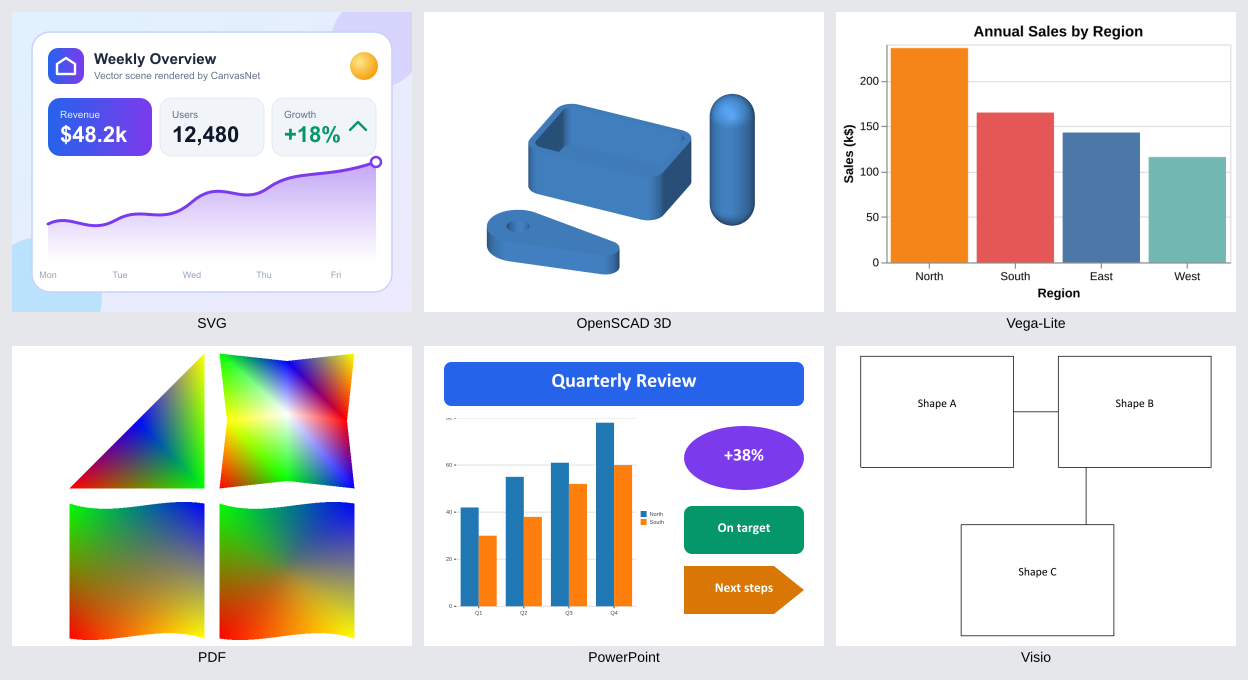
Rendered with the canvasnet tool: SVG, OpenSCAD 3D, Vega-Lite, PDF, PowerPoint, and Visio. See
how the image was made.
- 🖼️ Pixel Buffer - Mutable 32-bit RGBA surface with span access
- ✂️ Cropping - Independent-copy crop for load/crop/save workflows
- 📐 Resizing -
Resize/ResizeToFitwith Nearest, Bilinear, Bicubic, Lanczos3 and Area filters - 🌈 Compositing - Alpha premultiply and Porter-Duff "over" compositing
- 🎨 CSS Colors -
CssColorparses CSS color text (names, hex,rgb(),hsl()) intoRgba32 - 📀 BMP Codec - Load/save 24-bit/32-bit uncompressed BMP files
- 🎨 PNG Codec - Load non-interlaced PNGs; save 8-bit RGB/RGBA
- 🖨️ TIFF Codec - Load/save 8-bit RGB/RGBA/Grayscale TIFF files
- 🗜️ JPEG Codec - Load baseline/progressive; save baseline JPEG
- 🎞️ GIF Codec - Decode-only load of first GIF frame;
GetInforeports the true frame count - 🖼️ JPEG 2000 Codec - Decode-only load of JP2 files and raw codestreams
- 📐 SVG Codec - Rasterize a common SVG subset to a surface
- 📄 PDF Document - Open, inspect, and rasterize PDF pages with font substitution
- 📽️ PowerPoint Rendering - Rasterize
.pptxslides to a surface - 📊 Chart Rendering - Build and paint Bar/Column/Line/Area/Pie/Doughnut charts
- 📈 OOXML Chart Parsing - Parse ECMA-376 DrawingML charts, including from
.pptx - 🔷 Visio Rendering - Rasterize
.vsdxdiagrams; unsupported constructs are reported - 🧊 3D Rendering - Rasterize meshes and scenes with CSG, extrusion, hulls, and Minkowski sums
- 🧩 OpenSCAD-Language Rendering - Parse, evaluate, and render
.scadmodels to a surface - 📉 Vega-Lite Charts - Render a growing subset of Vega-Lite specs (see User Guide)
- 🔍 Header-Only Probing -
GetInforeads headers without decoding pixels (GIF excepted) - 🖥️ Command-Line Tool - The script- and agent-friendly
canvasnetdotnet tool, with photo clean-up - 📝 Pandoc Filter - Draw models, charts, and pages in Pandoc documents (see User Guide)
- 🖌️ Path Filling - Antialiased nonzero/even-odd fill of vector paths
- 🖊️ Stroke-to-Fill - Convert stroked paths into fillable outlines
- 🌅 Gradient Paint - Linear or radial gradient fills with spread
- 🧱 Tile Paint - Fill a path by repeating a pre-rendered tile bitmap at a configurable pitch
- 🔤 TrueType/CFF Fonts - Load fonts and collections, extract glyph outlines, query metadata
- 🗂️ System Font Discovery - Match a family/style against installed fonts, with a bundled fallback
- 🎬 Rendering - Transform-aware canvas with text and shape drawing
- ⚡ Span-Based - Fast, allocation-conscious pixel and row access
- 🔄 Multi-Target - Supports .NET 8, 9, and 10
- 📦 NuGet Ready - Easy integration via NuGet package
Install the core package with the .NET CLI (or the equivalent Install-Package command in the
Package Manager Console):
dotnet add package DemaConsulting.CanvasNetTo use CanvasNet from the command line instead of from code, install the canvasnet tool (it bundles the libraries):
dotnet tool install --global DemaConsulting.CanvasNet.ToolEach optional file-format/rendering feature ships as its own additional package - install only the ones you need, the same way as above:
| Package | Adds |
|---|---|
DemaConsulting.CanvasNet.Svg |
SVG rasterization |
DemaConsulting.CanvasNet.Pdf |
PDF document rendering |
DemaConsulting.CanvasNet.Charts |
Chart building/rendering and OOXML chart parsing |
DemaConsulting.CanvasNet.Pptx |
PowerPoint (.pptx) document rendering |
DemaConsulting.CanvasNet.Vsdx |
Visio (.vsdx) diagram rendering |
DemaConsulting.CanvasNet.Render3D |
3D mesh/scene rasterization |
DemaConsulting.CanvasNet.Scad |
OpenSCAD-language model rendering |
DemaConsulting.CanvasNet.VegaLite |
Vega-Lite static chart rendering |
DemaConsulting.CanvasNet.Tool |
The canvasnet command-line tool (dotnet tool) |
DemaConsulting.CanvasNet.Tool is a .NET tool that
exposes CanvasNet from the command line, for people, scripts, and AI agents. It bundles the CanvasNet libraries,
so installing it needs no other CanvasNet package:
dotnet tool install --global DemaConsulting.CanvasNet.Tool
canvasnet --help
The tool succeeds with exit code 0 and fails with exit code 1. An expected failure is reported as a one-line
message on standard error with a stable error code (for example Error: usage-error: Unknown command 'x'.), and
a command's standard output contains only the command's own output, so it can be piped and parsed. Add --json to any
command to get its result as one JSON document on standard output (a failure is written as a document with "ok":false
and an error.code too). An unexpected exception is a bug: it is re-thrown, ends the process with the .NET
unhandled-exception output, and should be reported. Use canvasnet --version to print the version and
canvasnet --validate to run the built-in self-validation, which can write its results as TRX or JUnit XML with
--results.
| Command | Purpose |
|---|---|
formats |
List the formats the tool reads and writes, and its limits |
info |
Show the size, format, pages, or modules of a file without rendering it |
render (alias convert) |
Write PNG, JPEG, BMP, or TIFF from an image, drawing, page, or model |
crop |
Cut a rectangle (pixels or percent) out of an image |
resize |
Resample an image to an exact size |
rotate |
Rotate clockwise by any angle (grows the canvas, fills the corners) |
flip |
Mirror horizontally, vertically, or both |
pad |
Add a border around an image |
compare |
Measure how much two images differ (MAE, RMSE, PSNR, SSIM, grid) |
montage |
Compose images and document pages into one labeled contact sheet |
inspect |
Report the dominant colors and luma statistics, or the value of a pixel |
render reads PNG, JPEG, BMP, TIFF, GIF, JPEG 2000, SVG, PDF, PPTX, VSDX, SCAD, and Vega-Lite charts
(.vl.json, .vl), and applies --crop, --resize,
--fit, --rotate (any angle), --flip, and --pad in the order written, together with the photo operations
--grayscale, --invert, --threshold, --levels, --brightness, --contrast, --auto-levels, --deskew, --trim,
and --grid; crop, resize, rotate, flip, and pad are
the same pipeline with one operation first. Defaults: an existing output is replaced (--no-clobber refuses),
vector sources are flattened over white, a JPEG is turned upright by its EXIF orientation, document pages are
drawn at 96 dpi (--page, --all-pages, --dpi), and no side of an image may exceed 8192 pixels.
The photo operations clean up a photograph of a sketch so it can be read and measured: --auto-levels stretches the
contrast, --deskew finds the tilt of the near-horizontal lines (within 15 degrees) and levels the image, reporting the
angle and a confidence in the --json result, --trim crops away the uniform border, --threshold auto makes it
black and white (Otsu's method), and --grid 100 draws a labeled coordinate grid to read positions off the picture
(put it last). inspect colors <input> reports the dominant colors and the luma statistics, and
inspect pixel <input> <x,y> the value of a pixel, in the coordinates of the image after the same operations.
A model (.scad) is drawn from a named view (--view iso|front|back|left|right|top|bottom, orthographic unless
--projection perspective) at 800x800 pixels unless a size is given, with -D name=value setting its variables, for
example canvasnet render part.scad --view top -D width=30 -o part-top.png --json. The files its include and use
directives name are read from the folder of the model and below it only, and a model whose include cannot be found
is an error. canvasnet info part.scad lists the modules, functions, and directives of a model without drawing it.
A Vega-Lite chart is read from a file named .vl.json or .vl, or from a .json file whose $schema is a Vega-Lite
schema, and is drawn at the size its specification lays out (--scale, --width, --height, and --size change it),
for example canvasnet render chart.vl.json -o chart.png --json. It is a chart in the kind column of
canvasnet formats, and canvasnet info chart.vl.json reports its laid-out size, marks, data sources, parameters,
title, and schema version without drawing it. The library implements a defined subset of the language (one view with
inline, local-file, named, or generated data; the row, aggregating, binning, and stacking transforms with a subset of the
expression language and static parameters; bar, rect, point, circle, square, rule, tick, line, area, trail, text, and arc
marks; position, color,
size, shape, and opacity encodings with legends, color schemes, and time scales and axes), draws only the bundled
fonts, and never reads the
network; a chart's CSV, TSV, DSV, or JSON data file is read from the folder of its specification and below it only
(there is no data-folder option, and a missing file is a vega-lite-error); everything else (other marks, layers,
remote data, and so on) is left out and reported in diagnostics with a stable vl-* code (--strict turns the first
such report into a failure). A malformed or invalid specification is the error vega-lite-error.
compare <a> <b> measures how much two images, drawings, document pages, or models differ: the mean absolute error,
RMSE, PSNR, a structural similarity (SSIM), the share of pixels that differ by more than --tolerance, and the RMSE of
each cell of a --grid, all computed exactly so that the same inputs give the same numbers. Images of different sizes
are refused (size-mismatch) unless --resize-to a|b|WxH says which size to use; a vector input is then drawn
directly at that size. --diff, --side-by-side, and --overlay write pictures of the differences, and
--threshold ssim=0.9 (also mae, rmse, max-diff, cell-rmse, diff-ratio, psnr) fails with exit code 1 and
the error code threshold-failed after writing the result and the pictures; with --json that failure document
carries the metrics too. montage <inputs...> -o sheet.png composes images and, with --all-pages, every page of
documents into one contact sheet (--columns, --cell, --labels with the bundled font).
Give an agent eyes on documents and models by turning them into pictures it can inspect, and let it compare its own drawings with a reference:
# 1. Learn what the file is (pages and sizes) - parse the one JSON line on standard output
canvasnet info report.pdf --all-pages --json

# 2. Render a page to look at, then write an SVG redraw and render it at the same size to compare
canvasnet render report.pdf --page 2 --dpi 150 -o ref.png --json
canvasnet render redraw.svg --size 1250x1750 -o redraw.png --json

# 3. Zoom into the same detail of both pictures
canvasnet render ref.png --crop 200x120+100+80 --resize 1000x600 -o ref-detail.png

# 3b. Compare the redraw with the reference (the SVG is drawn at the reference size) and see where they differ
canvasnet compare ref.png redraw.svg --resize-to a --grid 4x4 --side-by-side cmp.png --threshold ssim=0.9 --json

# 3c. Review every slide of a deck in one picture
canvasnet montage deck.pptx --all-pages --labels -o overview.png --json

# 4. A napkin photo: clean it up (shrink, stretch contrast, level, crop to the drawing; the JSON result reports the angle)
canvasnet render napkin.jpg --fit 2048x2048 --auto-levels --deskew --trim -o sketch.png --json

# 4b. Read coordinates off the picture with a grid, probe a pixel, and see the dominant colors
canvasnet render sketch.png --grid 100 -o sketch-grid.png
canvasnet inspect pixel sketch.png 412,230 --radius 2 --json
canvasnet inspect colors sketch.png --count 5 --json

# 4c. Draw named views of the OpenSCAD model written from the sketch
canvasnet render bracket.scad --view front -o front.png --json
canvasnet render bracket.scad --view top -D width=55 -o top.png --json

# 4d. Draw a Vega-Lite chart; anything the library cannot draw yet is listed in the diagnostics
canvasnet info sales.vl.json --json
canvasnet render sales.vl.json --scale 2 -o sales.png --json
Check ok in each JSON document and branch on error.code on a failure (usage-error, input-not-found,
corrupt-input, unsupported-feature, page-out-of-range, scad-error, vega-lite-error, size-mismatch,
threshold-failed, and so on); read diagnostics even on
success, because they list what the renderer left out. For the full command reference, JSON schemas, error codes,
defaults, and recipes see the User Guide.
Create a surface, crop it, and round-trip it through a codec:
using DemaConsulting.CanvasNet.Canvas;
using DemaConsulting.CanvasNet.Codecs;

// Create a surface, set a pixel, and crop an independent copy
using var surface = new Surface(4, 4);
surface[1, 1] = new Rgba32(255, 0, 0, 255);
using var cropped = surface.Crop(0, 0, 2, 2);

// Save as PNG and load it back
PngCodec.Save(surface, "surface.png");
using var reloaded = PngCodec.Load("surface.png");

// Load, crop, resize to fit a 64x64 box, and save
using var photo = PngCodec.Load("photo.png");
using var region = photo.Crop(10, 10, 200, 100);
using var thumbnail = region.ResizeToFit(64, 64, ResamplingMode.Lanczos3);
PngCodec.Save(thumbnail, "thumbnail.png");
Open a PDF and render a page (BMP/TIFF/JPEG/GIF/JPEG 2000/SVG codecs, header-only probing, and feature-detection all follow the same pattern):
using DemaConsulting.CanvasNet.Pdf;

// Render paints the page's real content-stream geometry: path fills/strokes, shadings and tiling
// patterns, placed image XObjects, and text (using the page's embedded font, or an
// automatically substituted system/bundled fallback font when none is embedded). Device,
// CalGray/CalRGB/Lab, ICCBased, Indexed, Separation and DeviceN colors are converted to sRGB.
using var pdfDoc = PdfDocument.Open("document.pdf");
var pageInfo = pdfDoc.GetPageInfo(0);
using var pdfSurface = pdfDoc.Render(0, pageInfo.Width, pageInfo.Height);
Render a PowerPoint slide and a Visio page (both report constructs they cannot draw rather than skipping them silently):
using DemaConsulting.CanvasNet.Pptx;
using DemaConsulting.CanvasNet.Vsdx;

// EMF/WMF pictures on a slide are skipped; the callback reports each one
using var deck = PptxDocument.Open("slides.pptx");
var pptxOptions = new PptxRenderOptions
{
    OnUnsupportedPictureSkipped = ex => Console.WriteLine($"Skipped picture: {ex.Message}"),
};
using var slide = deck.Render(0, 96f, pptxOptions);

// Each recognized-but-unsupported Visio construct is reported with a stable feature token
using var diagram = VsdxDocument.Open("diagram.vsdx");
var vsdxOptions = new VsdxRenderOptions
{
    UnsupportedFeatureHandler = f => Console.WriteLine($"{f.Feature}: {f.Message}"),
};
using var page = diagram.Render(0, 150, vsdxOptions);
Fill a vector path onto a surface (stroking, gradients, tile paint, fonts, and charts use the same
Drawing/Geometry API):
using DemaConsulting.CanvasNet.Canvas;
using DemaConsulting.CanvasNet.Drawing;
using DemaConsulting.CanvasNet.Geometry;
using System.Numerics;

using var canvas = new Surface(64, 64);

// Build a triangular path
var triangle = new PathBuilder()
    .MoveTo(new Vector2(8, 56))
    .LineTo(new Vector2(56, 56))
    .LineTo(new Vector2(32, 8))
    .Close()
    .Build();

// Fill the triangle with an antialiased solid color
PathFiller.Fill(canvas, triangle, new Rgba32(0, 128, 255, 255));
Render a 3D scene (a pure-managed software rasterizer with camera, lights, antialiasing, and parallel tile rendering):
using DemaConsulting.CanvasNet.Canvas;
using DemaConsulting.CanvasNet.Codecs;
using DemaConsulting.CanvasNet.Render3D.SceneModel;
using DemaConsulting.CanvasNet.Render3D.SceneRendering;
using DemaConsulting.CanvasNet.Render3D.Tessellation;

// A gray plate with a red sphere on it; node colors are optional and default to neutral gray
var plate = new MeshNode(PrimitiveTessellator.Box(new Vector3D(10, 10, 1), center: true))
{
    Transform = Matrix4x4D.CreateTranslation(new Vector3D(0, 0, -0.5)),
};
var ball = new MeshNode(PrimitiveTessellator.Sphere(2, 48))
{
    Transform = Matrix4x4D.CreateTranslation(new Vector3D(0, 0, 2)),
    Appearance = new NodeAppearance(new Rgba32(200, 40, 40, 255)),
};
var scene = new Scene(new GroupNode([plate, ball]));

// Render an automatically framed isometric view and save it
using var image = SceneRenderer.RenderFitted(scene, 640, 480);
PngCodec.Save(image, "scene.png");
Render an OpenSCAD-language model (the DemaConsulting.CanvasNet.Scad package parses and evaluates the
source, builds the solids with DemaConsulting.CanvasNet.Render3D, and draws them; it is an independent, clean-room
implementation of the language, not affiliated with the OpenSCAD project):
using DemaConsulting.CanvasNet.Codecs;
using DemaConsulting.CanvasNet.Scad;

// Parse a model (or ScadDocument.Open("part.scad") to read a file) and render a fitted isometric view
var document = ScadDocument.Parse("""
    size = 20;
    difference() {
        cube([size, size, 6], center = true);
        cylinder(h = 8, r = size / 5, center = true, $fn = 48);
    }
    """);
using var image = document.Render(640, 480);
PngCodec.Save(image, "part.png");

// Translucent surfaces: color alpha, a % ghost that is not part of the model, and a # highlight that still cuts
var seeThrough = ScadDocument.Parse("""
    difference() {
        color("steelblue", 0.6) cube(20);
        #translate([10, 10, -1]) cylinder(h = 22, r = 5, $fn = 48);
    }
    %translate([30, 0, 0]) cube(20);
    """);
using var glass = seeThrough.Render(640, 480);

// Lettering: text() is a 2D shape (extrude it, subtract it, move it). Without a font argument it uses the
// bundled Liberation Sans, so the result is the same on every machine; size is the height of a capital H
var label = ScadDocument.Parse("""
    difference() {
        cube([40, 14, 3]);
        translate([20, 7, 1.5]) linear_extrude(height = 2)
            text("CanvasNet", size = 6, halign = "center", valign = "center");
    }
    """);
using var engraved = label.Render(640, 480);

// Override variables, and be told about anything that could not be built instead of losing it silently
var options = new ScadRenderOptions
{
    Evaluation = new ScadEvaluationOptions
    {
        Variables = new Dictionary<string, object?> { ["size"] = 30.0 },
        UnsupportedFeatureHandler = feature => Console.WriteLine(feature),
    },
};
using var variant = document.Render(640, 480, options);

// An explicitly named font is looked up in your own directories first, then (unless disabled) the installed fonts,
// then the bundled Liberation families; turn the installed fonts off to make named fonts reproducible too
var fonts = new ScadRenderOptions
{
    FontResolution = new ScadFontResolutionOptions { UseSystemFonts = false, AdditionalDirectories = ["./fonts"] },
};
var named = ScadDocument.Parse("text(\"Hello\", font = \"Liberation Serif:style=Bold Italic\");");
using var serif = named.Render(640, 480, fonts);
Render a Vega-Lite chart (the DemaConsulting.CanvasNet.VegaLite package implements a defined subset of the
language for static pictures: it never touches the network, reads local data files only from a sandbox, uses only the
bundled fonts unless told otherwise, and
reports everything it recognizes but cannot draw; it is not affiliated with the Vega project):
using DemaConsulting.CanvasNet.Codecs;
using DemaConsulting.CanvasNet.VegaLite;

// Parse a specification (or VegaLiteDocument.Open("chart.vl.json") to read a file; a data "url" such as "stalls.csv" is
// then read from the folder of that file, never from the network); here the data is inline
var chart = VegaLiteDocument.Parse("""
    {
      "$schema": "https://vega.github.io/schema/vega-lite/v5.json",
      "title": "Crates sold per stall",
      "data": { "values": [
        { "stall": "North", "crates": 28 }, { "stall": "South", "crates": 55 },
        { "stall": "East", "crates": 43 }, { "stall": "West", "crates": 91 } ] },
      "mark": "bar",
      "encoding": {
        "x": { "field": "stall", "type": "nominal", "axis": { "labelAngle": 0 } },
        "y": { "field": "crates", "type": "quantitative" }
      }
    }
    """);

// Render at the natural size of the chart (VegaLiteRenderOptions.Scale multiplies it), and be told about every
// construct that was recognized but could not be drawn
var options = new VegaLiteRenderOptions
{
    UnsupportedFeatureHandler = feature => Console.WriteLine(feature), // location, vl-* identifier, and message
};
using var picture = chart.Render(options);
PngCodec.Save(picture, "crates.png");
See the User Guide for the full API reference and additional worked examples, including stroking, gradients, tile paint, font loading/metadata, chart building, OOXML chart parsing, PDF, PowerPoint and Visio rendering, 3D scene rendering, OpenSCAD-language model rendering, Vega-Lite chart rendering, and SVG and JPEG 2000 decoding.
pwsh ./build.ps1Detailed API documentation for all public types and members is distributed in the api/ folder
of the NuGet package.
The CanvasNet User Guide is available on the CanvasNet releases page.
Contributions are welcome. See CONTRIBUTING.md for development setup, coding standards, and the pull request process.
Copyright (c) DEMA Consulting. Licensed under the MIT License. See LICENSE for details.
By contributing to this project, you agree that your contributions will be licensed under the MIT License.
The DemaConsulting.CanvasNet package bundles the Liberation Sans, Liberation Serif, and
Liberation Mono TrueType fonts (12 files total) as embedded resources, used as a last-resort
fallback font by PdfDocument's automatic font-substitution feature. These fonts are Copyright
(c) 2012 Red Hat, Inc., licensed under the SIL Open Font License, Version 1.1; see
src/DemaConsulting.CanvasNet/Fonts/BundledFonts/OFL.txt and
src/DemaConsulting.CanvasNet/Fonts/BundledFonts/README.md for the full license text and
sourcing/provenance details.
The DemaConsulting.CanvasNet package also bundles the Noto Sans, Noto Sans Math, and Noto Sans
Symbols 2 TrueType fonts (NotoSans-Regular.ttf, NotoSansMath-Regular.ttf,
NotoSansSymbols2-Regular.ttf) as embedded resources, used as the dedicated substitute font for
Symbol/ZapfDingbats text by PdfDocument's automatic font-substitution feature. These fonts
are part of the Noto Project, licensed under the SIL Open Font License, Version 1.1; see
src/DemaConsulting.CanvasNet/Fonts/BundledFonts/NotoFonts-OFL.txt and the "Noto Substitute
Fonts" section of src/DemaConsulting.CanvasNet/Fonts/BundledFonts/README.md for the full license
text and sourcing/provenance details.
The DemaConsulting.CanvasNet.VegaLite package (and the canvasnet tool, which bundles it) implements the public
Vega-Lite specification language and contains a small number of values and algorithms that were ported, with
attribution, from the Vega and Vega-Lite projects (BSD-3-Clause, Copyright (c) University of Washington Interactive
Data Lab) and from the d3 libraries d3-array, d3-format, d3-scale, d3-time, d3-time-format, d3-scale-chromatic,
d3-interpolate, d3-color, d3-shape, and d3-path (ISC,
Copyright Mike Bostock), and its color schemes include the ColorBrewer colors (Apache-2.0, Copyright Cynthia Brewer,
Mark Harrower, and The Pennsylvania State University), the Turbo color map (Apache-2.0, Copyright Google LLC), the
cividis color map (Battelle Memorial Institute license), and the matplotlib colormaps viridis, magma, inferno, and
plasma (CC0, by Nathaniel J. Smith, Stefan van der Walt, and Eric Firing). The license texts ship in the packages under
licenses/; see
the third-party notice (src/DemaConsulting.CanvasNet.VegaLite/third-party) for the
license texts and the record of what was ported from where. The package is not affiliated with or endorsed by the
Vega project, the Vega-Lite project, the d3 project, or the University of Washington Interactive Data Lab.