
YAHBackup is a small Windows GUI application that provides an easy-to-use graphical interface for yahb (Yet Another Hardlink-Based Backup).
The goal of YAHBackup is to make the power of hardlink-based incremental backups accessible to Windows users who prefer a simple graphical workflow instead of working directly with command-line tools.
Inspired by the ideas behind tools such as the excellent Back In Time, YAHBackup focuses on creating efficient, space-saving backups on Windows while keeping the resulting backup structure easy to browse and understand.
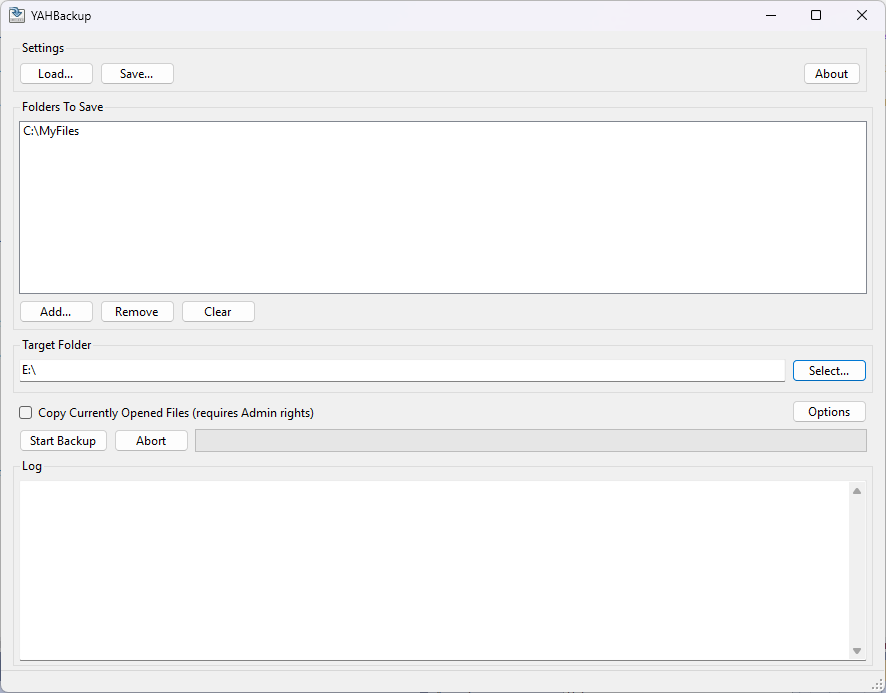
- Simple Windows GUI for managing backups with yahb
- Incremental backups using hardlinks
- Efficient use of disk space
- Easy creation and management of backup jobs
- Designed for personal and small-scale backup scenarios
- Native Windows application
Traditional backup systems often create a complete copy of all files for every backup run. This can consume a lot of storage space.
YAHBackup uses hardlink-based incremental backups. Files that have not changed since the previous backup are represented using hardlinks instead of duplicate copies. This provides:
- Multiple backup snapshots
- Low storage consumption
- Fast access to individual backup versions
- A normal file-system view of each backup snapshot
Each backup snapshot can be browsed like a regular folder.
- Windows
- Administrative rights when copying files that are currently in use
- Target file system must support NTFS hardlinks
Either use the ZIP file:
- Go to the Releases page of this repository.
- Download the latest release ZIP file
- Extract the archive to a location of your choice.
- Start
YAHBackup.exe.
or download the Setup-Installer from Releases and start the setup installer.
YAHBackup is a .NET 8 Windows Forms application.
To build it yourself:
- Install Visual Studio 2022 with the .NET desktop development workload.
- Clone this repository.
- Open the solution file (
.sln). - Build the solution in Visual Studio.
Required NuGet dependencies will be restored automatically.
YAHBackup is free software released under the terms of the GNU General Public License version 2 (GPL-2.0).
You are free to use, study, modify, and redistribute this software under the conditions of the GPL-2.0 license.
See the LICENSE file for the full license text.
YAHBackup is provided "as is", without warranty of any kind. Always verify that your backup strategy works by testing restores before relying on it for important data.
App icon taken from Oxygen-Icons, licensed under GNU LGPL version 3.