

Self-hosted human approval before your application acts.


JaGate is a small approval service for consequential actions: deploying a release, publishing a post, deleting a backup, or starting a maintenance job. Your application submits what it wants to do. A human decides in Telegram. After approval, the application claims the decision once, performs the action with its own credentials, and reports the outcome.
JaGate never executes caller-supplied commands, URLs, scripts, or callbacks. The gateway binds to 127.0.0.1 by default; put it on a private network or behind an authenticated TLS reverse proxy before exposing it.
Status: pre-1.0.
mainincludes changes that are not yet in a tagged release; see the changelog.
Client app → JaGate HTTP API → SQLite → Telegram approver
Client app ← decision + one claim ← JaGate
Client app → performs its own action → reports the result
A request is pending until an allowlisted person approves or rejects it in the client's Telegram chat, or until it expires or is cancelled. Only an approved, unclaimed request can be claimed. JaGate stores the outcome the caller reports; it cannot verify or undo the external action and does not provide exactly-once execution. If a caller crashes after claiming, the outcome is unknown and the target system must be reconciled before retrying. See Security and recovery.
JaGate needs Node.js 24.22.1, a SQLite file, and one dedicated Telegram bot. No public URL or webhook is required because the gateway uses Telegram long polling.
Check the full lifecycle without a bot, network, or .env:
git clone https://github.com/ahmetomerv/JaGate.git
cd JaGate
npm ci
npm run build
npm run demo:fake
For a real Telegram decision, create a bot and find the numeric chat and approver IDs as described in Get started locally, then:
cp .env.example .env
openssl rand -hex 32
# edit .env with the client key, bot token, and numeric IDs
npm run start:local
In another terminal, confirm readiness and run the real demo:
curl -i http://127.0.0.1:3080/ready
set -a; . ./.env; set +a
export JAGATE_CLIENT_KEY="${CLIENT_KEYS#example:}"
node --import tsx examples/demo.ts
The demo uses the single-client .env.example configuration and asks for approval before writing one temporary file. Use npm run start:local for a local .env; the production npm start command expects the environment to be provided by a process manager.
Prefer containers? Configure .env the same way, then run docker compose up --build -d and check http://127.0.0.1:3080/ready. See Docker Compose.
Create a request with the client's key:
export JAGATE_URL='http://127.0.0.1:3080'
export JAGATE_CLIENT_KEY='paste-your-client-key'

curl -sS -X POST "$JAGATE_URL/v1/requests" \
  -H "Authorization: Bearer $JAGATE_CLIENT_KEY" \
  -H 'Content-Type: application/json' \
  -d '{"idempotencyKey":"deploy:abc123","action":"deploy","title":"Deploy website","description":"Deploy revision abc123 to production","details":[{"label":"Revision","value":"abc123"}],"expiresInSeconds":900}'
The response contains the request id and status. Wait for the Telegram decision, then poll until status is no longer pending:
REQUEST_ID='paste-request-id'
curl -sS "$JAGATE_URL/v1/requests/$REQUEST_ID" \
  -H "Authorization: Bearer $JAGATE_CLIENT_KEY"
If the status is approved, claim it once. The claim response returns a claimToken that is shown only once:
curl -sS -X POST "$JAGATE_URL/v1/requests/$REQUEST_ID/claim" \
  -H "Authorization: Bearer $JAGATE_CLIENT_KEY" \
  -H 'Content-Type: application/json' -d '{}'
Perform the approved action yourself, then report the outcome with that token:
curl -sS -X POST "$JAGATE_URL/v1/requests/$REQUEST_ID/result" \
  -H "Authorization: Bearer $JAGATE_CLIENT_KEY" \
  -H 'Content-Type: application/json' \
  -d '{"claimToken":"paste-claim-token","status":"succeeded","summary":"Deployed revision abc123"}'
If the decision is rejected, expired, or cancelled, do not perform the action. See the HTTP API for every field and status code, or use the bundled TypeScript client. The client is not published to npm yet; build this checkout and install it by path as described in the TypeScript client guide.
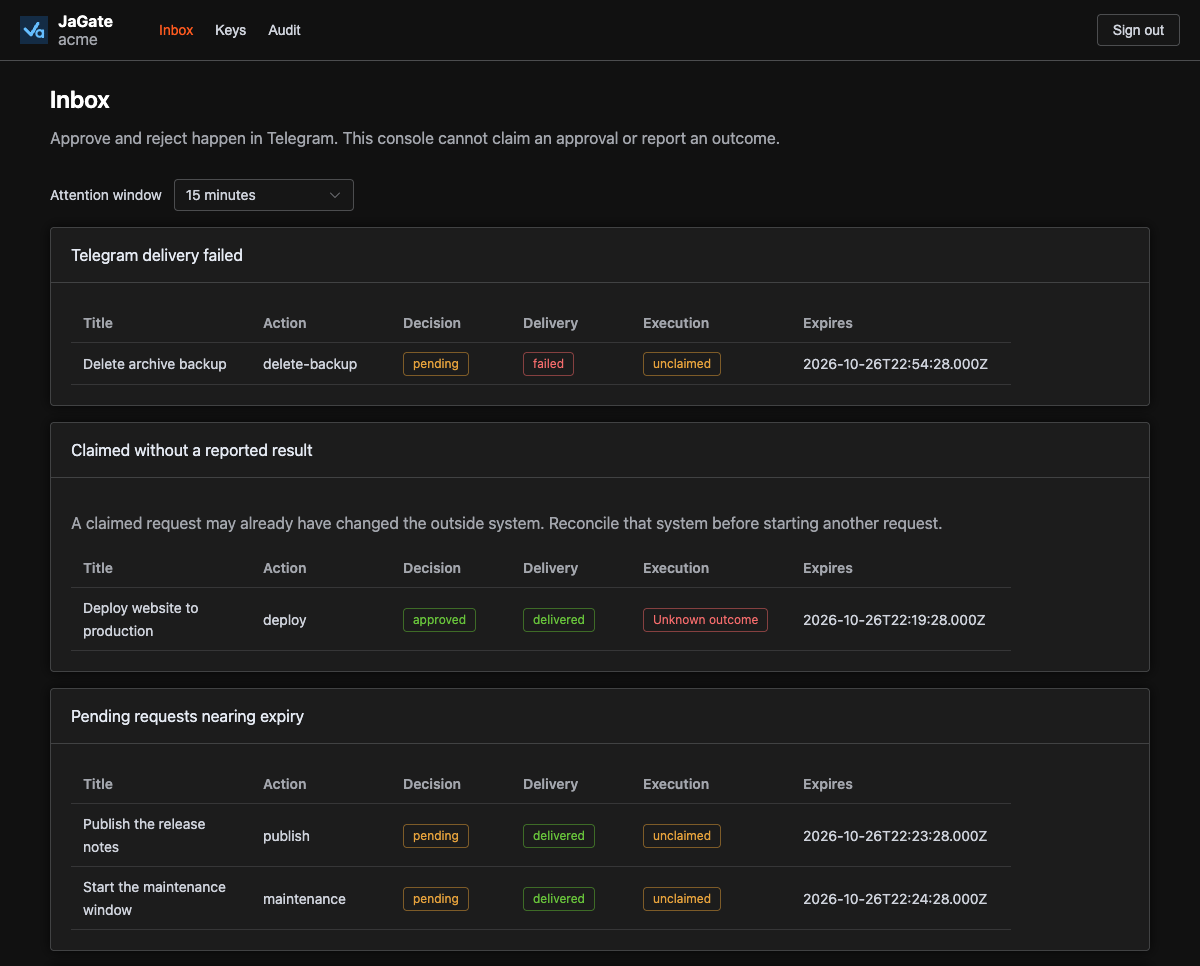
Operator console: one client's inbox and attention lists. Decisions stay in Telegram.
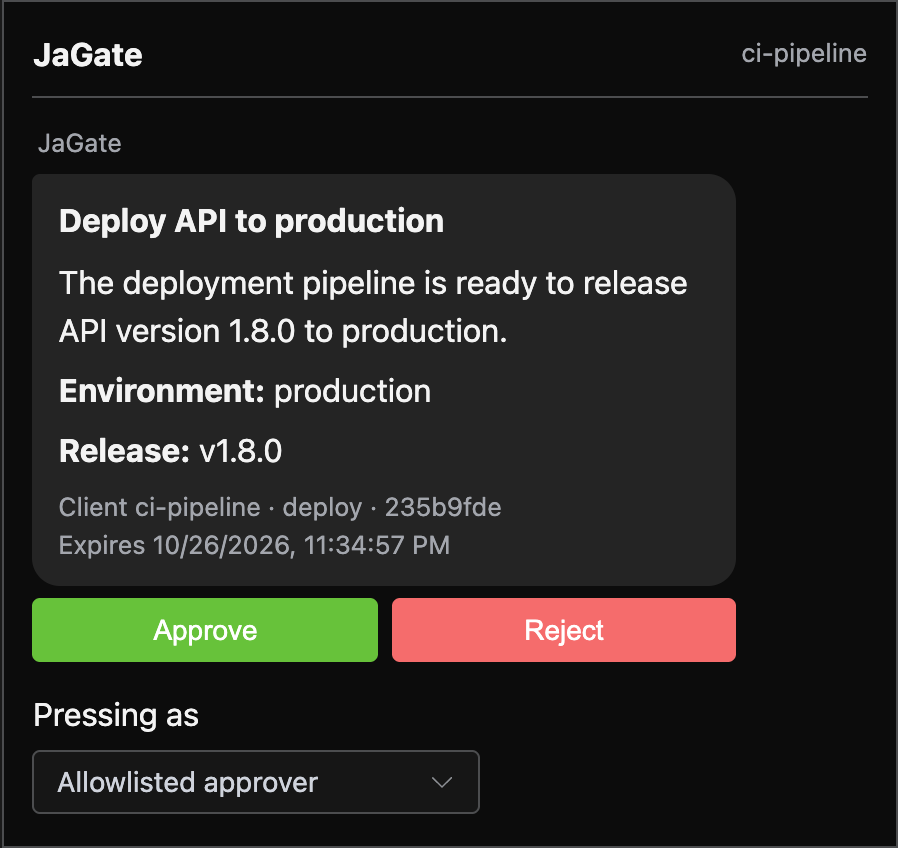
Local playground: the approval prompt in the simulated Telegram chat, before the caller claims and reports. No bot or network required.
- Caller-owned execution. JaGate never runs supplied commands, URLs, scripts, or callbacks. After approval, the calling application acts with its own credentials.
- Telegram decisions without a public URL. One bot delivers each client's requests to that client's own chat. Only allowlisted numeric user IDs can approve or reject, and long polling works behind NAT and firewalls.
- Durable lifecycle and one claim. SQLite stores proposals, delivery state, decisions, one-time claims, and reported outcomes across restarts. Pending requests fail closed when they expire.
- Scoped keys and audit. Issue keys for specific operations with optional expiry, revoke them without a restart, and inspect which key created, claimed, or reported a request.
- Request history. Filter and page a client's requests, find failed delivery, old claims, or approvals nearing expiry, and inspect each request's event timeline.
- Operator console and client tooling. Review a client's inbox, timeline, keys, and audit feed in the browser; exercise the API in the local playground; call the gateway from any language or with the bundled TypeScript client.
- Get started locally
- Configuration and clients
- Scenario guides
- HTTP API
- TypeScript client
- Operator console
- Local playground
- Security and recovery
- Architecture and schema
Follow the local setup guide. Node.js 24.22.1 is required. From the repository root, npm ci then npm run verify runs typecheck, tests, lint, and the server, console, docs, and playground builds.
npm run demo:fake walks through one approval with an in-memory database and a fake Telegram transport.
npm run playground opens a local API client workbench at http://127.0.0.1:5173 for idempotency, cancellation, expiry, claims, client isolation, and real Telegram integration. See the playground guide.
npm run console:dev opens the operator console at http://127.0.0.1:5174 against a gateway on port 3080. See the console guide.
For a configured local gateway, run npm run build followed by npm run start:local; the latter loads .env without changing the production npm start command.
JaGate coordinates approval; it never performs the action. The gateway binds to 127.0.0.1 by default, and the Compose example publishes only to host loopback. Use a private network or an authenticated TLS reverse proxy before allowing remote clients or operators. Run only one gateway instance with a given SQLite database and bot token, and keep the database, backups, client keys, bot token, and claim tokens private. Request title, description, and details are delivered to Telegram; metadata stays in SQLite and is shown in the console and API. Avoid secrets in all request content.
Read Security and recovery for the trust model, claim semantics, and crash recovery. Report vulnerabilities privately as described in SECURITY.md.
Create a branch, add commits, and open a pull request. Read CONTRIBUTING for the process, and keep behavior changes reflected in the docs.
GitHub Actions runs npm run verify, audits production dependencies, checks the npm package, and builds the Docker image on pull requests. It publishes the documentation site after successful pushes to main. See the workflow runs.
See the CHANGELOG file for details.
This project is licensed under the MIT License — see the LICENSE file for details.