







Let your users view your product or 3D renders using mouse/touch or set it to autoplay!
See it in action in storybook
·
Report Bug
·
Request Feature
Table of Contents
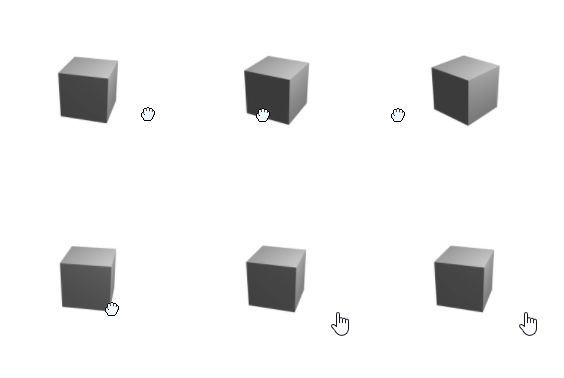
There are a few javascript product viewers out there but none could deliver what I needed. A React component written in Typescript and free! With a lot of customization you can quickly setup this component. All you need is a set of images that represents an animation you would like your users to explore. Either through user-interaction or setting it to autoplay! Point the component to your image folder, set the name, count and image type and you are ready!
It can be controlled either using mouse or touch!
Main features:
- React component
- Uses Typescript
- Free
- Simple
The package is published on npm and the repository now uses GitHub Actions plus Changesets for versioning and releases.
React In order to use the component you need a React project. The library supports React 18 and React 19.
Make sure you have a react project - otherwise use: .
npx create-react-app my-app --template typescript- Download through npm
npm add react-360-product-viewer- Add the component to your page, change the properties to fit your need. For all options see storybook
<React360Viewer
  imagesBaseUrl="./imageSeries/"
  imagesCount={YOUR_IMAGE_SERIES_COUNT_HERE}
  imagesFiletype="png"
  mouseDragSpeed={20}
/>TODO: Add descriptions of all parameters For more example and a playground please refer to storybook
Releases are managed through Changesets:
npm run changesetAdd a changeset in the pull request that changes the package. When the pull request is merged to master, GitHub Actions will open or update a release PR. Merging that release PR publishes the package to npm and creates the corresponding GitHub release automatically.
The npm package has a Trusted Publisher configured for GitHub owner Todilo, repository react-360-product-viewer, and workflow filename release.yml, with direct npm publish enabled. The release job uses Node 24 and GitHub's OIDC identity; no npm write token is needed. If the connection is recreated, these values must match the workflow and the npm package settings.
GitHub may require a maintainer to approve CI runs on a release PR created with GITHUB_TOKEN. Check that the release PR's required checks have run before merging it.
| Prop | Default | Description |
|---|---|---|
imagesCount |
Required | Number of frames in the image sequence. |
imagesBaseUrl |
Required | Base URL of the image sequence, for example /frames/. |
imagesFiletype |
Required | Image extension, for example png. |
imageIndexSeparator |
/ unless the URL ends in / |
Text between the base URL and filename. |
imageFilenamePrefix |
Empty | Text before each frame number. |
imageInitialIndex |
0 |
Initial frame index, starting at zero. |
mouseDragSpeed |
20 |
Frame change sensitivity while dragging. |
inertia |
false |
Smooths dragging toward the pointer position. It does not add momentum after release. |
autoplay |
false |
Advance frames automatically. |
autoplaySpeed |
10 |
Frames per second. |
autoplayTarget |
None | Stop when this zero-based frame index is reached, including when looping is enabled. |
autoplayLoop |
true |
When false, stop after one full revolution or at autoplayTarget, whichever comes first. |
stopAutoplayOnInteraction |
true |
When false, resume autoplay after a pointer interaction ends. |
reverse |
false |
Reverse drag and autoplay direction. |
width, height |
150 |
Image dimensions in pixels when fillContainer is off; width also sets drag sensitivity in that mode. |
fillContainer |
false |
Fill the parent element's width and height and fit images inside it. Give the parent an explicit size. |
imagePosition |
center |
CSS object-position used when fillContainer is on. |
zeroPad |
0 |
Number of leading zeroes before one-digit frame numbers. |
showRotationIconOnStartup |
false |
Show the rotation hint before interaction. |
customRotationIcon |
None | Function returning a custom rotation hint. |
shouldNotifyEvents |
false |
Enable the coordinate callbacks below. |
notifyOnPointerDown, notifyOnPointerUp, notifyOnPointerMoved |
None | Callbacks receiving pointer x and y coordinates. |
Standard HTML div attributes, including className, style, ARIA attributes, and pointer handlers, are forwarded to the viewer container.
- Add rotate icon
- Start image index
- Set autoplay to look x number of times
- Release for NPM
- Document API
- Allow for external URI:s as imagesources
- Example on how to layout images
- Add smoothed dragging (
inertia) - Supply events
- Autoplay finished
- Image changed
- User key Down
- User key release
- User movement
See the open issues for a full list of proposed features (and known issues).
Contributions are what make the open source community such an amazing place to learn, inspire, and create. Any contributions you make are greatly appreciated.
If you have a suggestion that would make this better, please fork the repo and create a pull request. You can also simply open an issue with the tag "enhancement". Don't forget to give the project a star! Thanks again!
- Fork the Project
- Create your Feature Branch (
git checkout -b feature/AmazingFeature) - Commit your Changes (
git commit -m 'Add some AmazingFeature') - Push to the Branch (
git push origin feature/AmazingFeature) - Open a Pull Request
The autoplay controls, smoothed dragging, and container-fitting options were inspired by Andrew Leek's fork. Thank you, Andrew, for sharing the ideas and implementation.
Distributed under the MIT License. See LICENSE.txt for more information.