Repository navigation
[feat] canvas: Resize text nodes and support fullscreen Markdown editing #336
Description

Goal and scope
A canvas text node is a project object used to write text directly on the canvas and provide text references to other creative operations. This feature applies to these nodes.
Make canvas text nodes suitable for writing and reviewing notes, prompts, and longer documents. Users can customize node dimensions, edit Markdown, and expand the editor to fullscreen.
Before and after
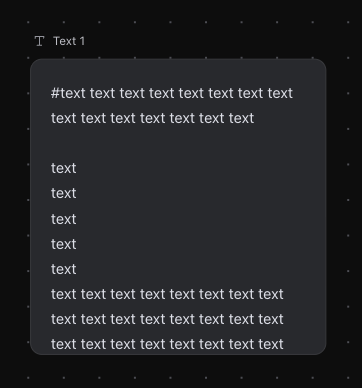
The screenshot shows the current text card. The following table defines the requested behavior.
| Before | After |
|---|---|
| Text nodes have a fixed size. | Users can adjust width and height independently with a resize handle. |
| Markdown is displayed as plain text. | Users can edit Markdown source and view formatted headings, lists, tables, links, and code blocks. |
| Editing longer content inside a small node is inconvenient. | Users can expand the editor to fullscreen and return to the canvas with their draft and cursor position preserved. |
User flow and rules
- Resize a text node by dragging its bottom-right handle. Width and height are independent, with a minimum size that keeps the content usable. Long content scrolls within the node.
- Open the text editor from the node. Support Markdown source editing and rendered preview, including headings, lists, quotes, emphasis, links, code blocks, and tables. Formatting actions update the same Markdown content.
- Fullscreen means an editor overlay filling the application viewport. Expand the editor using a fullscreen control. Keep editing and preview available, then return to the canvas with the current draft and cursor position preserved.
- Save content and dimensions to the project. Reopening the project restores both. Resizing changes the presentation without changing the text.
- Respect object locks and revision conflicts. Preserve unsubmitted text when saving fails and show a readable error.
- Provide labels, tooltips, and errors in English and Chinese.
Example
A user writes a Markdown document in a text node, makes the node wider to review a table, and expands the editor to work on a longer section. After returning to the canvas, the node shows the updated content at the chosen size.
CLI and Agent support
- Provide CLI operations to create a text node from Markdown, read its complete source, update its content, and set its width and height by stable object ID.
- Accept Markdown through a UTF-8 file or standard input so multiline content, quotes, backticks, and code fences survive without shell escaping.
- Expose required object revisions and reuse the same validation, locking, conflict handling, and persistence as the UI. Return the object ID, committed revision, dimensions, and operation status.
- Report width and height in canvas coordinate units, independently of the current viewport zoom.
- Update CLI
--help, command schemas, and examples so users and agents can discover the supported text and sizing operations. Describe content format, units, limits, and failure responses. - Agent-created Markdown must appear as editable project content with the same source and rendered output available in the UI.
Implementation impact
- Reuse shared canvas layout commands for dimensions and the existing text content persistence path for Markdown.
- Use one editing state for inline and fullscreen modes, with consistent save and cancel behavior.
- Let Agent operations read and update the same Markdown content and node dimensions through the shared business commands.
Acceptance criteria
- Resize a text node horizontally and vertically. Verify the result at different canvas zoom levels and after reopening the project.
- Edit Markdown and preview headings, lists, quotes, emphasis, links, code blocks, and tables without losing source content.
- Enter and exit fullscreen while preserving the draft, selection, and cursor position. Save and cancel behave consistently in both modes.
- Text selection and editor scrolling work without accidentally dragging or zooming the canvas.
- Locked nodes reject edits and resizing. Save failures and revision conflicts preserve the draft and provide a clear recovery path.
- Through the documented CLI, create, read, update, and resize a text node. Verify UTF-8 file and standard-input handling with Chinese and English text, multiline content, backticks, and code fences. Check receipts against queried project state.
- Ask an Agent to create a Markdown document containing headings, lists, a table, links, and a fenced code block at specified node dimensions. Verify the saved source, rendered content, dimensions, and receipt.
- Edit that document in fullscreen, save it, then ask the Agent to revise a named section. Verify that the Agent reads the latest content and preserves unrelated sections and user edits.
- Repeat the Agent creation and revision flow through the supported Agent runtimes OpenCode, OpenJiuwen, Codex, dsh, and the bundled runtime. Record actual outputs and screenshots for each supported runtime.
- Reopen the project and verify the same text object, Markdown content, and dimensions. Exercise locked objects, stale revisions, and save failures through UI and CLI.
- Agent completion messages identify the actual updated object and accurately report saved results or failures.
- Verify English and Chinese flows and attach screenshots of resizing, Markdown editing, and fullscreen editing to the implementation PR.
Activity
curealb commentedon Nov 15, 2026
Hi @FayeSpica , I'd like to work on this issue if it's still available. Could you assign it to me?
I'll start with the text-node UI, including resizing, Markdown editing and preview, and fullscreen editing. Then I'll extend the CLI support using the existing shared commands, ensuring consistent persistence, revision conflict handling, and UI–Agent workflows.