| Android 3.1 | Android 95/NT 4.0 | Android 98 |
|---|---|---|
 |
 |
 |
| Android ME Professional (2000/ME) with IE6 | Android XP | Android 7 |
 |
 |
 |
| Apple iOS 6 | MacOS | OS/2 |
| ugh | potentially | is that even a good idea? |
- Lawnchair Legacy 2.0-2589 is
the least worst launcherrecommended. Newer versions lack support for changing icons using images. Also, other launchers have ads or are painful to customise/use. It also supports custom fonts! - Backup/Restore - Lawnchair backups store the icons, layout and wallpapers ✅
- Lawnchair backups do NOT contain custom fonts. You'll need both the .shed file and .ttf files to the device
- Lawnchair supports .gif files as wallpaper (non-animated), which is ideal for stock Windows backgrounds which use GIF colours
- Note: set the icons in the app drawer first - the change will flow down to the home screen icons
- You can use GIF Live Wallpaper by Awesome Robot to set an animated .GIF as wallpaper, for example setting a Windows loading screen on the lock screen!
- Futo keyboard v0.1.27 now supports themes (eg background image)
- Notification Shortcuts app also supports custom (.png) icons!
- Icons can be extracted from Windows files using wrestool, which supports all Windows DLLs, EXEs etc since Windows 3.0!
- VirtualBox hard drive .vdi files can be opened/extracted with 7Zip
- .ICO files can be converted to .PNG (with transparency!) using imagemagick
- Fun icons can be found in MORICONS.DLL and PIFMGR.DLL
- Win95/NT 4.0 have the same vibe, likewise with Win2k/ME. Icons/wallpaper colour are the same. WinME and Win2k do have different wallpaper though
- Nova launcher works, but it has its bugs. Wallpaper placement can be hard to get right. It has ads. It's also not fun to pick custom icons, although others I've tried are worse. It also doesn't support custom fonts

- Font: MS Sans Serif 8pt.ttf
- Icons
- Text colour: Black
- Original Win31 wallpapers: https://archive.org/details/winlogo_202511/
- Issues: Wallpaper is dark (should be pure white, but Lawnchair has made it grey-ish)
- Sample Lawnchair .shed
- Font: MS Sans Serif 8pt.ttf or https://www.dafont.com/w95fa.font
- Font colour: White
- Wallpaper colour:
008484 - Win95 grey:
C6C6C6 - Original Win95 icons: https://archive.org/details/windows-95-c-icons
- Original Win95 wallpapers: https://archive.org/details/sc-wall
- Issues: I couldn't find any Win95-type icons for Camera so I had to use the older style one from PROGMAN.EXE 🙁
- Sample Lawnchair .shed
- Font: MS Sans Serif (Western), size 8.
SSERIFE.FON- Here's the .TTF version https://github.com/MARTYR-X-LTD/ms-w98-ui/tree/main/TTF - Wallpaper colour:
000080 - Wallpaper with the Windows 98 logo: the logo is a .gif stored in
MEMBG.DLL(extracted with Resource Hacker) - Original Win98 wallpapers: https://archive.org/details/underw1
- Windows 98 SE VDI: https://archive.org/details/windows-98-32-bit
- Issues: Font doesn't look right
- Reference pic: https://winworldpc.com/res/img/screenshots/final-3e8aaaa2b1c65587e5249551445642da-w2kfilebrowser.png
- Windows 2000 font:
TAHOMA.TTF, size 8. Note that modern Tahoma is different - so here's a conversion of the original Win2k Tahoma: https://github.com/SpitFire-666/AndroidThemes/blob/main/Tahoma-Win2k.ttf - Original Win2k Wallpapers: https://archive.org/details/windows-2000_202502/
- Windows Me VDI: https://archive.org/details/win_me_archive_vdi/
- Wallpaper (Win2k Blue) colour:
3B6EA5 - Windows 2000 grey:
D4D0C8/ R212, G208, B200
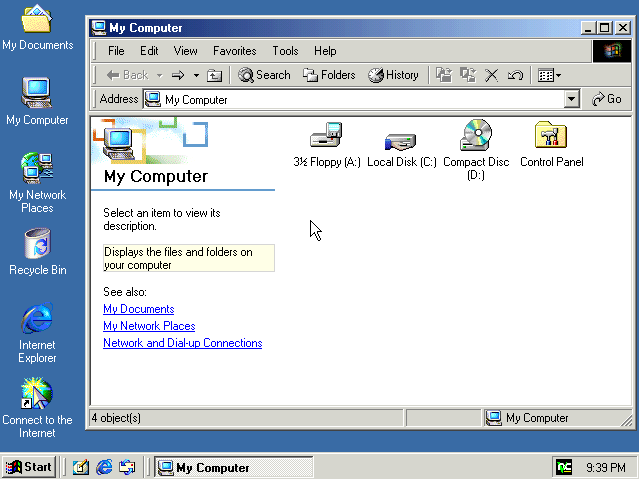
Finally, an OS that has most of the icons I need, out of the box!
- Font:
TAHOMA.TTF, size 8. Note that modern Tahoma is different - so here's a conversion of the original Win2k Tahoma: https://github.com/SpitFire-666/AndroidThemes/blob/main/Tahoma-Win2k.ttf - Wallpaper: BLISS.JPG
- WinXP "Grey":
FBFBFC - WinXP Grey (classic theme):
- WinXP Blue:
235EDC - Notes: I had to hunt down a Windows Messenger (remember that!?) .exe, because it's missing from newer versions of WinXP 🤔 It took a lot of digging to even find the name of the .exe
wmsmsgs.exewhich is here. Then I had to expand.exe the file 🙃
- Wallpaper:
- Font:
The irony of theming your device like an OS that won't let you customise it 🙃
- Icons: https://www.deviantart.com/alternatecontent/art/Classic-IOS-6-Icons-Pack-1287853974
- Wallpaper: https://cdn.wallpapersafari.com/3/68/fHe1yV.jpg
- Font:

- Icons: warpicon***
- Icons: https://github.com/bearz314/MacOS9-icons
- MacOS 9 grey:
ADACAD - Wallpaper colour: 63639C
- Wallpaper
- Font
- if i can be bothered

- First attempt at theming. Took forever. Use Lawnchair instead!
- Icon text: black
- Theme file: https://github.com/SpitFire-666/AndroidThemes/blob/main/Win31.novabackup
- Wallpaper:
- Home screen settings, Advanced, Disable Wallpaper Zoom Effects
- Screenshot taken from Windows 3.1 via DOSBOX-X, with 3x scaling enabled
- Photoshopped into a .GIF (jpeg is fine too)
- Nova Launcher sucks at aligning/setting the wallpaper