###This is a Table widget for the Kivy library.
Features:
- Mouse scrolling
- Methods for a keyboard control
- Custom colors in the:
- label panel
- number panel
- grid
- cell widgets(click/unclick colors)
- Visibility of panels
- Auto width of number panel
- Two-dimensional array of grid cells
- Quick and custom adding a new row
(only Button and TextInput at this time)
The other features I will add in my free time.
Short example:
...
from kivy_table_widget import Table
...
table = Table()
table.cols = 2
table.add_button_row('123','456')
table.add_row([Button, {'text':'button2',
                        'color_widget': [0, 0, .5, 1],
                        'color_click': [0, 1, 0, 1]
                       }],
              [TextInput, {'text':'textinput2',
                           'color_click': [1, 0, .5, 1]
                          }])
table.choose_row(3)
table.del_row(5)
table.grid.color = [1, 0, 0, 1]
table.grid.cells[1][1].text = 'edited textinput text'
table.grid.cells[3][0].height = 100
table.label_panel.labels[1].text = 'New name'
...
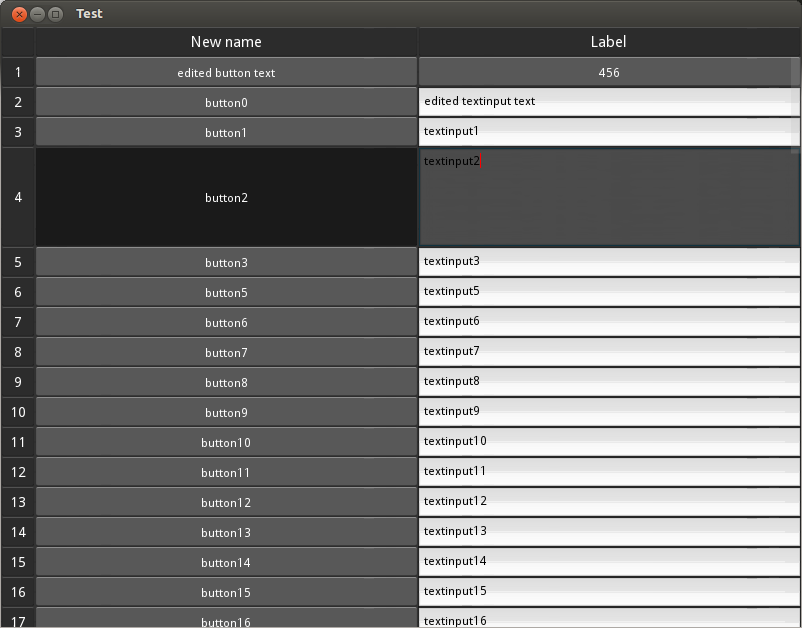
Standard widget
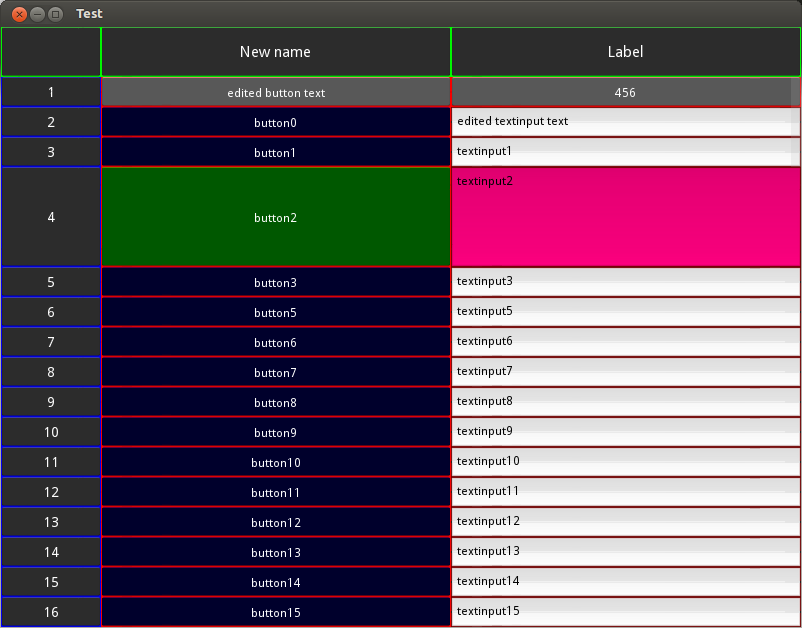
Custom widget
For more information look at example file example.py and API Reference. The Table widget is licensed under the terms of the MIT. Please refer to the LICENSE file. Authors of the project are listed in the AUTHORS file.