
Load any GGUF model directly in your browser. Chat 100% offline.
No API key. No account. No subscription. No data leaves your machine.


LocalAI Chat is a Chrome extension that runs GGUF language models entirely inside the browser using WebAssembly (via wllama, a WASM build of llama.cpp). Drop any .gguf file onto the page — the model loads locally, and you chat with full streaming output. No server. No Python environment. No internet connection required after install.
It also functions as a lightweight agentic IDE: open a local workspace folder, let the AI generate code in structured <file> blocks, preview a line-by-line diff, and click Apply to write changes to disk — with undo.
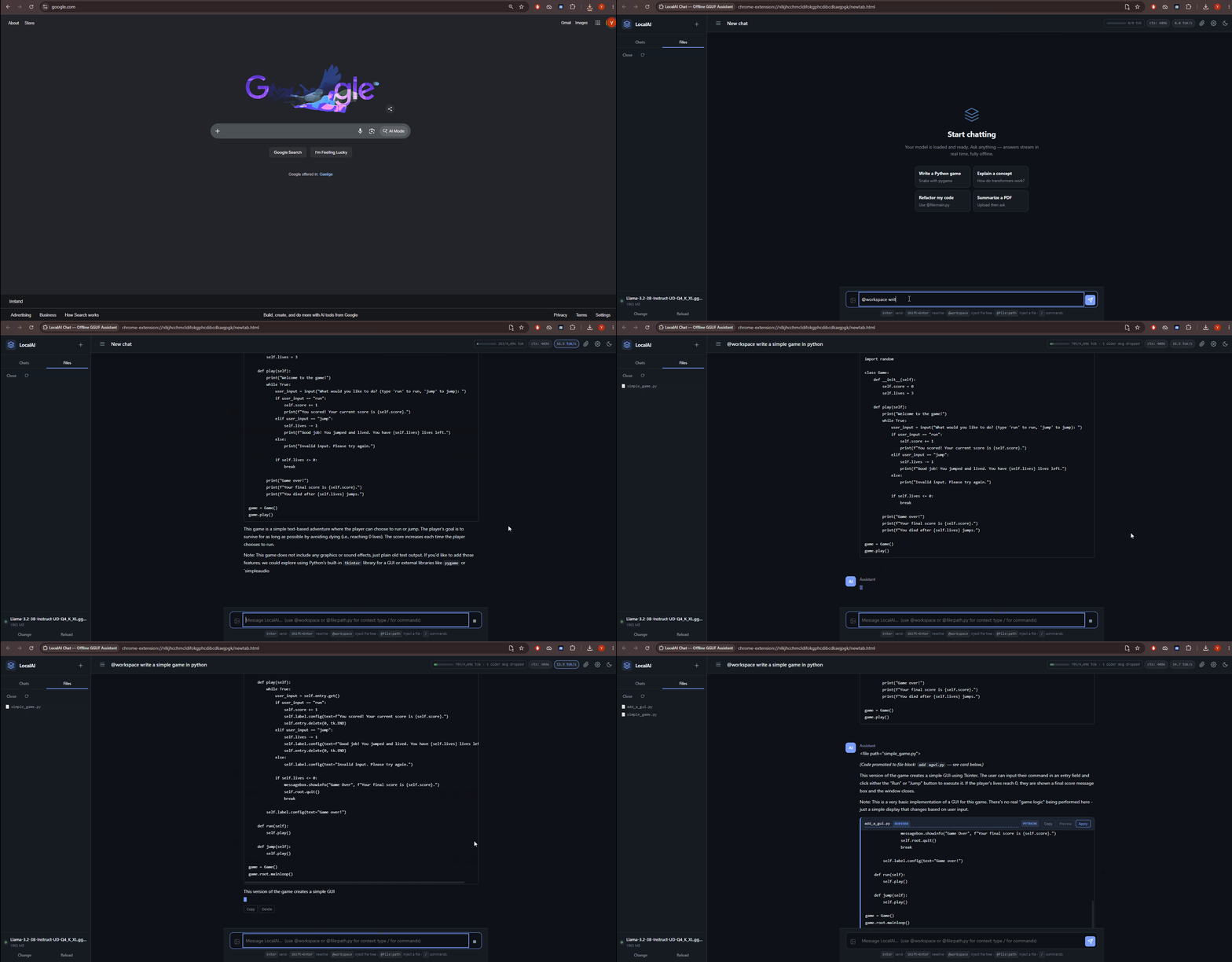
- Any GGUF model — Llama 3, Mistral, Qwen, Gemma, Phi, SmolLM2, TinyLlama, and more
- Streaming output with live tokens-per-second display
- Model persistence — reload the tab, keep your model (IndexedDB blob cache)
- Recent models list with one-click reload
- GGUF metadata display — architecture · params · quantization · size, parsed from the binary header
- Memory budget indicator — color-coded green / amber / red based on available JS heap
- Vision model support — load an
mmprojcompanion file to enable image understanding - Configurable inference — temperature, top-p, max tokens, context length, CPU threads, repeat penalty
- Token-aware context management — smart budget system, live ctx-fullness bar
- Chat history — search, rename, delete, fork, edit-and-resend
- Export / import — Markdown or JSON
- Stop generation at any time
- Custom system prompt persisted across sessions
| Command | Action |
|---|---|
/clear |
Start a new chat |
/summarize |
Summarize the conversation in 5 bullets |
/translate <lang> |
Translate the last message |
/review |
Review code in @workspace or attached file |
/tests |
Generate unit tests for the discussed code |
/explain |
Simplify the previous answer |
/rename <title> |
Rename the current chat |
/export |
Export chat as Markdown |
/help |
List all commands |
User-defined snippets support {{selection}}, {{args}}, and {{date}} substitution. A floating autocomplete dropdown appears when you type /.
Attach files directly to any message — parsed entirely in-browser:
| Format | Parser |
|---|---|
| pdf.js (up to 100 pages) | |
| DOCX / DOC | mammoth.js |
| TXT, MD | Plain text |
| CSV, TSV | Rendered as markdown table (≤ 200 rows) |
| HTML / HTM | DOMParser — strips script/style |
| RTF | Built-in control-word stripper |
| JSON | Pretty-printed (≤ 100K chars) |
- File System Access API — open any local folder, browse the file tree in the sidebar
- Context tokens — type
@workspaceto inject the full file tree, or@file:path.pyto inject a file's contents - AI file edits — the model wraps new/modified files in
<file path="...">blocks; they render as interactive cards - Diff preview — line-by-line diff modal with context-collapse for long unchanged runs
- Apply button — writes directly to disk via the File System Access API
- Undo — snapshot-based, up to 10 levels per file (stored in IndexedDB)
- In-app file viewer — double-click any file in the tree to read it
- File watcher — external changes reflected automatically (5-second polling)
Full ARIA roles, aria-live regions, skip-link, keyboard navigation (ESC closes modals, arrow keys navigate the slash dropdown), prefers-reduced-motion, prefers-contrast, and auto light/dark theme detection.
Download the latest ZIP from Releases, unzip it, then:
- Open
chrome://extensions - Enable Developer mode (top-right toggle)
- Click Load unpacked → select the unzipped
LocalAI Chat/folder - Click the extension icon in the toolbar — a new tab opens automatically
Grab a small quantised GGUF from HuggingFace. Recommended starting points:
| Model | Size | Notes |
|---|---|---|
Qwen2.5-0.5B-Q4_K_M |
~380 MB | Fastest |
Qwen2.5-1.5B-Q4_K_M |
~950 MB | Best balance |
Llama-3.2-1B-Q4_K_M |
~700 MB | Strong general use |
SmolLM2-1.7B-Q4_K_M |
~1.1 GB | Good instruction following |
Phi-3-mini-Q4_K_M |
~2.3 GB | Strong reasoning |
LLaVA-1.5-7B-Q4_K_M |
~5 GB | Vision — needs mmproj |
Models over ~4 GB require the equivalent free RAM available to the browser tab.
Drop the .gguf file onto the drop overlay. The model loads locally — no upload, no network. Start chatting.
# Clone the repo
git clone https://github.com/LMLK-seal/localai-chat
cd localai-chat

# Download third-party libraries (wllama, pdf.js, mammoth.js)
bash scripts/setup-libs.sh

# Optional: regenerate icons
python3 scripts/make-icons.py

# Package for distribution
bash scripts/package-extension.sh
# → download/localai-chat-extension.zipClick "Open Workspace"
→ File tree appears in the left sidebar
Type a prompt (e.g. "Add type hints to utils.py")
→ System prompt is auto-augmented with the file tree
AI responds with <file path="utils.py">…</file> blocks
→ Cards appear in chat with Preview / Apply / Undo buttons
Click Preview → side-by-side diff modal
Click Apply → file written to disk instantly
Click Undo → previous version restored from IndexedDB
Context injection tokens:
| Token | Effect |
|---|---|
@workspace |
Injects the full file tree |
@file:path/to/file.py |
Injects that file's contents |
All settings persist via chrome.storage.local:
| Setting | Range | Default |
|---|---|---|
| System prompt | — | — |
| Temperature | 0 – 2 | 0.7 |
| Top-p | 0 – 1 | 0.9 |
| Max tokens | 64 – 8192 | 512 |
| Context length | 512 – 32768 | 4096 |
| CPU threads | 1 – 16 | 4 |
| Repeat penalty | 1.0 – 2.0 | 1.1 |
| Stream tokens | toggle | on |
| Auto-apply file blocks | toggle | off |
Note: Changing context length requires a model reload.
LocalAI Chat/
├── manifest.json              MV3 manifest
├── background.js              Service worker — opens chat tab on icon click
├── newtab.html                Chat UI shell
├── newtab.css                 Dark / light theme
├── icons/                     PNG icons (16 / 32 / 48 / 128)
├── src/
│   ├── app.js                 Main controller
│   ├── model-loader.js        wllama integration, GGUF loading, vision detection
│   ├── chat-manager.js        Streaming, history, copy, regenerate
│   ├── settings.js            Persisted settings
│   ├── document-parser.js     PDF, DOCX, TXT/MD, CSV, HTML, RTF, JSON
│   ├── workspace.js           File System Access API: tree, read, write, @context
│   ├── file-renderer.js       <file> block parsing, diff view, Apply Changes
│   ├── file-history.js        Snapshot-based undo (IndexedDB)
│   ├── model-store.js         Model persistence (IndexedDB blobs)
│   ├── token-counter.js       Token budget estimation
│   ├── prompt-library.js      Slash commands & user snippets
│   └── markdown.js            Minimal safe markdown renderer
├── lib/
│   ├── wllama.min.js          WASM llama.cpp
│   ├── pdfjs/                 PDF parsing
│   └── mammoth.browser.min.js DOCX parsing
└── wasm/
    └── wllama.wasm            WebAssembly binary
- Zero network requests during inference — enforced by CSP (
connect-src 'self') - Model never leaves your machine — loaded into browser memory, optionally cached in IndexedDB
- Chat history stored locally —
chrome.storage.local, exportable and deletable at any time - No telemetry, no analytics, no account
- Workspace file handles require explicit re-grant of permission each browser session
| Limitation | Detail |
|---|---|
| CPU or GPU | Can work both with CPU or GPU |
| Memory | A 4 GB model needs ~4 GB of RAM free in the tab. |
| Browser | File System Access (workspace) requires Chrome 86+ or Edge 86+. Not available in Firefox or Safari. |
| Vision | wllama's vision support depends on the llama.cpp build. LLaVA / Qwen-VL variants may vary. |
Legacy .doc |
Best-effort ASCII extraction. Convert to .docx for reliable results. |
| Large context | Context windows > 32K may exhaust WASM memory. Start at 4096 and increase as needed. |
| Symptom | Fix |
|---|---|
wllama library not found |
Run bash scripts/setup-libs.sh |
| Model fails to load | Try a smaller context length (4096) and verify the .gguf is valid |
| Very slow inference | Use a smaller model (≤ 2B params) or increase CPU thread count in Settings |
| File System Access unavailable | Use Chrome 86+ or Edge 86+ — not available in Firefox or Safari |
| Vision images ignored | Load the mmproj file before the main .gguf via "+ Add mmproj (vision)" |
| Context bar shows red | Export and start a new chat, or reduce Max Tokens in Settings |
Eight major feature areas: model persistence, GGUF metadata display, token-aware context management, conversation power features (search / rename / fork / edit-and-resend / export / import), slash commands & prompt library, file-editing v2 (undo + diff preview + in-app viewer + file watcher), expanded document parsing (CSV / HTML / RTF / JSON), and full accessibility.
12 bugfixes: CPU threads setting honoured, stream toggle working, maxTokens default corrected, single apply panel, regenerate metadata fix, debounced streaming via requestAnimationFrame, multi-template prompt fallback (Llama-3 / Llama-2 / Mistral / Gemma / Qwen / Phi / DeepSeek / Yi), path sanitization on Apply, CSP connect-src 'self' enforcement, per-conversation storage, unlimitedStorage permission, and auto-migration.
| Library | License |
|---|---|
| wllama | MIT |
| pdf.js | Apache-2.0 |
| mammoth.js | BSD-2-Clause |
MIT — see source files.