
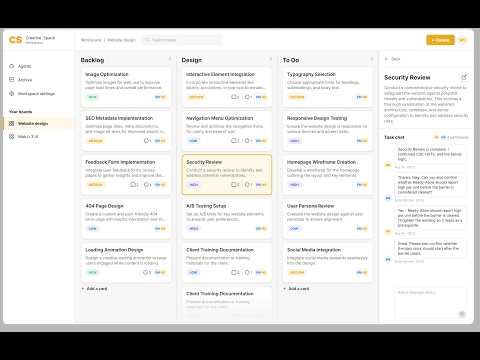
A kanban board where you and your coding agents work on a project together. An Architect plans tasks, sorts the queue and reviews the work; coders implement cards in your repository and the board commits their work. You add cards, talk to the agents in each card's chat, drag cards between columns, and the board shows who is doing what. Everything runs on your own computer and is stored in one SQLite file — no accounts, no cloud, no keys to paste. The agents run on the Claude Code or Codex CLI you already have installed, on your own subscription.
- Node.js 22.13 or newer (24 recommended) — the board uses Node's built-in SQLite.
- Claude Code installed and logged in (
npm i -g @anthropic-ai/claude-code, then runclaudeonce and log in), and/or the Codex CLI (npm i -g @openai/codex, thencodex login). The agents are those CLIs, so they run on your own Claude or ChatGPT subscription — there are no API keys to paste, and every agent run spends quota on that plan. - A project in a git repository for the agents to work in — or let the board create a new one. The board commits the coders' work for it (it never pushes and never rewrites history).
The board listens on 127.0.0.1 only, so it opens from this computer and from nowhere else.
git clone https://github.com/Kalxoznik/Creative-Space.git
cd Creative-Space
npm install
npm run up
npm run up starts the board and the agent worker together, opens
http://localhost:43123, and one Ctrl+C stops both. (On a Mac you can also double-click
Creative Space.command.)
The first launch asks for your name — that's the whole setup. You start with an Architect, a Coder and one example board, Creative Space, which tracks this tool itself (its folder is the clone you are running) with a few ideas in Backlog — drag one into Ready to watch the agents work.
For your own project, create a board (+ next to the boards in the sidebar): give it a
name and either point it at an existing project folder or let the board create a new git
repository for it under ~/CreativeSpaceProjects/ (CREATIVE_SPACE_PROJECTS_DIR moves that).
In the same dialog you set the check that runs before Review and choose which agents take
part. If the folder has no CLAUDE.md yet, the dialog offers to add a first card where the
Coder reads the project and writes one, so the agents know the stack, the structure and how
to run and check things on every run after that.
Every agent run spends quota on the plan behind your CLI. To try the loop without any
model calls, start in stub mode: CS_AGENT_MODE=stub npm run up. Stub agents answer with
canned replies and change no files, so you can watch dispatch, the queue and the chat work
before you spend anything. Cards go all the way to Review, but the agents change nothing in
your files.
npm run worker— stub mode by default; no real CLIs are called.npm run worker:live— live mode; each run spends quota on your Claude / ChatGPT plan.
Each agent's engine is set in its agent card. To use Codex, install the Codex CLI and
log in with codex login. Override the path to its binary with CS_CODEX_BIN if needed.
Agents in the sidebar is where agents are created. Each agent is a member of the
workspace with a role — Architect or Coder — and its own configuration: which CLI
runs it (Claude Code or Codex), the model, the effort level (Low / Medium / High / Max —
--effort for Claude Code, model_reasoning_effort for Codex, Max = xhigh), a turn limit,
a one-line description of what it is good for, and extra instructions appended to its role
prompt. You can have several coders — say a cheap, fast one for small UI fixes and a
high-effort one for logic — and the Architect picks between them by their descriptions.
Per board you choose which agents take part (Board details in the board's menu). The worker
picks up new and changed agents without a restart.
Backlog  →  Ready  →  In progress      →  Review  →  Done
 drafts     queue    coders, then the      you       you
                     Architect's review
- Backlog is yours. Nothing happens to a card until you move it to Ready.
- Ready is the queue, and the Architect sorts it. When a card enters Ready on a board that has an Architect, the Architect reads the whole queue and decides which coder takes which card, in what order, and what has to wait for what (a card marked after “…” stays in Ready until the work on that card is done). A card too vague to implement is sent back to Backlog with a question. On a board without an Architect, untagged Ready cards go to the board's first coder as they are.
- Coders take their cards one after another. Whenever a coder is free — nothing running, none of its cards in In progress — its top Ready card that is not waiting for anything moves to In progress by itself and its run starts. Coders on one repository never run at the same time: they share one checkout, so a second coder's run waits for the first to finish. Boards on different folders do run in parallel.
- One card at a time (on by default, Board details): while any card is in In progress or Review the queue stands still, so you see one card in work and the next one starts after you move the current one to Done. Switch it off to let Ready move on while a card waits in Review.
- Drag a card into In progress to start it right now: the agents tagged on the card wake up (an untagged card goes to the board's first coder; a card tagged with people only wakes nobody).
- A card is in In progress while anyone is working on it. When a coder reports the work done, the card does not move: the Architect reviews it right there, and the coder is free to take its next Ready card. If the coder stopped to ask a question, the card also stays in In progress and that coder waits for you.
- The Architect's verdict decides. Work left to do → it mentions the coder and the card stays in In progress. Good → it moves the card to Review, and that is your final look: no agent runs in Review, moving to Done is yours.
- Check before Review. A board can have a check command (Board details, e.g.
npm run typecheck && npm run lint). The worker runs it in the project folder when a coder hands a card to Review; if it fails, nothing is committed, the card stays in In progress with the output in its chat and the coder gets one retry. After that a human looks. - The board does the committing, not the agent: once the check passes, the worker commits
the paths that run changed — your own uncommitted work is left alone — with the subject the
coder wrote for it (
"commit"in its ACTIONS line: English, imperative, at most 72 characters, about the code rather than the task) and the task id and agent in the body. A hand-off without a usable subject falls back to the card's title. If git refuses, the card stays in In progress and the changes stay in the working tree. If the work changed no file, there is nothing to commit: the card goes on to the review anyway, with a line saying so in its chat. - You are told when something needs you — a macOS notification, and Telegram when its token
is in
.env: a card in Review, a card in Done, a card waiting for you, an agent that tagged you with a question, a failed run, a check that failed twice in a row, agents paused, a commit git refused. The card number, what happened and the card's title, then the one line the agent wrote for you about what it did or what it needs, then a link that opens the card — never the chat, the log or the diff. One per card every two minutes; Notify me in the board's details turns it off, and Detailed notifications next to it keeps the notification but drops the agent's line. - The Telegram bot answers back — reply to a notification and your text lands in that card's
chat as your own message (marked
telegramthere), so the board carries on without you opening it: no tag goes to the architect, a tag wakes whoever you name. You can also write without replying — a card number («BI-69 looks good, ship it») addresses that card, and with neither it goes to the card you were last told about. The bot says nothing about delivering it: the confirmation is the agent's own answer, which comes back into the chat as a reply to your message (BI-79 · …) — so a wrong guess at the card is visible in the answer. It writes only when something went wrong, or when nobody on that board was woken and no answer is coming. A 👍 on a notification about a card in Review moves that card to Done. Send/statusfor In progress, Review and what is waiting for you, per board. Only your chat is listened to, and nothing else the bot is sent gets an answer. - Stop in a card's panel kills the agent's run; the card stays where it is.
- @handle in any card's chat wakes that agent. Agents can talk to each other, but after six agent messages in a row the thread pauses until a human writes.
- Columns are recognised by their names (Backlog, Ready / To do, In progress, Review, Done) and can be renamed or reordered; a board without a Ready list starts nothing by itself, but after a hand-off the coder continues with the next Backlog card.
Every dispatch is one Architect run, so on a board with an Architect a card moved to Ready
costs a (short, read-only) model call before the coder's — Architect: off in Board details
runs a board without one. Agents in the sidebar shows whether the worker is running and
which CLIs it found — a missing Claude Code or Codex is reported there instead of failing
silently. Done cards can be archived from the list menu and restored from Archive in the
sidebar — a restored card lands in Done. Images pasted into a chat or a description are saved
to uploads/ and passed to the agents as file paths.
Someone else who plans or reviews a board over the API — a script, or a Claude running in your
own chat — can be added as a second human member: see docs/people.md.
A chat is not memory: what the agents know about your project has to live in files. Copy
templates/project-docs/ into the project — AGENTS.md (stack, layout, how to run and
check), docs/status.md (what works, what is broken, what is next), docs/decisions.md
(the decision log: date, decision, why, what was rejected) and
docs/features/_template.md — and a feature then runs like this:
epic card  →  docs/features/<slug>.md  →  child cards  →  you move them to Ready
                                                       →  coder ticks each item
                                                       →  epic closes when all are ticked
- Add one epic card — the goal, not the steps — and ask the Architect to split it.
- The Architect plans in a file, not in the chat. It never writes code, so the first
card it creates is the one where a coder writes
docs/features/<slug>.mdfrom the template: the goal, how it is built, the subtasks as checkboxes, the open questions. - Then it creates one card per checkbox — small, verifiable on its own, with its acceptance criteria and a line naming the feature file and the item number, so the coder reads the plan before touching the code. The epic card goes back to Backlog and waits.
- Backlog is still yours: you decide which child cards go into Ready, and in what order. Nothing starts until you move them.
- A coder reads the feature file, does its item and ticks it in the same change, adds
an entry to
docs/decisions.mdif it decided something, and updatesdocs/status.mdif the state of the project changed. The Architect checks all of that at Review. - The epic is done when every checkbox is ticked. Move it to Done yourself — and the next person to open the project, human or agent, reads the feature file instead of scrolling a chat.
browser ── /api/* ──▶ Next.js route handlers ──▶ src/server/store.ts ──▶ data/board.db (SQLite)
   ▲                                                    │
   └──────────── /api/events (SSE) ◀────────────────────┘
                                                        ▲
agents/worker.mjs ── claim / log / reply / move ────────┘
src/server/db.ts— opensdata/board.db(node:sqlite, no native deps), creates the schema, migrates older databases, seeds the first launch (an unnamed owner, an Architect and a Coder, the example board). Override the path withCS_DB_PATH.src/server/store.ts— all reads and writes plus the rules above: mention → run, column → run, Ready → dispatch, the queue with its blockers, the agent-chain guard, one run at a time per agent and one coder run at a time per repository.src/app/api/*— thin HTTP layer over the store.GET /api/eventsstreams change notifications; the UI and the worker refetch on each. The same path with?board=<key|id>&since=<id>answers instead with the board's stored event feed — what happened since that event id, for a client that cannot sit on the stream.GET /api/agentslists the agents with their configuration;POST /api/boards/:id/dispatchapplies the Architect's decision;POST /api/tasks/:id/subtaskscreates the follow-up cards an agent asked for — Backlog by default (they wake nobody), while the Architect may ask forcolumn: "ready"to send a decomposition straight into the queue, chained one after another unless it passesparallel: true. A card made that way cannot create more.POST /api/tasks/:id/needs-ownerparks a card on the owner's word (a paid call, a write to the corpus, a deploy, a question): it keeps the card where it is, shows a Needs owner badge and wakes no agent there until a human writes in its chat (orDELETEs the flag).agents/worker.mjs— reads the agents from the board, polls/api/agents/claimfor each, runs the agent through its engine's adapter, posts the reply as the agent and applies theACTIONS: {...}line from the reply (move,create,needs: "owner", orassign/order/blocked_byfor a dispatch). Heartbeats to/api/agents/heartbeatevery 5 s with the CLIs it found; polls a running run for the Stop flag; runs the board's check command before a coder's hand-off. Adapters:stub(no model),claude(claude -p; the Architect gets read-only tools, coders can edit and run git/npm/node),codex(codex exec, workspace-write for coders, read-only for the Architect). The role prompts live inagents/prompts/— edit them to change how the agents behave;dispatch.mdis what the Architect gets for the queue.
| Variable | Default | Meaning |
|---|---|---|
PORT |
43123 |
port of the board (npm run up) |
HOST |
127.0.0.1 |
address the board listens on; 0.0.0.0 exposes the board and its agents to everyone on your network |
CS_DB_PATH |
data/board.db |
SQLite file |
CS_API |
http://localhost:43123 |
board URL for the worker |
CS_AGENT_MODE |
live with npm run up, stub for npm run worker |
stub (every agent runs without a model) or live |
CS_CLAUDE_BIN / CS_CODEX_BIN |
claude / codex |
CLI binaries |
CS_CLAUDE_MODEL / CS_CODEX_MODEL |
— | model for agents that set none |
CS_CLAUDE_MAX_TURNS |
20 (Architect) / 80 (coders) | turn limit for agents that set none |
CS_RUN_TIMEOUT_MS |
20 min | kill a run after this |
CS_CHECK_TIMEOUT_MS |
10 min | kill a board's check command after this |
CS_NO_OPEN |
— | set to skip opening the browser |
CREATIVE_SPACE_PROJECTS_DIR |
~/CreativeSpaceProjects |
where New board creates a new project folder |
CS_BOARD_URL |
CS_API |
the URL notifications link to |
TELEGRAM_BOT_TOKEN / TELEGRAM_CHAT_ID |
— | both set: notifications also go to Telegram, and your replies to them come back into the cards |
The worker reads a .env next to package.json too (it is git-ignored) — that is where the
Telegram token belongs; anything already in the environment wins over the file.
Pieces separately: npm run dev (board only), npm run worker (stub agents),
npm run worker:live (real agents).
Next.js 16 (App Router, Turbopack) · React 19 · TypeScript · Tailwind CSS 4 · dnd-kit ·
node:sqlite. See CHANGELOG.md for what each release brought.
MIT — see LICENSE.