

Helicopters, planes, tanks and ground vehicles for Minecraft 26.3, 26.2, 26.1, 1.21.11, 1.21.5, 1.21.1 and 1.20.6, on Forge, NeoForge and Fabric.
MCHeli Rework is a ground-up port of MCHeli 1.0.3, a mod that stopped at Minecraft 1.7.10. Every system is rewritten for the modern game, while the original vehicle definitions, models, textures and sounds load unchanged.
Status:
1.1.0is the current release. Every helicopter, plane, tank, car and ground vehicle can be placed, crewed and driven with the original handling, all 229 weapons fire, and the scripted HUDs, fuel, the vehicle screen and all of the original's equipment are in, down to UAV stations, the drafting table and the team manager. The vehicle workshop builds new vehicles in game from a Blockbench or Blender model, with their own textures and sounds, and sends them to a server for its operators to approve. Every jar ships: Forge, NeoForge and Fabric for every version from 1.20.6 to 26.3 (see supported versions). Testers are playing these jars for the first time on this release, and fixes go into 1.1.1. See the roadmap.
Helicopters, jets and tanks of 1.0.0-alpha.3 in action, on YouTube:
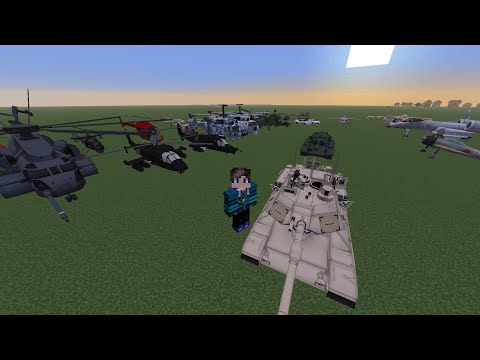
Phase 4 clips (click a picture to open the video):
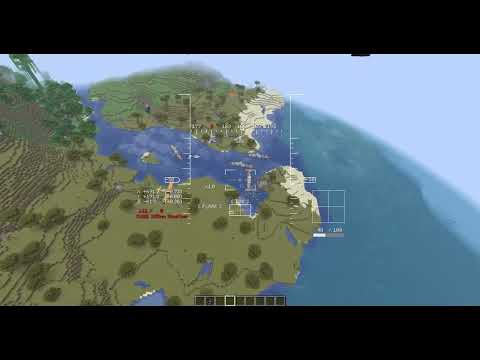 |
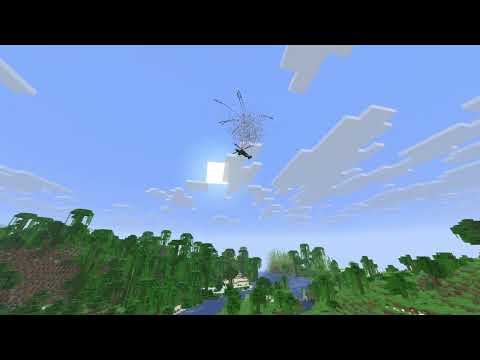 |
| AC-130 gunner mode: the autopilot circles while the pilot works the guns | S-75 lock-on: an SA-2 brings down a helicopter, which goes up in the crash fireball |
The vehicle workshop in a development build (1.1.0-beta.8): bring a model
from Blockbench or Blender, place its parts on it, tune it and fly it, then give it textures and
sounds of its own. Every earlier phase is in the screenshot gallery.
 |
 |
| A PNG per part, showing on the model straight away | An OGG for the engine, with its pitch following the throttle along a curve |
 |
 |
| Place every part by dragging it on the model | Tune how it flies; values you changed stand out from the defaults |
 |
 |
| Drop an OBJ on the window to start a vehicle | Test flight straight from the editor |
 |
 |
| Name the pack and export a zip to share | The result is an ordinary content pack |
MCHeli was created by EMB4, a Japanese mod author who first published it on the minecraftuser.jp forum. Its English home is the CurseForge project MCHeli Minecraft Helicopter Mod (project 224304), maintained by Fureniku, with more than 1.5 million downloads. The last release, 1.0.3, came out for Minecraft 1.7.10 and the project page states it will not be updated further.
All vehicle content (definitions, models, textures, sounds and HUD scripts) is EMB4's work. The mod does not ship it: on first start it converts the player's own copy of the original 1.0.3 zip to the modern resource layout. This repository holds none of it either; the unit tests import the same zip.
The rework is by JayMar921 (JnH Projects). More of their projects and plugins are at jhprojects.dev.
The original mod is published as All Rights Reserved, and its CurseForge page states that EMB4 gave redistribution permission to Fureniku only. The released jar therefore contains none of the original files: only the new Java code and the rework's own translations. Players download the original zip from the CurseForge page themselves, and the mod converts it on their machine.
This repository holds no original files either; the unit tests import the developer's own copy of the zip.
The rework's own code is under the MCHeli Rework Licence: play it anywhere, include official releases in free modpacks, read and build the source, and send pull requests. Redistributing the source, modified builds or forks, and selling the mod need written permission. Content packs you make are yours. Because the engine is a rework of EMB4's All Rights Reserved original, the code is source available rather than open source.
| Minecraft | Forge | NeoForge | Fabric | Java |
|---|---|---|---|---|
| 26.3 | 66.1.0 or newer in 66.x | 26.3.0.99 or newer | Loader 0.20 and Fabric API | 25 |
| 26.2 | 65.1.5 or newer in 65.x | 26.2.0.93 or newer | Loader 0.20 and Fabric API | 25 |
| 26.1 | 62.0.9 or newer in 62.x | 26.1.2.126 or newer | Loader 0.20 and Fabric API | 25 |
| 1.21.11 | 61.2.4 or newer in 61.x | 21.11.48 or newer | Loader 0.16 and Fabric API | 21 |
| 1.21.5 | 55.1.18 or newer in 55.x | 21.5.101 or newer | Loader 0.16 and Fabric API | 21 |
| 1.21.1 | 52.1.0 or newer | 21.1.200 or newer | Loader 0.16 and Fabric API | 21 |
| 1.20.6 | 50.2.14 or newer in 50.x | 20.6.144 or newer | Loader 0.16 and Fabric API | 21 |
The launcher bundles the right Java for each version.
-
Install Forge, NeoForge or Fabric for Minecraft 26.3, 26.2, 26.1, 1.21.11, 1.21.5, 1.21.1 or 1.20.6. On Fabric, also install Fabric API.
-
Download the jar for your loader from the releases:
mcheli-<loader>-<minecraft>-<version>.jar, such asmcheli-fabric-1.21.1-<version>.jar. -
Drop it into the
modsfolder of that profile. -
Download
MC1.7.10_mcheli_1.0.3.zipfrom the MCHeli CurseForge page and put it, still zipped, into a folder calledmchelinext tomods(create it if needed):<game directory>/ mods/mcheli-<loader>-<minecraft>-<version>.jar mcheli/MC1.7.10_mcheli_1.0.3.zip
On the next start the mod converts the zip into mcheli/imported, which takes a few seconds once.
That folder is loaded as a resource pack and a data pack (listed as "MCHeli Content") and can't
be switched off. The zip can be deleted afterwards. Dedicated servers need the zip in the same
place. Without it the game still starts, but there are no vehicles, and the chat says where the
zip goes.
Use a separate game directory for each loader and version. Mods built for other loaders or older
versions in a shared mods folder will stop the game from starting. Worlds and the mcheli
folder can move between loaders on the same Minecraft version: the imported content, content packs
and configs are the same files on all three. Do not open a world in an older Minecraft version than
the one that last saved it.
Take a vehicle from one of the MCHeli creative tabs, right-click a block to place it and right-click the vehicle to board; in survival, craft it with the original's recipe. W and S work the throttle, the mouse flies or aims, right mouse fires and Shift gets out. Every key can be rebound under Controls, category MCHeli.
The full controls for each kind of vehicle, fuel and repairs, the equipment (parachute, smoke grenades, GLTD, rangefinder, Stinger and Javelin, container, UAV station, drafting table, tow chain), troops, the team manager and the commands and server settings are in docs/PLAYING.md.
Content packs add vehicles and weapons: drop a pack (a zip or a folder) into
<game dir>/mcheli/packs. On a server only the server needs it; players download the server's
packs automatically when they join. examples/rework-example-pack
adds a small helicopter, the Rework Scout. To make your own, use the
workshop in game, or write one by hand with
docs/content/packs.md.
- Playing: controls, equipment, commands and server settings
- Screenshots: every phase in pictures
- Changelog
- Roadmap: what each phase delivered, and what is planned for 1.1.0
- Architecture: how the mod is put together
- Development: building, running, testing and releasing
- In-game test plan
- Content authoring: the workshop, content packs, modeling in Blockbench or Blender, vehicles, weapons, HUD scripts
- Contributing: rules for pull requests and bug reports
./gradlew build
The jars, one per loader and Minecraft version, end up in build/release. Java 25 is required;
Gradle downloads one automatically if it is not installed. ./gradlew :<loader>-26.3:runClient
and :<loader>-26.3:runServer (forge, neoforge or fabric) import the content from
Mod/MC1.7.10_mcheli_1.0.3.zip, which you have to download yourself. See
DEVELOPMENT.md for details.