


Keeping dependencies up-to-date is an important aspect of software maintenance. Update-time is a command line tool that scans your repository for dependencies and updates them to their latest versions. Where possible, it adds a hash pin to references. To protect against supply-chain attacks, it applies a cooldown period. And it warns you about stale dependencies and yanked versions.
Update-time rewrites the files in place and logs what it did:
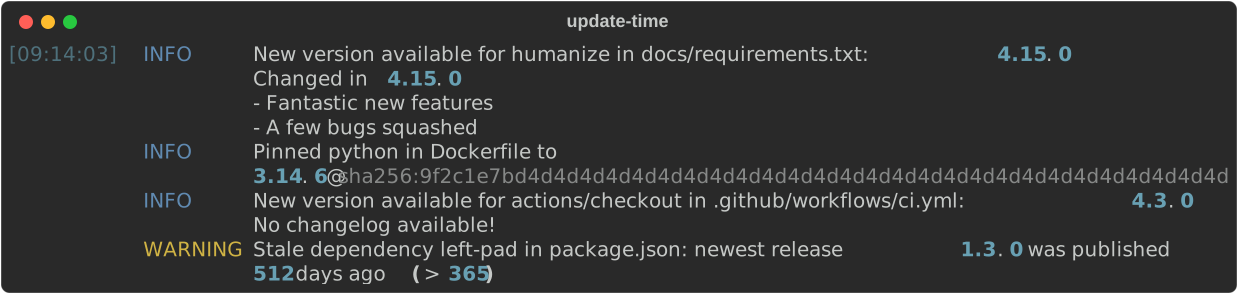
The same output as text
[09:14:03] INFO     New version available for humanize in docs/requirements.txt:12: 4.15.0
                    Changed in 4.15.0
                    - Fantastic new features
                    - A few bugs squashed
           INFO     Pinned python in Dockerfile:1 to
                    3.14.6@sha256:9f2c1e7bd4d4d4d4d4d4d4d4d4d4d4d4d4d4d4d4d4d4d4d4d4d4d4d4d4d4d4d4
           INFO     New version available for actions/checkout in .github/workflows/ci.yml:17: 4.3.0
                    No changelog available!
           WARNING  Stale dependency left-pad in package.json: newest release 1.3.0 was published
512 days ago (> 365)- ⚡ Usage
- 📦 What is updated
- 📌 Pinning
- ⏳ Cooldown
⚠️ Stale dependencies- 🚫 Yanked dependencies
- 🎛️ Controlling updates per reference
- 📖 Details per dependency type
- 📮 Point of contact
Run Update-time without installing it using uvx:
uvx update-timeOr install it as a uv tool so it's always available on your PATH:
uv tool install update-time
update-time
Running update-time -h shows the full command-line interface
$ update-time -h
usage: update-time [-h] [-V] [--cooldown DAYS] [--stale-after DAYS]
                   [--exclude-path PATHS] [--allow-hash-drift] [--force]
                   [--log-level {DEBUG,INFO,WARNING,ERROR}]
                   [PATH]

Scan the PATH for pinned dependencies and update them to their latest
versions, rewriting the pinned versions in place. Looks at pyproject.toml,
requirements.txt, Python PEP 723 inline script metadata, .python-version
files, package.json, Dockerfiles, GitHub Actions workflows, pre-commit
configs, CircleCI configs, GitLab CI configs, Docker Compose and Helm
manifests, devcontainer configs, and jsDelivr URLs. A cooldown period holds
back releases that are too fresh to trust.

positional arguments:
  PATH                  the directory to scan recursively for dependencies to
                        update; paths in the log are reported relative to it
                        (default: the current directory)

options:
  -h, --help            show this help message and exit
  -V, --version         show program's version number and exit
  --cooldown DAYS       number of days to hold back newly published Docker
                        image, GitHub Action, pre-commit hook,
                        requirements.txt, npm, pnpm, pyproject.toml, Python
                        inline script metadata, .python-version, and jsDelivr
                        versions, except for references that set a cooldown of
                        their own with an # update-time: ignore[cooldown<DAYS]
                        marker (default: 7)
  --stale-after DAYS    warn when a dependency's newest release is older than
                        this many days; 0 disables the check, except for
                        references that set a threshold of their own with an #
                        update-time: ignore[stale<DAYS] marker (default: 365)
  --exclude-path PATHS  comma-separated list of directories, relative to the
                        scan root, to exclude from the scan, for example
                        vendor,packages/legacy. Every file under an excluded
                        directory is skipped, on top of the always-ignored
                        build, node_modules, __pycache__, and hidden folders.
                        Directories are matched by relative path, not by name:
                        --exclude-path vendor excludes vendor/ at the root but
                        not sub/vendor/. Directories that don't exist are
                        ignored and logged at log-level WARNING. Absolute
                        paths, or paths that escape the scan root (../…), are
                        rejected. Run with --log-level DEBUG to see excluded
                        directories
  --allow-hash-drift    when an already-pinned image tag has been re-pushed,
                        or a pinned version tag has been moved to another
                        commit, adopt the new digest or commit instead of only
                        warning; equivalent to marking every reference with #
                        update-time: allow[hash-drift] (an # update-time:
                        ignore marker still wins)
  --force               run even when not inside a git repository (changes are
                        made in place and cannot be reverted)
  --log-level {DEBUG,INFO,WARNING,ERROR}
                        the minimum severity of messages to log; available new
                        versions are logged at INFO (default: INFO)

Update-time exits with status 0 when it ran successfully, 1 when an error
prevented it from finishing, and 2 when any command-line argument was invalid,
including a PATH that is not inside a git repository (unless --force is
passed). Exit status does not indicate whether anything was updated. Inspect
the diff or the INFO-level log for that.
Update-time logs at four levels. --log-level sets the lowest one shown, which by default is INFO:
| Level | What is logged | |
|---|---|---|
| 🔍 | DEBUG |
What Update-time is doing: each file it checks, each marker it recognises, and everything those markers held back |
| ℹ️ | INFO |
What Update-time changed: a version updated, a hash pinned |
WARNING |
What needs your attention: a stale or yanked dependency, hash drift, a source it could not reach, a marker that is invalid, incorrect, or redundant | |
| ❌ | ERROR |
Failures that stop an update, such as a package manager that is not installed |
The recommended workflow is to run Update-time on a dedicated branch, push it, and let CI do the verification:
- Create a branch for the updates.
- Run
update-timein the root of your repository to update the dependencies in place. - Commit the changes and open a pull request.
- Let your tests and checks run in CI to confirm nothing is broken before merging.
Because Update-time rewrites files in place, it expects to make updates inside a git repository, allowing for changes to be reverted. Update-time refuses to run when the directory to scan is not inside a git repository; printing an error and exiting with a non-zero status without touching any files. Pass --force to override.
Note that being inside a repository only guarantees revertability relative to the last commit. Update-time does not check for uncommitted edits before running.
To raise API rate limits while updating, set the following environment variables before running Update-time:
GITHUB_TOKEN— increases the GitHub API rate limit when updating GitHub Actions. The token only needs to read public release and commit data, so no specific scope is required: both a classic token with no scopes selected and a fine-grained token with default read-only access to public repositories work.DOCKER_HUB_USERNAMEandDOCKER_HUB_TOKEN— authenticate to the Docker Hub API (both must be set) to increase its rate limit when updating Docker images.
Update-time updates the following types of dependencies, found in the listed files, and using the listed sources:
| Dependency type | Files | Source |
|---|---|---|
| Python dependencies | pyproject.toml, requirements.txt, and PEP 723 inline script metadata (# /// script blocks in *.py files) |
PyPI |
| npm and pnpm dependencies | package.json (and their lock files) |
npm registry |
| Node engine version | package.json |
the Node base image in the project's Dockerfile, or the latest Node release on Docker Hub |
| Python version | .python-version |
the Python base image in the project's Dockerfile, or the latest Python release on Docker Hub |
| Docker images | Dockerfiles, CircleCI configs, .gitlab-ci.yml, Docker Compose files, Helm charts, and devcontainer configs |
OCI registries (Docker Hub, ghcr.io, mcr.microsoft.com, …) |
| GitHub Actions | YAML files under .github/ |
GitHub API |
| Pre-commit hooks | .pre-commit-config.yaml |
GitHub API |
| jsDelivr npm URLs | Sphinx config | npm registry |
Each type links to its own section under Details per dependency type, which covers the files and dependencies it updates, and how pinning, the cooldown, staleness, yanks, and markers apply to it.
Pinning means specifying exactly what a reference should resolve to, rather than leaving that to whatever its source serves at the time. Two things can be pinned: the version a reference resolves to, and the artefact that the version resolves to.
A version pin names an exact version instead of something that floats: python:3.14 instead of python:latest, humanize==4.15.0 instead of humanize>=4. That is what Update-time scans for and updates.
A hash pin adds a cryptographic hash of the artefact the version resolves to — an image digest, a commit SHA, or an integrity hash. The difference with a version pin is immutability: a version pin can be re-pointed under you, because a tag can be moved or re-pushed, while a hash pin can only match the one thing it was computed from. That is what protects against a supply-chain attack, and Update-time strives to add a hash pin where possible.
Update-time works on both version pins and hash pins: it moves a version pin forward, taking the most precise spelling the source has for the version it lands on, and adds a hash pin to any reference that can hold one.
When a version pin is updated, and the source offers a more precise new version, that version is chosen. For example, when python:3.12 is updated and both python:3.13 and python:3.13.0 are available, python:3.13.0 is applied. Every kind of version pin gains precision this way: a .python-version entry of 3.12 becomes 3.13.2, and actions/checkout@v4 moves to the exact version that tag resolves to.
However, more precision is not guaranteed: if a newer version is less precise, it is still applied. For example, if python:3.12.1 is the current version pin and python:3.13 is available, but no python:3.13.0, the version pin moves to python:3.13.
Precision is only gained by updating, so a more precise spelling of the version a pin already names is left alone: python:3.12 stays as it is when the newest matching tag is 3.12.0, and so does humanize==4.15 as long as 4.15.0 is the latest release.
What Update-time adds depends on what the reference can hold:
| Dependency type | What Update-time adds |
|---|---|
| Python dependencies | nothing: a pin names a version, and the hashes live in uv's lock file |
| npm and pnpm dependencies | nothing: the integrity hashes live in the package manager's lock file |
| Node engine version | nothing: it names a Node version, not an artefact that could be hashed |
| Python version | nothing: it names a Python version, not an artefact that could be hashed |
| Docker images | the @sha256:digest of the tag, appended to the reference |
| GitHub Actions | the commit SHA of the version, with the version in a trailing comment |
| Pre-commit hooks | the commit SHA of the version, with the version in a # frozen: comment |
| jsDelivr npm URLs | the SRI integrity hash of the file the URL points at |
Each type's own section explains which of its references can carry one.
Sometimes a reference already carries a hash pin and only what it points at has changed. Update-time warns about that and leaves the pin unchanged, so a changed target is never silently adopted (which would defeat the immutability a pin exists to provide). It takes three forms, one per kind of hash pin:
WARNING Digest drift for python:3.14 in Dockerfile:1: pinned to sha256:… but the registry now serves sha256:…; the pin was left unchanged, verify the change is expected before updating the pin
WARNING Tag drift for actions/checkout@4.1.1 in .github/workflows/ci.yml:17: pinned to commit … but the tag now points at …; the pin was left unchanged, verify the tag was moved deliberately before updating the pin
WARNING Integrity hash mismatch for clipboard@2.0.11 in docs/conf.py:4: declares sha256-… but jsDelivr serves sha256-…; the hash was left unchanged, and since npm does not republish a version it is probably the declared hash that is wrong
Digest drift means an image tag was re-pushed (rebuilt) under the same name and version, so the registry now serves a different digest.
Tag drift means the version tag of a GitHub Action or pre-commit hook was moved onto another commit than the one the reference pins — a git tag is mutable, so whoever controls the repository can move v4.1.1. This is what pinning to a commit SHA exists to catch: the pin keeps the run on the commit it was pinned to whatever the tag does, which is the point, but without the warning nothing tells you that tag and pin have parted company.
An integrity hash mismatch means the hash a jsDelivr URL declares is not the one jsDelivr serves for the version the URL sits on. Unlike the other two this rarely means anything upstream changed, since npm does not allow a published version to be republished; the declared hash is more likely wrong — mistyped, copied from another file, or tampered with. It is also the most urgent, because the browser silently refuses to load the script until the hash matches, which no build step catches. Checking it costs one extra request per up-to-date URL that declares a hash.
A reference with no image digest, commit SHA, or integrity hash has nothing that can drift, so a requirements.txt pin, a .python-version entry, and the Node engine version are not checked; nor are the dependencies Update-time updates through uv, npm, and pnpm.
To adopt the new value instead, opt the reference in with a marker (see Controlling updates per reference): an image reference then adopts the re-pushed digest, and a GitHub Action or pre-commit hook adopts the commit its tag was moved to. Alternatively, pass --allow-hash-drift to opt every reference in the scan in at once. Adopted drift is logged at INFO, like any other change. A marker that holds the reference back wins over both, so a reference you deliberately froze is never re-pinned.
An integrity hash mismatch is never adopted, whatever you opt in to: the whole point of the hash is to refuse content that doesn't match it, so Update-time reports it and leaves correcting it to you.
To avoid adopting releases that are too fresh to trust, Update-time honours a cooldown period during which newly published versions are not yet picked up. It defaults to 7 days and can be changed with the --cooldown option, for example update-time --cooldown 14. A single reference can carry a cooldown of its own, which wins over whatever --cooldown says (see Controlling updates per reference). Who applies it depends on the dependency type:
| Dependency type | Applied by | Measured against |
|---|---|---|
| Python dependencies | Update-time for requirements.txt, uv for the rest |
the release's publication date on PyPI |
| npm and pnpm dependencies | npm and pnpm | the release's age on the npm registry |
| Node engine version | Update-time, or already applied via the Dockerfile | the Node image tag's push date |
| Python version | Update-time, or already applied via the Dockerfile | the Python image tag's push date |
| Docker images | Update-time, on Docker Hub only | the image tag's push date |
| GitHub Actions | Update-time | the release's publication date, or the tagged commit's date |
| Pre-commit hooks | Update-time | the release's publication date, or the tagged commit's date |
| jsDelivr npm URLs | Update-time | the release's publication date on the npm registry |
Where Update-time applies the cooldown itself, it holds back every version published inside the window.
Where a package manager applies it, Update-time hands the value to uv, npm, or pnpm, each of which takes it per run rather than per dependency, and each of which leaves a cooldown your project already configures in place. What that means per type is described under Python dependencies and npm and pnpm dependencies.
Keeping a pin on the latest version doesn't help if that latest version is itself years old: the project may have been abandoned or superseded. Alongside updating, Update-time warns when a dependency's newest release is older than a threshold, so you can decide whether to keep it, replace it, or vendor it. The threshold defaults to 365 days and is set with --stale-after DAYS; pass --stale-after 0 to disable the check. A single reference can carry a threshold of its own, which wins over whatever --stale-after says (see Controlling updates per reference). The warning is informational only: it never changes a file and never affects the exit status. For example, a pin whose newest release came out well over a year ago is reported as:
WARNING Stale dependency humanize in docs/requirements.txt: newest release 4.15.0 was published 512 days ago (> 365)The date compared against the threshold is the publication date of the dependency's newest release. This way a project that has just published a release is never reported as stale, not even when that release is still within the cooldown window. A reference can also be left out of the check altogether by a marker, which is a separate choice from holding back its updates (see Controlling updates per reference).
Every kind of dependency Update-time updates is checked for staleness, against the date its own source reports:
| Dependency type | Measured against |
|---|---|
| Python dependencies | the newest release of the package on PyPI |
| npm and pnpm dependencies | the newest release on the npm registry, for the dependencies that resolve to one |
| Node engine version | the base image it follows, or the Node image tag's push date when it follows Docker Hub |
| Python version | the base image it follows, or the Python image tag's push date when it follows Docker Hub |
| Docker images | the tag's push date, and on Docker Hub only, since other registries expose no publication date |
| GitHub Actions | the newest version's release date, or its tagged commit's date |
| Pre-commit hooks | the newest version's release date, or its tagged commit's date |
| jsDelivr npm URLs | the newest release of the package on the npm registry |
A yank means "stop using this": a release the maintainer withdrew because it was broken, botched, or insecure. An exact pin keeps installing a yanked release anyway — pip and uv honour it by design — so Update-time warns when the version a dependency is pinned to has been yanked. Like the staleness warning, it is informational only: it never changes a file and never affects the exit status. The maintainer's reason is included when they gave one:
WARNING Yanked dependency humanize in docs/requirements.txt:12: version 4.15.0 was yanked ("accidentally broke Python 3.10 support")When no reason was given, the message reports (reason not specified) instead.
The warning is only given when the run leaves the reference on the yanked version, because the replacement is still within the cooldown, a marker holds it back, or the yanked release is the newest one and there is nothing to move to. When the run updates away from the yanked version, the warning would be noise and is not given. A yank is never a reason to adopt a release that is too fresh to trust: the cooldown still applies, so Update-time warns and leaves the decision to update to you. A reference can also be left out of the check altogether by a marker (see Controlling updates per reference).
Which dependencies are checked follows from where a yank can be observed. PyPI reports one as PEP 592 yank metadata. On npm there is no yank, but a per-version deprecation is the same signal, and is reported in the same wording as one. Where a withdrawal can be observed, that version is skipped when picking a new one, and a reference left on it is warned about:
| Dependency type | Yank check |
|---|---|
| Python dependencies | requirements.txt pins, against PyPI's yank metadata; uv handles the other two file kinds |
| npm and pnpm dependencies | none: npm and pnpm handle deprecated versions themselves |
| Node engine version | none: its source has no yank concept |
| Python version | none: its source has no yank concept |
| Docker images | none: its source has no yank concept |
| GitHub Actions | none: its source has no yank concept |
| Pre-commit hooks | none: its source has no yank concept |
| jsDelivr npm URLs | against the npm registry's deprecation of the pinned version |
Comments of the form # update-time: <directive> let you steer what happens to an individual reference — most often to hold it back, but also to bound how far it may move, or to opt it into behaviour that is off by default. To stop Update-time from changing a specific reference, add an # update-time: ignore comment (all lower-case). You might do this because of a known incompatibility, a deferred migration, or to keep something reproducible. The reference is then left untouched and no registry or source is queried for it. You can add a reason after the marker, for example # update-time: ignore (pinned until the 3.13 migration).
By default the marker holds a reference back from version updates, the staleness check, and the yank check. Add a bracketed scope to narrow it to just one:
| Marker | Version update | Staleness warning | Yank warning |
|---|---|---|---|
# update-time: ignore |
held back | held back | held back |
# update-time: ignore[update] |
held back | still checked | still checked |
# update-time: ignore[stale] |
applied | held back | still checked |
# update-time: ignore[yanked] |
applied | still checked | held back |
So # update-time: ignore[update] keeps a deliberately pinned reference frozen while still telling you when the project behind it has gone quiet or its version was withdrawn, # update-time: ignore[stale] silences a staleness warning you've acknowledged without freezing the version, and # update-time: ignore[yanked] does the same for a yank you have decided to live with. A reason can still follow the scope, for example # update-time: ignore[update] (pinned until the 3.13 migration).
A yank can only be observed where the dependency's source reports one, so of the references that accept a marker, ignore[yanked] has something to hold back on a requirements.txt pin and on a jsDelivr URL (see Yanked dependencies). On a Docker image, a GitHub Action, a pre-commit hook, or a .python-version entry the scope can never suppress anything, so Update-time logs it as redundant at WARNING:
WARNING Redundant update-time marker ignore[yanked] for python in Dockerfile:2: this dependency's source has no yank concept, so the marker holds nothing backA scope Update-time does not recognise — a mistyped ignore[stlae], say — is logged at WARNING as an invalid item:
WARNING Invalid 'stlae' in the update-time marker for python in Dockerfile:2; leaving the reference unchangedThe reference is left as it is, because an item Update-time cannot read may have been meant to bound or silence anything, so acting on the rest of the marker would be guessing. Once the marker is corrected, the reference is updated as usual.
ignore[stale] silences the staleness warning altogether. To keep the warning but on a different schedule, give the scope a number of days: # update-time: ignore[stale<90] warns once that reference's newest release is more than 90 days old, and is a per-reference --stale-after 90. Use it for a critical dependency you want to hear about early, or for a low-churn library that shouldn't be flagged for years:
humanize==4.15.0 # update-time: ignore[stale<90] (critical, warn early)
# update-time: ignore[stale<1095]
FROM python:3.12
The threshold applies to the reference carrying it, and every other reference in the scan keeps the global one. It wins over --stale-after whatever that is set to, --stale-after 0 included: no command-line option overrides a marker, so disabling the check globally still leaves a reference with its own threshold checked. To disable the check for one reference, ignore[stale<0] does what --stale-after 0 does globally, and ignore[stale] is the plainer way to spell it.
allow and ignore are complements here as elsewhere, so allow[stale>=90] sets the same 90-day threshold as ignore[stale<90]. Inverting the operator would warn while a release is fresh and go quiet once it is old, so neither allow[stale<90] nor ignore[stale>=90] sets a threshold. Update-time logs an inverted comparison at WARNING and holds nothing back, so the reference updates as usual and the global threshold applies to it:
WARNING Incorrect 'stale>=90' in the update-time marker for python in Dockerfile:2: this comparison warns while a release is fresh and goes quiet once it is old, so it sets no thresholdA day count must be a whole number of days, whichever way the comparison runs, so ignore[stale<-5] and ignore[stale>=1.5] are reported as invalid and leave the reference unchanged. An unreadable count is judged before the direction, so ignore[stale>=1.5] is reported as an unreadable count rather than as an inverted comparison. Where a reference carries both a threshold and a bare ignore[stale], the ignore[stale] wins and the warning is suppressed whatever the threshold says. Use a single threshold per reference; pairing one with another, say an ignore[stale<90] with an allow[stale>=30], is undefined.
The cooldown holds back releases that are too fresh to trust. To put one reference on a different window from the rest, give a cooldown scope a number of days: # update-time: ignore[cooldown<30] drops update candidates published less than 30 days ago, and is a per-reference --cooldown 30. Use it for a dependency you have been burned by, or one you trust enough to adopt sooner than the rest:
some-flaky-lib==2.1.0 # update-time: ignore[cooldown<30] (burned by 2.0.0)
# update-time: ignore[cooldown<30]
FROM python:3.12
The cooldown applies to the reference carrying it, and every other reference in the scan keeps the global one. It wins over --cooldown whatever that is set to. allow and ignore are complements here as elsewhere, so allow[cooldown>=30] sets the same 30-day window as ignore[cooldown<30]. To adopt new releases for one reference as soon as they ship, write allow[cooldown>=0] or ignore[cooldown<0]: a zero-day window holds nothing back, which is what --cooldown 0 means globally.
Inverting the operator would adopt a release only while it is fresh and hold it back once it is old, so neither allow[cooldown<30] nor ignore[cooldown>=30] sets a cooldown. Update-time logs an inverted comparison at WARNING and holds nothing back, so the reference updates as usual and the global cooldown applies to it:
WARNING Incorrect 'cooldown>=30' in the update-time marker for python in Dockerfile:2: this comparison adopts a release only while it is fresh and holds it back once it is old, so it sets no cooldownA bare ignore[cooldown] can be understood in two ways: adopt at once, or never adopt at all. Rather than guess, Update-time reports it as invalid and leaves the reference unchanged. allow[cooldown] is reported the same way. Write allow[cooldown>=0] to adopt at once, and ignore[update] to freeze the reference. A day count must be a whole number of days, so ignore[cooldown<-5] and ignore[cooldown<1.5] are reported as invalid too. Use a single cooldown directive per reference; pairing one with another is undefined.
The override reaches the dependencies whose cooldown Update-time enforces itself. It does nothing for the dependencies handed to uv, npm, or pnpm, which take a cooldown per run rather than per dependency (see Cooldown), nor for a .python-version entry or Node engine version derived from the project's Dockerfile, whose cooldown was already applied when the image was updated. It does nothing for an image outside Docker Hub either, since no cooldown applies there at all: the registry exposes no publication date to measure one against.
One further marker does the opposite of holding a reference back. # update-time: allow[hash-drift] opts an already-pinned reference into adopting what it now points at, so a re-pushed image tag's new digest, or the commit a moved version tag points at, is pinned instead of only warned about (see Hash drift). It follows the same placement rules as the other markers, and the global --allow-hash-drift flag applies it to every reference at once. Where an ignore (or ignore[update]) marker also applies, that wins and the reference is left untouched.
ignore[update] freezes a reference at its current version. Sometimes you want the middle ground: keep receiving updates within a range while blocking a jump you're not ready for — for example, keep getting python:3.12 patch releases but hold off on 3.13 until you've migrated. Add a PEP 440 version specifier directly after update inside the brackets, either to allow or ignore updates: # update-time: allow[update<specifier>] keeps only the updates whose version satisfies the specifier, and # update-time: ignore[update<specifier>] drops the updates whose version satisfies it (the plain ignore[update] is the drop-everything case).
For example, allow[update<3.13] keeps a python base image on its newest 3.12 release and never crosses into 3.13:
# update-time: allow[update<3.13]
FROM python:3.12.1-bookworm-slim
The same works inline, for image and action references — here allow[update==7.*] keeps Redis on its 7.x line and ignore[update>=5] keeps checkout below v5:
image: redis:7.2  # update-time: allow[update==7.*]
uses: actions/checkout@v4  # update-time: ignore[update>=5]
Update-time filters the candidate versions before the highest is picked, so a bounded reference still advances as far as the bound allows: when on 3.12.8, allow[update<3.13] still adopts a freshly published 3.12.9, it just never crosses into 3.13.
allow and ignore are complements, which matters for ranges. For a one-sided bound the two are interchangeable — allow[update<3.13] and ignore[update>=3.13] express the same ceiling. For a range they are opposites: with versions 3.13 through 3.16 available, allow[update>=3.13,<3.15] keeps the reference within [3.13, 3.15) and picks 3.14, whereas ignore[update>=3.13,<3.15] excludes that range and skips ahead to 3.16.
Choose the operator deliberately. To keep 3.12 together with its patch releases while blocking 3.13, use <3.13, ==3.12.*, or ~=3.12.0. Don't use <=3.12 if you want to stay on 3.12: since 3.12.1 > 3.12 in PEP 440, it also blocks 3.12.1, which is rarely what "stay on 3.12" means.
A bound with a specifier names the version it must not reach, so it goes stale: after migrating to 3.13, an allow[update<3.13] blocks every update (Update-time warns about it) until the comment is rewritten. To express the policy ("no major jumps") rather than the fence ("not past 3.13"), bound the update by its level instead: # update-time: ignore[major-update] or ignore[minor-update], or their complements allow[minor-update] and allow[patch-update]. An update's level is the most significant version component it changes relative to the currently pinned version: a major update changes the first component, a minor update the second, and a patch update the third. A component the current version doesn't have counts as zero, so node:22 followed by 23 is a major update, and 22 followed by 22.1 a minor one. ignore holds back updates of the named level or more significant, allow keeps updates of the named level or less significant — "block minor but allow major" is never meaningful — which makes the two verbs exact complements, just like specifier bounds:
| Directive | Effect | Complement |
|---|---|---|
ignore[major-update] |
minor and patch updates only | allow[minor-update] |
ignore[minor-update] |
patch updates only | allow[patch-update] |
Pick whichever verb reads best in context. Unlike a specifier bound, a level-based bound is anchored to the currently pinned version on every run, so it ratchets along as the reference advances: ignore[minor-update] on python:3.12.1 blocks 3.13 today and, once you migrate the pin to 3.13, blocks 3.14 — the comment never needs editing:
# update-time: ignore[minor-update]
FROM python:3.12.1-bookworm-slim
The levels are positional, not semantic: they refer to the component's position in the version, not to the project's compatibility promises. Projects may ship breaking changes in releases that bump the second component, so "stay on Python 3.12" is ignore[minor-update] despite Python 3.13 shipping breaking changes (it removed 19 legacy modules from the standard library). The same caution applies to projects using calendar versioning. And as with specifier bounds, the level applies to a Docker tag's main version; a version embedded in the suffix (the 3.23 in alpine3.23) is unaffected by the bound.
A few rules govern how a bound — with a specifier or level-based — interacts with the other markers and checks:
- A bare
# update-time: ignore(or# update-time: ignore[update]with no specifier) holds back all updates and wins over any bound on the same reference. - Use a single bound per reference; pairing two bounds, say an
allow[update<specifier>]with anignore[update<specifier>], or a specifier bound with a level-based one, on one reference is undefined. - A bound narrows updates only, not staleness. Staleness is always measured against the project's newest overall release; the bound doesn't come into play.
- The hash pin is still added or refreshed for whichever version the bound selects, exactly as without a bound.
- To combine a bound with another directive of the same verb (say,
allow[hash-drift]), list both as comma-separated items in one bracket:# update-time: allow[update<3.13, hash-drift]or# update-time: allow[minor-update, hash-drift]. To combine directives of different verbs, list them after the# update-time:prefix, separated by a space:# update-time: ignore[stale] allow[update<3.13]. A reason can still follow the last directive.
Update-time logs a redundant bound at WARNING. That may happen in two ways:
- Either the bound never has an effect, so removing it would change nothing: the current version and every version above it satisfy the bound, for example
allow[update>=3.12]on a3.12pin, orallow[major-update]on any pin (it allows every update, so it says nothing). - Or the bound blocks every update, so it is just a frozen
ignore[update]in disguise (use that instead if the freeze is intended): no version above the current one satisfies the bound, for exampleignore[update>=3.12]on a3.12pin, orignore[patch-update]on any pin.
Any of these markers can be placed two ways:
-
Inline, on the reference's own line (in YAML files,
requirements.txt,devcontainer.json,.python-version, and Sphinxconf.pyfiles):image: python:3.12 # update-time: ignore
humanize==4.15.0 # update-time: ignore"https://cdn.jsdelivr.net/npm/clipboard@2.0.11/dist/clipboard.min.js", # update-time: ignore
-
On the line directly above the reference. Use this form in Dockerfiles, which don't allow inline comments:
# update-time: ignore
FROM ghcr.io/astral-sh/uv:python3.12-bookworm-slim
This works for every reference Update-time rewrites line by line: Dockerfiles, Docker Compose and Helm manifests, CircleCI and GitLab CI configs, GitHub Actions workflows, .pre-commit-config.yaml files, devcontainer.json files, requirements.txt files, .python-version files, and the jsDelivr URLs in a Sphinx conf.py. Use a # comment everywhere except devcontainer.json (which is JSONC), where the marker goes in a // comment. An inline marker pins only its own line, so it never accidentally pins the reference on the line below it. Where one placement is safer than the other, the details per dependency type say so.
A dependency updated through uv, npm, or pnpm takes no marker, because those updates don't go line by line. Opt one out with a version specifier instead, as described under Python dependencies and npm and pnpm dependencies.
Run with --log-level DEBUG to confirm a marker is recognised: every recognised marker is logged, and so is every update or warning it holds back, each on a line of its own. A marker Update-time recognised is reported as:
DEBUG Recognised update-time marker ignore[stale] for python in Dockerfile:2A recognised line means the marker was read and understood. Whatever the marker held back is logged too:
DEBUG Ignoring the staleness warning for python in Dockerfile:2 (update-time: ignore[stale])A hold-back line means the marker actually suppressed something: an ignore[yanked] on a version that was never yanked produces none. A missing hold-back line therefore tells you the marker did nothing this run. Since the marker is case-sensitive, a typo (or wrong case) in the # update-time: prefix or in a verb produces no Recognised line at all, and the reference is updated as usual. A typo inside the brackets produces no Recognised line either, but is logged at WARNING as an invalid item (see Holding a reference back).
For each dependency type, this chapter answers the same eight questions: what files, dependencies, and versions are updated, how pinning, cooldown, and stale and yanked dependencies are handled, and how markers can be placed. Two sections cover a pair of types that behave alike, which is why the eight types have six sections.
Python files containing requirements are discovered by name, case-sensitively: pyproject.toml, requirements.txt, requirements-<purpose>.txt and <purpose>-requirements.txt (e.g. requirements-dev.txt and dev-requirements.txt), and any .txt file in a requirements/ directory. Unrelated files such as constraints.txt or requirements.in are not touched.
In addition, any *.py file that carries a PEP 723 inline script metadata block is updated: a # /// script … # /// comment block that declares the standalone script's dependencies. *.py files without such a block are left untouched and never invoke uv.
Compiled or hash-pinned requirements files, such as a requirements.txt generated by pip-tools or uv pip compile are skipped entirely, because bumping a single pin without recompiling its transitive dependencies and hashes would corrupt the file. Regenerate these with your package manager instead. Update-time recognises compiled or hash-pinned files by their contents (an autogenerated header or --hash= lines) or by the existence of a sibling .in file.
Update-time cannot update individual git, VCS, and URL dependencies (e.g. git+https://github.com/org/repo.git@v8.0.3.0, direct URLs, and -e/editable installs) in both requirements.txt and pyproject.toml files. Update them manually.
In a PEP 723 inline script metadata block, only the pins in the dependencies array are updated; the requires-python value and any other inline-metadata fields are left untouched.
Only versions specified with an exact match are updated, i.e. dependency versions pinned with ==. Looser version specifiers are left untouched, so you can pin a maximum version to opt a dependency out of automatic updates.
Update-time adds no hash pin to a Python dependency. A requirements.txt pin carries one as a --hash= line, which has to hold for the file's transitive dependencies too, so a file that already has them is skipped entirely rather than partly rewritten. Dependencies in pyproject.toml are updated through uv, which records each distribution's hash in the uv.lock file it maintains; a PEP 723 script has no lock file, so its pins carry no hash either.
For a requirements.txt pin, Update-time enforces the cooldown itself, against the release's publication date on PyPI.
For pyproject.toml dependencies, Update-time applies the cooldown through uv's exclude-newer setting, which it writes into your pyproject.toml under [tool.uv] (as a relative value such as exclude-newer = "7 days", tagged with a managed by Update-time comment). It writes this to the workspace root, so a plain uv sync --locked keeps working afterwards without having to repeat the setting on the command line. Because the value lives in [tool.uv], the cooldown then applies to every uv command in the project (uv lock, uv add, CI), not just to Update-time. Update-time keeps its own commented value in step with --cooldown, but never touches a value you set yourself: if your pyproject.toml already sets exclude-newer without the marker comment, or the UV_EXCLUDE_NEWER environment variable is set, Update-time leaves that in place instead. Remove the marker comment to take ownership of the line and stop Update-time from changing it.
For inline script metadata, Update-time also applies the cooldown through uv's exclude-newer, but passes it to uv tree on the command line rather than persisting it, since a standalone script has no lockfile to keep reproducible. The cutoff is derived from --cooldown on every run, so, unlike pyproject.toml, nothing is written into the # /// script block.
Every Python pin is checked against the newest release of its package on PyPI, whichever of the three file kinds it sits in.
A requirements.txt pin is checked against PEP 592's yank metadata on PyPI: a yanked release is skipped when picking a new version, and a pin left on one is warned about. Dependencies in pyproject.toml and inline script metadata are not checked, because uv handles yanked releases itself.
A requirements.txt pin takes an inline marker on its own line, as in humanize==4.15.0 # update-time: ignore; see Controlling updates per reference for the directives and where they go. Dependencies in pyproject.toml and inline script metadata take no marker, because uv updates them rather than Update-time rewriting their lines. Opt one of those out by pinning it with a maximum or non-== specifier instead, for example package<=3.12.
Update-time looks for package.json files recursively from the starting path. The accompanying lock file is updated as well: package-lock.json for npm, pnpm-lock.yaml for pnpm.
Update-time delegates updating Node dependencies to the package manager used to manage the package.json. If that is npm, it runs npm update --save --include=dev; if it is pnpm, it runs pnpm update.
Both package managers update each dependency to the newest version that satisfies the range declared in the package.json, so a dependency declared as "react": "^17.0.0" receives 17.x updates but is never bumped to 18. This means you can declare an upper bound to opt a dependency out of major-version updates, and pin an exact version to opt it out of automatic updates entirely, just like with Python dependencies. See the documentation of npm update and pnpm update for the finer points of how each manager resolves versions.
Update-time adds no hash pin to an npm or pnpm dependency. The integrity hash of each resolved package lives in the lock file, which npm and pnpm maintain themselves and Update-time updates by running them.
For npm, Update-time passes the cooldown via npm's min-release-age option, also measured in days, which npm added in 11.10.0. Older npm versions ignore the option, so updates still run but without a cooldown. If your project already configures a cooldown in its .npmrc (min-release-age or before), Update-time leaves that in place instead of overriding it.
For pnpm, Update-time passes the cooldown via pnpm's minimumReleaseAge setting, converting the value to minutes (pnpm measures the age in minutes rather than days). If your project already configures minimumReleaseAge (in pnpm-workspace.yaml), Update-time leaves that in place instead of overriding it.
Each dependency is checked against its newest release on the npm registry. Dependencies given as git, file, link, workspace, alias, or GitHub-shorthand references are skipped, since they don't resolve to a registry release.
There is no yank on npm, and the per-version deprecation that plays the same role is handled by npm and pnpm themselves when they resolve an update, so Update-time doesn't check package.json dependencies for it.
A package.json dependency takes no marker, because npm and pnpm update it rather than Update-time rewriting its lines. Opt one out by declaring an upper bound or an exact version instead, as described under What versions are updated? above.
Both resolve their versions from the same source — a GitHub repository's releases and tags — so they behave the same way except where the file format differs.
For GitHub Actions, Update-time looks for *.yml and *.yaml files under the .github/ folder, recursively, so both workflow files (.github/workflows/*.yml) and composite action definitions are covered.
For pre-commit hooks, it looks for .pre-commit-config.yaml files, recursively from the starting path. Pre-commit reads the file at the repository root, but a monorepo can carry one per sub-project, so every one found is updated.
In a workflow or action definition, the actions in the uses: references. Actions referenced by a branch (e.g. @main) or as a local action without an @ don't resolve to a version and are left untouched.
In a .pre-commit-config.yaml, the rev: of each hook repository hosted on GitHub. A repo: local or repo: meta entry has no rev: and is left untouched, as is a rev: that names a branch rather than a version, and a repository hosted outside GitHub.
A reference given as a version tag — @v4 or @v4.1.1 for an action, v4.5.0 for a rev: — is bumped to the latest version, and so is one already pinned to a commit SHA with a version comment (@<sha> # v4.1.1, or rev: <sha> # frozen: v4.5.0). Often, the latest version is the latest GitHub release, but a version that was tagged without being published as a release counts too, so a repository that only tags its versions — or whose releases stopped while tagging continued — is still updated.
An action referenced by version tag only is pinned to the commit SHA of the latest version, with the version added as a trailing comment: uses: actions/checkout@v4 becomes uses: actions/checkout@<sha> # v4.1.1.
A rev: referenced by version tag only is pinned to the commit SHA the same way, with the version travelling in pre-commit's own # frozen: <version> comment convention: rev: v4.5.0 becomes rev: <sha> # frozen: v4.5.0. This is the same format pre-commit autoupdate --freeze produces and understands, so the config stays interoperable with pre-commit's own tooling. The tag's v prefix convention is kept in the comment, so a repository that tags without a v gets # frozen: 4.5.0.
An action referenced by a branch gets no pin, since it resolves to no version, and neither does a rev: that names a branch or that is already a bare commit SHA without a # frozen: comment. Once a reference is pinned, a version tag moved onto another commit is reported as tag drift (see Hash drift).
The cooldown is measured against the release's publication date, or, for a version that was only tagged, the date of the commit it tags. A version whose commit date can't be fetched is skipped rather than adopted with the cooldown unchecked.
Staleness is measured against the newest version overall: its release's publication date, or the tagged commit's date when that newest version was only tagged.
GitHub has no yank concept, so neither an action nor a hook rev: is checked for one, and an ignore[yanked] marker on either is reported as redundant.
Both take an inline marker on the reference's own line. In a .pre-commit-config.yaml, the marker follows the # frozen: comment on the rev: line when both are present:
rev: <sha> # frozen: v4.5.0 # update-time: ignoreBoth name the runtime a project runs on rather than a package it depends on, and both follow the project's Dockerfile where there is one, so that the runtime you develop against and the one you ship stay in step.
For the Node engine version, Update-time looks for package.json files that specify a Node engine.
For the Python version, it looks for .python-version files recursively from the starting path, so both a repository that pins its Python version at the root and a monorepo that pins one per package are covered. .python-version is the de facto standard for pinning a project's Python version, read by uv, pyenv, and GitHub's setup-python action, among others.
The Node engine version in the package.json.
In a .python-version file, each entry that is a plain CPython version, X.Y or X.Y.Z (for example 3.12 or 3.12.6), on a line of its own. A file may list several entries, one per line (pyenv reads more than one), each handled independently. Alternative implementations (pypy3.10-7.3.12, miniconda3-…), free-threaded and other variant suffixes (3.13t), prefixed forms (cpython@3.12, >=3.10), and the system sentinel are left untouched.
Other Python version pins are left untouched too: the requires-python value in pyproject.toml and in PEP 723 inline script metadata is not a .python-version entry and stays as it is.
The new version is taken from the matching base image in the project's Dockerfile, provided there is a Dockerfile in the same folder and its base image has a numeric version. When no Dockerfile declares one, the version is instead taken from the latest Node or Python release on Docker Hub.
The Node engine version is updated only when it contains a specific version (for example, 26.4); a range or other non-numeric value is left untouched. A Node base image pinned to a non-numeric tag such as node:lts is the exception to following the Dockerfile: the engine is left alone rather than overridden with a mismatched concrete version.
A .python-version entry is moved forward to a fuller version. It adopts the image's version at the precision the tag provides, so python:3.14.2-slim yields 3.14.2 and a bare python:3.14 yields 3.14, and an entry already ahead of the image is left alone rather than downgraded. Docker Hub always names a full version, so an entry that follows Docker Hub gains precision it didn't have: both 3.12.6 and 3.12 become 3.13.2 (or whatever the latest is).
Neither can carry a hash pin. Both name a version rather than one artefact — a version covers every build ever published for it — so there is no image digest, commit SHA, or integrity hash to add. Neither format has anywhere to put one either: package.json is strict JSON, and a .python-version line is a bare version. Update-time only moves them to a fuller version, which makes them more precise but verifies nothing.
A version taken from Docker Hub honours the cooldown through the Node or Python image tag's push date. A version that instead follows the project's Dockerfile needs no cooldown of its own, since it was already applied when the base image was updated.
Both are indirect cases. When the version is derived from the project's Dockerfile, only the staleness of the base image is reported; a .python-version entry that follows Docker Hub is checked against the Python image tag's push date.
Neither source has a yank concept, so neither is checked for one, and an ignore[yanked] marker on a .python-version entry is reported as redundant.
A .python-version entry takes a marker in either placement, but uv rejects an inline comment on a .python-version line, ignoring the entry and silently resolving a different Python, so the line-above form is the safer placement for a uv project:
# update-time: ignore
3.12
The Node engine version takes no marker: package.json is strict JSON, which has nowhere to put a comment. Opt it out by giving the engine a range instead of a specific version.
Either way a marker wins over a version derived from the Dockerfile, so a deliberately held-back development version is never dragged forward by an image update.
Update-time looks for Dockerfiles, CircleCI configs, .gitlab-ci.yml, Docker Compose files, Helm charts, and devcontainer configs from the starting path. Most are searched for recursively; the CircleCI and Helm configs are looked for under their conventional .circleci/ and helm/ folders, and GitLab CI uses a single .gitlab-ci.yml at the repository root. It uses the following filenames and globs:
| Files | Globs |
|---|---|
| Dockerfile | Dockerfile, *.Dockerfile, Dockerfile.* |
| CircleCI YAML configs | *.yml, *.yaml under .circleci/ |
| GitLab CI config | .gitlab-ci.yml at the repository root |
| Docker Compose files | docker-compose*.yml |
| Helm charts | *.yml, *.yaml under helm/ |
| Devcontainer configs | .devcontainer.json, .devcontainer/devcontainer.json, .devcontainer/*/devcontainer.json |
| Files | Dependencies |
|---|---|
| Dockerfile | Base images (FROM references) |
| CircleCI YAML configs | Docker images (machine-executor images are left unchanged) |
| GitLab CI config | Docker images (image: references) |
| Docker Compose files | Service images (image: references) |
| Helm charts | Container images (image: references) |
| Devcontainer configs | The base image and each feature |
When updating an image tag, Update-time keeps the non-numeric parts of the tag and only advances its version numbers. A tag such as python:3.14.6-alpine3.23 has three parts: the label prefix python, the main version 3.14.6, and the suffix alpine3.23. The label prefix (python) and the suffix's label (alpine) are preserved, so a variant is never swapped out: python never becomes pypy, slim never becomes fat, and alpine never becomes debian. Both the main version and a version embedded in the suffix are upgraded, independently or together, for example 3.14.6-alpine3.23 → 3.15.0-alpine3.24. Neither axis is ever downgraded to adopt a newer value on the other.
A suffix without an embedded version (bookworm-slim, windows) is never updated.
An image referenced by tag only gets the @sha256:digest of the (latest) tag appended, so the image is reproducible. This covers base images in Dockerfiles (FROM image:tag), CircleCI images, GitLab CI images, Docker Compose and Helm manifest images, and devcontainer base images and features. The image's registry is taken from the reference, so images on Docker Hub and on other OCI registries (ghcr.io, mcr.microsoft.com, …) are both resolved.
Two kinds of reference get no digest. An image without a concrete version tag is ignored: a reference through a {{ ... }} template or ${VAR} variable substitution, and a tagless base image such as FROM scratch or a stage reference. A CircleCI machine-executor image (the image: under a machine: key, such as ubuntu-2204:2024.01.1) gets none either, since it is not a registry image.
Once an image is pinned, a tag re-pushed under the same name is reported as digest drift (see Hash drift).
A newer tag is adopted only once it is past the cooldown, provided the image is hosted on Docker Hub. Other registries (ghcr.io, mcr.microsoft.com, …) expose no publication date, so images there are updated without a cooldown.
Image tags are only checked on Docker Hub, for the same reason the cooldown is. Because a maintained image tag is rebuilt (re-pushed) periodically, its push date reflects that maintenance, so a still-maintained tag is not reported as stale even when its version is old.
An OCI registry has no yank concept, so an image is not checked for one, and an ignore[yanked] marker on an image reference is reported as redundant.
In a Dockerfile the marker goes on the line above the FROM, since Dockerfiles don't allow inline comments. In the YAML formats — CircleCI, GitLab CI, Docker Compose, and Helm — it can go inline on the image's own line, and in a devcontainer.json it goes in a // comment.
Update-time looks for Sphinx configuration files (conf.py) under the docs/ folder, recursively.
The jsDelivr npm URLs and their accompanying Subresource Integrity (integrity) hash. For example: https://cdn.jsdelivr.net/npm/clipboard@2.0.11/dist/clipboard.min.js.
The npm package version embedded in the URL is updated to the latest version on the npm registry, and the SRI hash is updated in step so the two stay consistent.
A URL whose attribute dictionary declares no integrity entry gains one, so the browser verifies the script the CDN serves before running it. The hash is inserted in front of the entries the dictionary already has, and reported as a pin: Pinned clipboard in docs/conf.py:4 to 2.0.11@sha256-….
A URL declared as a bare string, without an attribute dictionary, has nowhere to hold an integrity hash, so it stays without one. Adding a hash would mean rewriting the string into a (url, {"integrity": …}) tuple, which is more than rewriting a line, so Update-time logs it at INFO and leaves it alone. Declare the URL as such a tuple to have it pinned.
A declared hash that doesn't match what jsDelivr serves is reported as an integrity hash mismatch, which is never adopted (see Hash drift).
A newer version is adopted only once it is past the cooldown, measured against its publication date on the npm registry.
The URL's package is checked against its newest release on the npm registry.
There is no yank on npm, but a per-version deprecation is the same signal, so it is reported in the same wording. A deprecated version is skipped when picking a new one, and a URL left on a deprecated version is warned about.
A jsDelivr URL takes an inline marker in a # comment on its own line in conf.py.
Point of contact for this repository is Frank Niessink.