A FastAPI project to fetch and serve solar event data using NASA's APIs.
🔧 Built with:
- FastAPI for high-performance APIs
- HTTPX for async HTTP requests
- JWT for authentication and authorization
- Docker for containerization
- pytest for testing
- flake8, black, and isort for linting
git clone https://github.com/FrancoRodriguez/solarwatcher_api.git
cd solarwatcher_apiCreate a .env file in the root directory with the following content:
ADMIN_USERNAME=admin
ADMIN_PASSWORD=supersecret
NASA_API_KEY=your_nasa_api_key_here
JWT_ALGORITHM = "HS256"
SECRET_KEY = any_secret_key_to_use
TOKEN_EXPIRATION_TIME = 30- Go to https://api.nasa.gov
- Fill out the form to request your API key (it's free).
- You will receive your key via email or directly in the browser.
- Add it to your .env file under NASA_API_KEY.
make app- This project uses JWT (JSON Web Tokens) for secure authentication.
- Login endpoint issues JWT tokens on successful authentication.
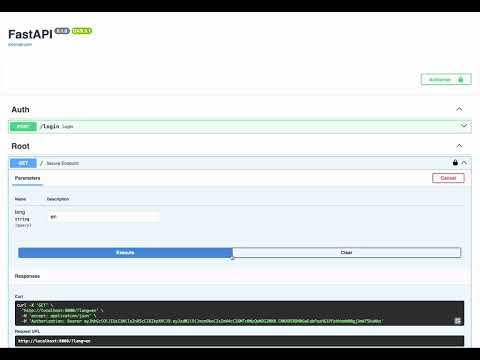
- Open your browser and go to: http://localhost:8000/docs
- You will see all the available endpoints and their schemas.
- To test a protected endpoint:
- First, use the /login endpoint to obtain a JWT token by providing valid credentials.
- Copy the token from the response.
- Click the Authorize button (top right in Swagger UI).
- In the value field, enter: Bearer <your_token_here>
- Click Authorize and then close the modal.
- Now you can interact with secured endpoints directly from Swagger UI.
❌ Not required. This project does not use a database or migrations.
make app-lintermake app-linter-fixMake sure pyproject.toml includes:
[tool.black]
line-length = 120

[tool.isort]
line_length = 120make testsTest files are located in app/tests.
app/
├── auth/               # Authentication logic (JWT implementation)
├── dependencies.py     # FastAPI dependencies
├── i18n.py             # Translations/locales
├── routers/            # Route handlers
├── services/           # Business logic (e.g. NASA data fetcher)
├── tests/              # Unit and integration tests
├── main.py # FastAPI entry pointmake app # Start app with Docker
make app-linter # Run linters
make app-linter-fix # Auto-fix lint issues
make tests # Run all tests- Docker & Docker Compose
- Make (optional but recommended)
For questions or feedback, feel free to open an issue or contact me.