The self-hosted CRM, ERP, and invoicing platform for 3D printing businesses, makerspaces, and engineering freelancers.
Create professional quotes and invoices, manage clients, estimate 3D printing costs, and run your fabrication business from one sleek, document-first platform.








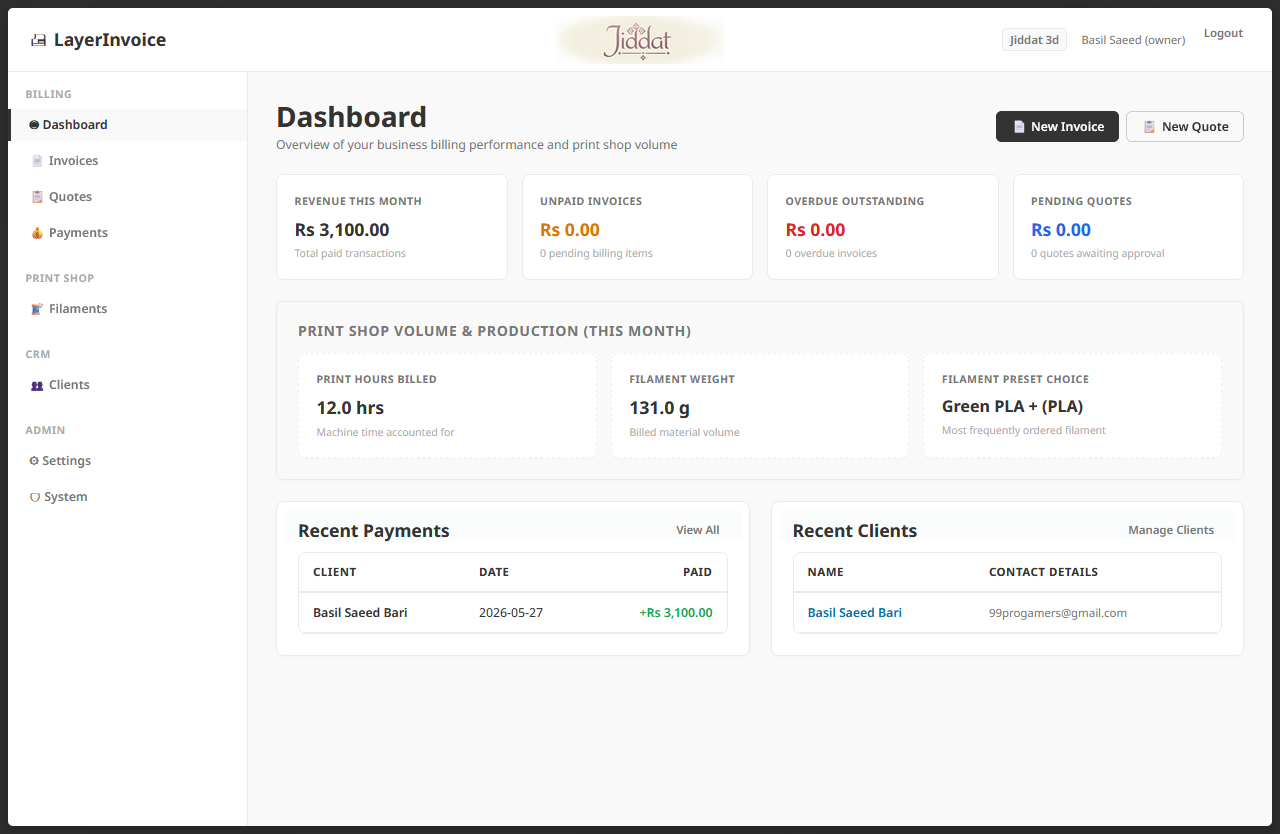
LayerInvoice is a premium, self-hosted, multi-tenant CRM, ERP, and professional Invoice/Estimate builder purpose-built for 3D Printing Service Shops, makerspaces, and engineering freelancers. It merges sleek document-centric design with powerful automation, database persistence, and an advanced 3D printing cost estimator.
LayerInvoice is heavily inspired by the visual design and document-centric layout of SimpleInvoice. We express our sincere appreciation to the SimpleInvoice creators; their layout served as the benchmark for designing a clean, high-contrast, premium, paper-like document editor. LayerInvoice builds upon that gorgeous document-first philosophy and extends it into a complete, Go-native CRM/ERP geared toward 3D fabrication.
- 💼 CRM Client Management: Full client profiles with integrated billing/shipping addresses, contact emails, and customizable client categorization.
- 📜 Estimates & Quotes CRM: Draft fully items-costed quotes. Transition statuses, export professional PDFs, and convert quotes to full invoices with a single click.
- 🧾 Automated Invoice Builder: Clean, inline, auto-saved invoice generation supporting custom line-items, discounts, and custom tax brackets.
- ⚡ Real-time 3D Printing Cost Calculator: Computes exact production costs and margins live within the invoice and quote interfaces, removing manual math.
- 🧵 Filament Profiles Manager: Register spools, custom material profiles (PLA, PETG, ABS, TPU, Carbon Fiber, Resins), and track real-time cost-per-gram properties.
- 📬 Debounced SMTP Email Dispatcher: When an invoice is updated, a smart background worker waits for a 5-second silence period (debouncing keys) before compiling the updated PDF and emailing it to the client. Includes resilient SMTP error handling.
- 💸 Integrated Payment Register: Log payments (Cash, Bank Transfer, PayPal, Stripe, etc.) against invoices. outstanding balances, earnings, and statistics update instantly.
- 📊 Interactive Financial Dashboard: Track gross revenue, outstanding balances, payment distributions, and active invoice charts.
- 🔒 Multi-Tenant Engine: Clean data separation between operating branches, organizations, or users.
- 💡 High-Contrast Modern Visual Theme: Styled with a robust CSS layer atop PicoCSS, locked into high-contrast light mode to ensure optimal readability on both light and dark operating systems.
LayerInvoice features an advanced cost breakdown engine to ensure 3D printing services maintain healthy profit margins. The calculator evaluates parameters in real-time using these formulas:
3D prints can fail mid-run due to support issues, power outages, or warping. LayerInvoice handles this elegantly:
A final job profit multiplier is applied to the production total to cover business growth and overheads:
LayerInvoice is built on a modern, ultra-lightweight, and lightning-fast tech stack:
- Backend Language: Go (Golang) 1.26+ for blazing-fast speed, static compilation, and zero-runtime dependency packaging.
- HTTP Router: Go-Chi — a lightweight, idiomatic router.
- Database Engine: SQLite operating in high-performance WAL (Write-Ahead Logging) mode. Provides local database speeds with ACID transactions.
- Migrations Tool: Goose — integrated directly into the binary to automatically run database migrations on startup.
- Frontend Reactivity: HTMX for high-performance, single-page-app reactivity (re-rendering DOM nodes on the server without heavy JavaScript frameworks).
- UI Micro-interactions: Alpine.js for handling client-side state, modal resets, and dropdown behaviors.
- CSS Framework: PicoCSS combined with custom Vanilla CSS tokens, ensuring high readability, responsive structures, and crisp contrast.
LayerInvoice is designed to be fully self-hosted. Using Docker ensures a uniform environment and easy updates.
LayerInvoice utilizes SQLite. To ensure your database, session records, and uploads are never lost when the container closes, updates, or reboots, you must mount the application's data directory to the host machine.
SQLite creates side-car files (layerinvoice.db-wal and layerinvoice.db-shm) during active operations. Mounting the entire parent folder (e.g. /app/data inside the container) instead of mounting a single file preserves these transactional logs safely and prevents corruption.
Create a folder for LayerInvoice (e.g., layerinvoice), place the following docker-compose.yml inside it, and customize the environment variables:
version: "3.9"

services:
  app:
    image: ghcr.io/basilsaeed/layerinvoice:latest
    container_name: layerinvoice_app
    restart: unless-stopped
    ports:
      - "8080:8080"
    volumes:
      - ./data:/app/data
    environment:
      - DB_PATH=/app/data/layerinvoice.db
      - SESSION_SECRET=choose_a_long_secure_random_string_here_32_chars
      - APP_ENV=production
      - PORT=8080

      # Optional: SMTP Configuration for Auto-Email Invoices
      # - SMTP_HOST=smtp.gmail.com
      # - SMTP_PORT=587
      # - SMTP_USER=your-email@gmail.com
      # - SMTP_PASS=your-app-specific-password
# - SMTP_FROM=billing@yourdomain.com- Start the Stack:
Run the following command in the same directory:
docker compose up -d
- Setup your Account:
Open
http://localhost:8080/setupin your browser. Since the database starts empty, it will prompt you to create the initial Tenant organization and the Administrator user account. - Login:
Access
http://localhost:8080/loginto begin managing your shop!
Deploying via Portainer is extremely simple:
- Log in to your Portainer Dashboard.
- Navigate to Stacks ➡️ Add Stack.
- Name your stack (e.g.,
layerinvoice). - Paste the
docker-compose.ymlcontent shown above into the Web Editor. - Under Environment variables, define your custom
SESSION_SECRETand SMTP credentials. - Click Deploy the stack.
- Ensure that the volume folder
./datamaps correctly on the host filesystem to secure persistent calculations.
If you want to run the project from source or make modifications:
- Go: Version 1.26 or higher.
- Git: To clone the repository.
- GCC compiler (Optional, only if using a CGO SQLite driver. Note: LayerInvoice utilizes a modern pure-Go SQLite driver, making it 100% C-Go free and fully cross-compilable!).
- Clone the repository:
git clone https://github.com/BasilSaeed/LayerInvoice.git cd LayerInvoice - Setup Configuration:
Copy the example environment template:
Modify
cp .env.example .env
.envto set your desired port and SQLite filename. - Run in Development Mode:
go run main.go
- Compile production binary:
go build -ldflags="-s -w" -o layerinvoice .
If you wish to customize the visual layouts, formatting, or styling of quotes and invoices, you can do so in the following files:
The interactive invoice and quote pages shown inside your browser are standard Go templates styled with custom CSS:
- Invoice Editor:
templates/invoices/show.html(Controls the main layout and includes the 3D Print Calculator modal). - Quote Editor:
templates/quotes/show.html(Controls the quote estimation screen and its calculator modal). - Line Item Rows:
templates/invoices/partials/line_item_row.html(The HTMX inline editor row for single products). - Totals Panel:
templates/invoices/partials/totals.html(Handles interactive subtotal, discount, and tax calculations).
The generated PDF files sent via email or downloaded by users are compiled programmatically using go-pdf/fpdf for high performance and page accuracy:
- PDF Engine:
internal/pdf/pdf.go- Modify fonts, sizes, table column widths, colors, and margins (defaults to 0.75-inch).
- Adjust cell heights and page numbering blocks dynamically.
Here is the exact status of implemented and planned integration features within the LayerInvoice system:
- Interactive 3D Print Cost Estimator & Calculator: In-browser calculation of filament weight, print time, electricity, failure rates, post-processing, and packaging with standard dynamic forms.
- Pure-Go gofpdf Vector PDF Printer: 100% browser-less, fast, programmatic vector A4 PDF compiler with custom corner geometric accents, alternating grids, and multi-page overflow page-splitting.
- Dynamic Company Profile & Logo Upload: Support for standard and wide corporate logos stored as base64 data URLs in SQLite, featuring zero-filesystem storage and live browser previews with anti-XSS bypassing (
safeURL). - Dynamic Top-Bar Branded Header: Dynamic corporate logo display centered in the sticky main app header for premium UI customization.
- Robust Asynchronous SMTP Mailer: Auto-email PDF dispatches upon invoice validation with a 5-second silence period (debouncer key). Saves detailed status logs dynamically to
email_logdatabase table. - Real-time SMTP Connection Tester: HTMX-driven Outbound mail checker directly inside the SMTP server config screen that provides immediate visual diagnostic feedback and prints errors to the debug console.
- Multi-tenant SQLite database in WAL-mode: Zero-configuration DB stack with Goose migrations.
- WhatsApp & SMS Client Notifications: Direct client updates, invoice delivery, and automatic billing reminders dispatched directly through WhatsApp and SMS gateways (currently not implemented).
- Third-Party Payment Gateways: Direct online client payments through Stripe, PayPal, JazzCash, and EasyPaisa integrations (currently payments are logged manually).
- Recurring Invoice Automations: Dynamic Cron-driven billing engine that auto-generates and sends invoices (schema is ready, but scheduling logic is mock/partially automated).
- Advanced Cloud Storage Backends: Option to persist generated PDFs or logos directly in AWS S3, Google Cloud Storage, or MinIO instead of SQLite base64 blobs.
- Interactive CRM Client Portal: A secure dedicated dashboard where clients can log in, view historical estimates/invoices, download PDFs, and pay directly.
- Accounting & Tax Reporting: Exporting quarterly ledgers, tax returns (VAT/GST basis points summaries), and business expenses charts.
LayerInvoice follows a highly modular design tailored for reactive server-side HTML rendering. To explore the structure:
- Mermaid Architecture Diagram: See docs/architecture_diagram.mermaid (renders directly in GitHub).
- Mermaid Architecture Diagram: See docs/architecture.md
- Comprehensive Codebase Reference: See docs/codebase_documentation.md for a detailed file-by-file manual outlining every function, struct, input, and output parameter.
This project is licensed under the GNU Affero General Public License v3.0 (AGPL-3.0) - see the LICENSE file for details.