Repository navigation
Conversation


|
Are you an Automattician? Please test your changes on all WordPress.com environments to help mitigate accidental explosions.
Interested in more tips and information?
|
 github-actions
Bot
added
[Feature] Protect Dashboard
[Plugin] Jetpack
github-actions
Bot
added
[Feature] Protect Dashboard
[Plugin] Jetpack
|
Thank you for your PR! When contributing to Jetpack, we have a few suggestions that can help us test and review your patch:
This comment will be updated as you work on your PR and make changes. If you think that some of those checks are not needed for your PR, please explain why you think so. Thanks for cooperation 🤖 Follow this PR Review Process:
If you have questions about anything, reach out in #jetpack-developers for guidance! Jetpack plugin: No scheduled milestone found for this plugin. If you have any questions about the release process, please ask in the #jetpack-releases channel on Slack. Protect plugin: No scheduled milestone found for this plugin. If you have any questions about the release process, please ask in the #jetpack-releases channel on Slack. |

Code Coverage SummaryCoverage changed in 6 files. Only the first 5 are listed here.
9 files are newly checked for coverage. Only the first 5 are listed here.
Full summary · PHP report · JS report Coverage check overridden by
Covered by non-unit tests
|

cc151f9 to
032237f
Compare
b531356 to
6567e4b
Compare
github-actions
Bot
added
[Package] My Jetpack
[Tests] Includes Tests
[Package] Protect
labels

4d26414 to
f82b81e
Compare
…rewall off, and fix stale block counts
…lists in Settings
github-actions
Bot
added
[Package] WAF
[Plugin] Protect
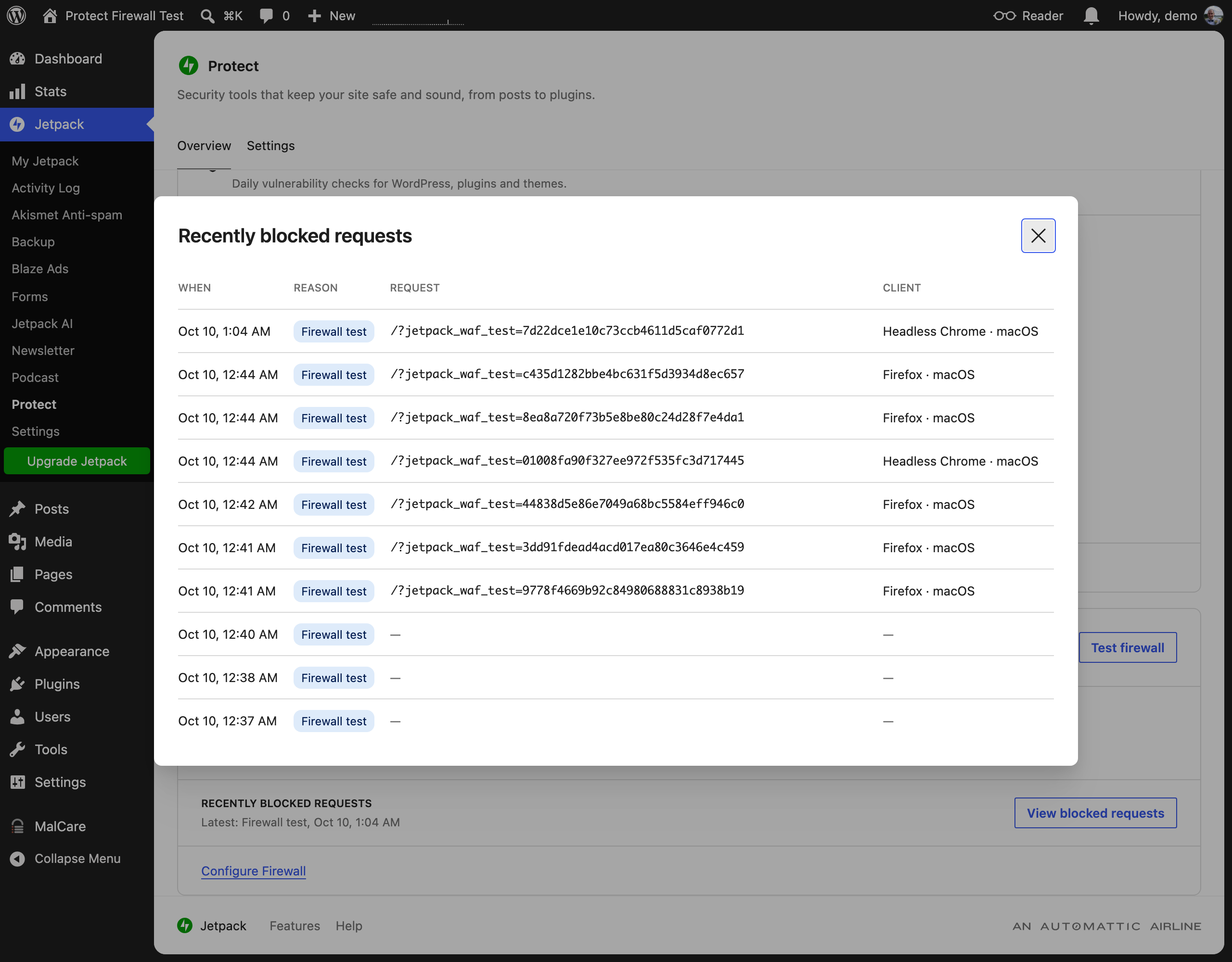
The card shows the latest block; a table of all of them opens from it.
…teps under Learn more
…n, and show the requests it kept

The View blocked requests dialog now needs the firewall's request log (Share basic data). When that log has a block, the dialog adds its request and client, read from the log file rather than a new blocklog column.
Protect only uses the WAF when a plugin bundles it, so it is a dev dependency, as in Sync. Also pass the self-check's rule ID as the string Waf_Runtime::block() documents.
…erview

The IP lists stay on the Settings tab, so the page no longer sends them with its state.
There was a problem hiding this comment.
🟡 Changes recommended
Firewall tests can fail across supported origin configurations, and refresh failures can display stale successful results.
3 open findings

What changed in this PR
Adds the Firewall section to the feature-gated Protect dashboard and extends the WAF package with testing, recent-block, and cache-safe count APIs.
Changes:
- Adds Firewall overview/settings cards, manual IP rules, recent blocks, and self-test UI.
- Adds one-time WAF self-check tokens and direct database reads for current counts.
- Adds PHP/JavaScript tests and changelog entries.
| File | Description |
|---|---|
projects/plugins/protect/changelog/fix-waf-stale-block-counts |
Records the Protect count fix. |
projects/plugins/jetpack/changelog/add-protect-dashboard-firewall |
Records the Jetpack dashboard feature. |
projects/packages/waf/tests/php/unit/WafSelfCheckTest.php |
Tests self-check tokens and blocking. |
projects/packages/waf/tests/php/unit/WafBlocklogManagerTest.php |
Tests cache-bypassing count reads. |
projects/packages/waf/tests/php/unit/functions-wordpress.php |
Adds an unserialization test shim. |
projects/packages/waf/src/class-waf-self-check.php |
Implements one-time firewall tests. |
projects/packages/waf/src/class-waf-runner.php |
Runs self-checks before normal rules. |
projects/packages/waf/src/class-waf-blocklog-manager.php |
Adds recent blocks and fresh count reads. |
projects/packages/waf/changelog/fix-waf-stale-block-counts |
Records the WAF count fix. |
projects/packages/waf/changelog/add-protect-dashboard-firewall |
Records new WAF dashboard support. |
projects/packages/protect/tests/php/Firewall_Section_Test.php |
Tests compatibility fallbacks. |
projects/packages/protect/src/sections/class-firewall.php |
Provides Firewall state and REST routes. |
projects/packages/protect/routes/dashboard/sections/firewall/types.ts |
Defines Firewall state types. |
projects/packages/protect/routes/dashboard/sections/firewall/test/manual-rules.test.ts |
Tests manual-rule summaries. |
projects/packages/protect/routes/dashboard/sections/firewall/test/firewall-test.test.ts |
Tests firewall outcomes and labels. |
projects/packages/protect/routes/dashboard/sections/firewall/test-details.tsx |
Renders self-test diagnostics. |
projects/packages/protect/routes/dashboard/sections/firewall/style.scss |
Styles Firewall lists and diagnostics. |
projects/packages/protect/routes/dashboard/sections/firewall/settings-card.tsx |
Adds Firewall settings controls. |
projects/packages/protect/routes/dashboard/sections/firewall/recent-blocks.tsx |
Renders recent blocked requests. |
projects/packages/protect/routes/dashboard/sections/firewall/overview-card.tsx |
Adds Firewall status and testing UI. |
projects/packages/protect/routes/dashboard/sections/firewall/manual-rules.tsx |
Summarizes configured IP rules. |
projects/packages/protect/routes/dashboard/sections/firewall/index.tsx |
Registers Firewall dashboard cards. |
projects/packages/protect/routes/dashboard/sections/firewall/firewall-test.ts |
Executes and classifies self-tests. |
projects/packages/protect/changelog/add-protect-dashboard-firewall |
Records the shared dashboard feature. |
🧠 Review effort: Balanced
💡 Add a code-review agent skill or configure MCP servers for context-aware, tailored reviews. Learn more in the docs.
| path: `${ FIREWALL_PATH }/test`, | ||
| method: 'POST', | ||
| } ); | ||
| const response = await fetch( url, { credentials: 'omit', cache: 'no-store' } ); |
| * @return The addresses to show and the count of the rest. | ||
| */ | ||
| export function summarizeIpList( list?: unknown ): { shown: string[]; more: number } { | ||
| const ips = typeof list === 'string' ? list.split( /[\s,]+/ ).filter( Boolean ) : []; |
| const lastId = blocks.recentBlocks[ 0 ]?.id ?? 0; | ||
| setResult( await runFirewallTest( active ) ); | ||
| const fresh = await apiFetch< { | ||
| blockedCount: number | null; | ||
| recentBlocks: BlockedRequest[]; | ||
| } >( { path: `${ FIREWALL_PATH }/blocks` } ); | ||
| setBlocks( fresh ); | ||
| setRecorded( | ||
| fresh.recentBlocks.some( block => block.id > lastId && block.ruleId === SELF_CHECK_RULE_ID ) | ||
| ); |
enejb
added
the
Covered by non-unit tests

Fixes JETPACK-2957
Part of JETPACK-2882
Proposed changes
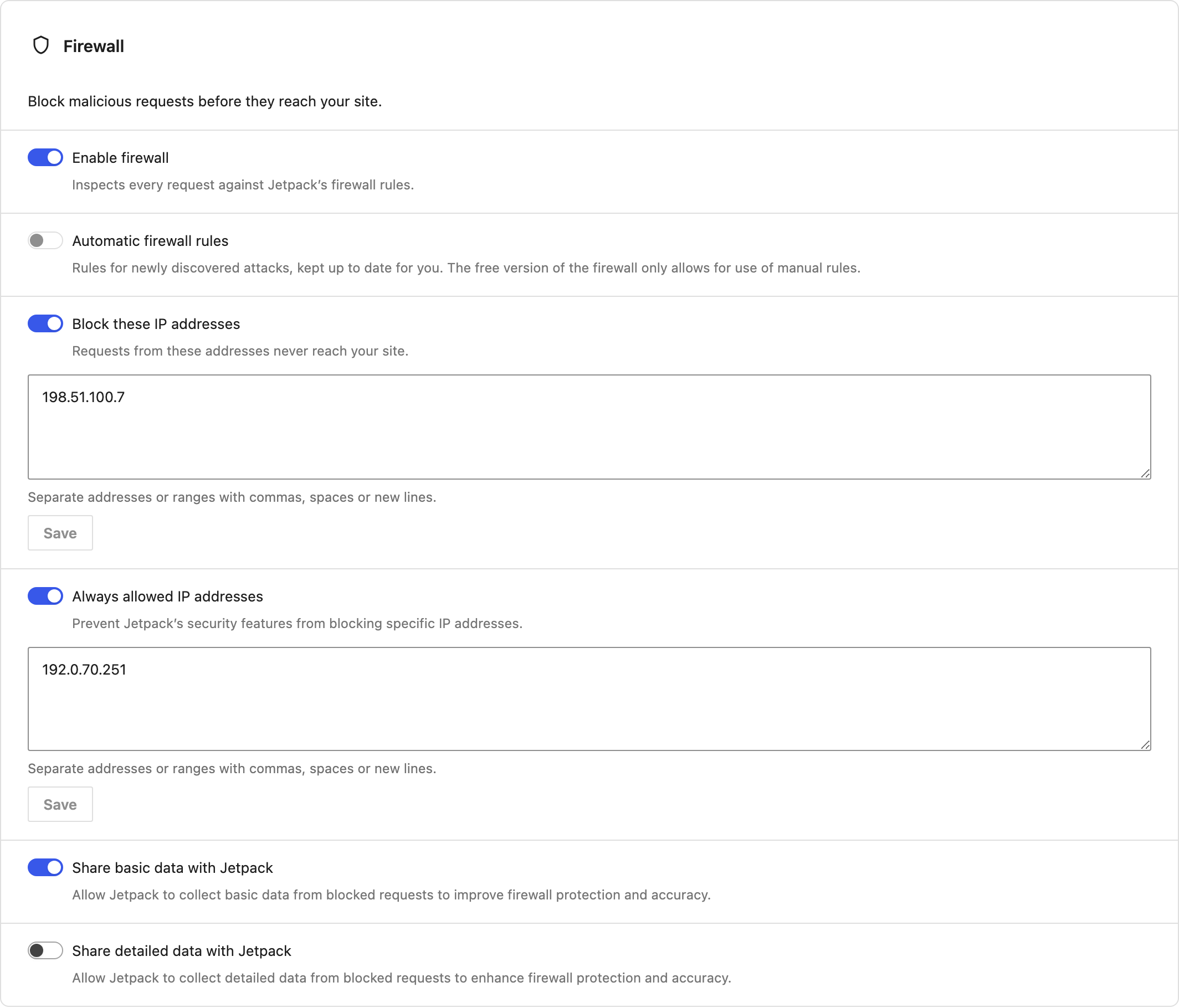
packages/protect/src/sections/class-firewall.php+packages/protect/routes/dashboard/sections/firewall/).wafmodule's availability and on/off state, the all-time blocked request count fromWaf_Blocklog_Manager::get_all_time_block_count()(sent even while the firewall is off, since the counter survives), and whether the site has a Scan plan.jetpack/v4/waf, like Jetpack Settings, so turning off basic sharing also turns off detailed sharing (and vice versa) and the standalone bootstrap is regenerated.jetpack/v4/waf, everything else throughjetpack/v4/settings.POST jetpack/v4/protect-dashboard/firewall/testcreates a one-time token that expires after 60 seconds (only its hash is stored, injetpack-waf/self-check-token) and returns/?jetpack_waf_test=<token>. The browser requests that URL without cookies. The WAF runner checks the token before any rules run (so the IP allow list can't let the request through) and blocks it as rule-2, "firewall test". A snackbar shows "Testing the firewall…", then the result: blocked, logged but not blocked (silent mode), not blocked, or firewall off. The result stays until dismissed, with a checkmark when the firewall blocked the request and an X when it didn't or the test couldn't run. Its "Learn more" opens a dialog with the steps: the token, the request, the status andX-JetpackWAF-Blockedheader, and whether the block was logged. The test also runs while the firewall is off, to show the request getting through.Waf_Blocklog_Manager::get_recent_blocks()), refreshed after a test viaGET jetpack/v4/protect-dashboard/firewall/blocks.jetpack-waf/waf-blocklog).--wp-ui-dialog-z-index, as in the VideoPress dashboard), so they aren't covered on narrower screens.automattic/jetpack-wafis a dev dependency ofpackages/protectso static analysis can see it, as in Sync; at runtime it's still optional and guarded.Waf_Request::get_real_user_ip_address()).get_option()returned stale counts. They're now read straight from the options table.Related product discussion/links
Does this pull request change what data or activity we track or use?
No.
Testing instructions
wp companion feature-flag enable jetpack-protect-dashboard(or filterjetpack_feature_flag_enabled_jetpack-protect-dashboardto true)wp eval 'Jetpack_Options::delete_option("available_modules");'wp jetpack module activate protect-dashboardandwp jetpack module activate waf203.0.113.7, click Save. Both requests tojetpack/v4/settingsreturn 200, and after a reload the toggle is on and the address is still there.wp-content/jetpack-waf/rules/block-ip.phpnow contains the address.block-ip.php.jetpack/v4/waf). Turn off "Share basic data with Jetpack": detailed sharing turns off too, andwp-content/jetpack-waf/bootstrap.phpnow defines bothJETPACK_WAF_SHARE_DATAandJETPACK_WAF_SHARE_DEBUG_DATAas''.403with the firewall header, and the block logged. "Latest: Firewall test" shows on the card, and the all-time count goes up by one./?jetpack_waf_test=…) and client (e.g. "Chrome · macOS"). Narrow the window to a phone width: the dialog stays above the admin menu and rows stack.200 OKwith no firewall header.wp-content/jetpack-waf/rules/allow-ip.phpcontains the address.Review follow-ups
jetpack/v4/waf, so the basic/detailed coupling and standalone bootstrap regeneration run; the optimistic update mirrors the coupling.Waf_Blocklog_Manager::get_all_time_block_count()only, and locale-formatted.Code coverage
The coverage check flags
class-firewall.php,settings-card.tsxandWaf_Blocklog_Manager::get_recent_blocks(). What's left uncovered is REST callbacks, page state and toggle wiring, plus raw$wpdb/mysqli reads of the blocklog and options tables. These are exercised end to end on a Jurassic Ninja site with the steps above, so this PR carries theCovered by non-unit testslabel. The logic with branches has unit tests: test outcomes, block labels, user-agent summaries, matching request-log entries to blocks, the dialog's gating and columns, the test snackbar and Learn more, and saved-settings snackbars and rollback.Screenshots
Overview → Firewall card:
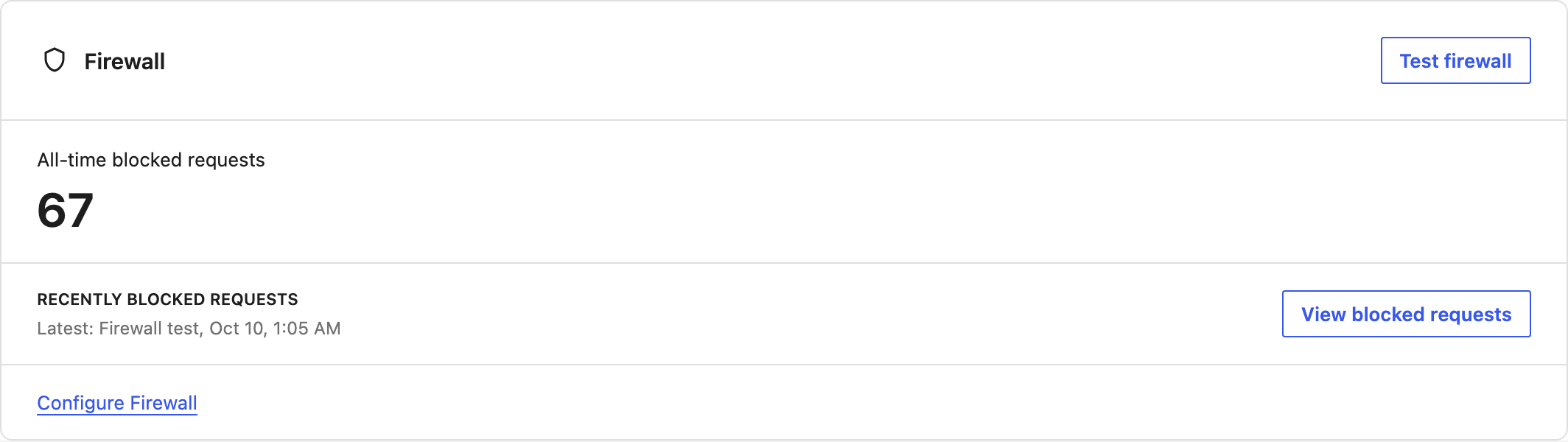
Test firewall → result snackbar with Learn more:
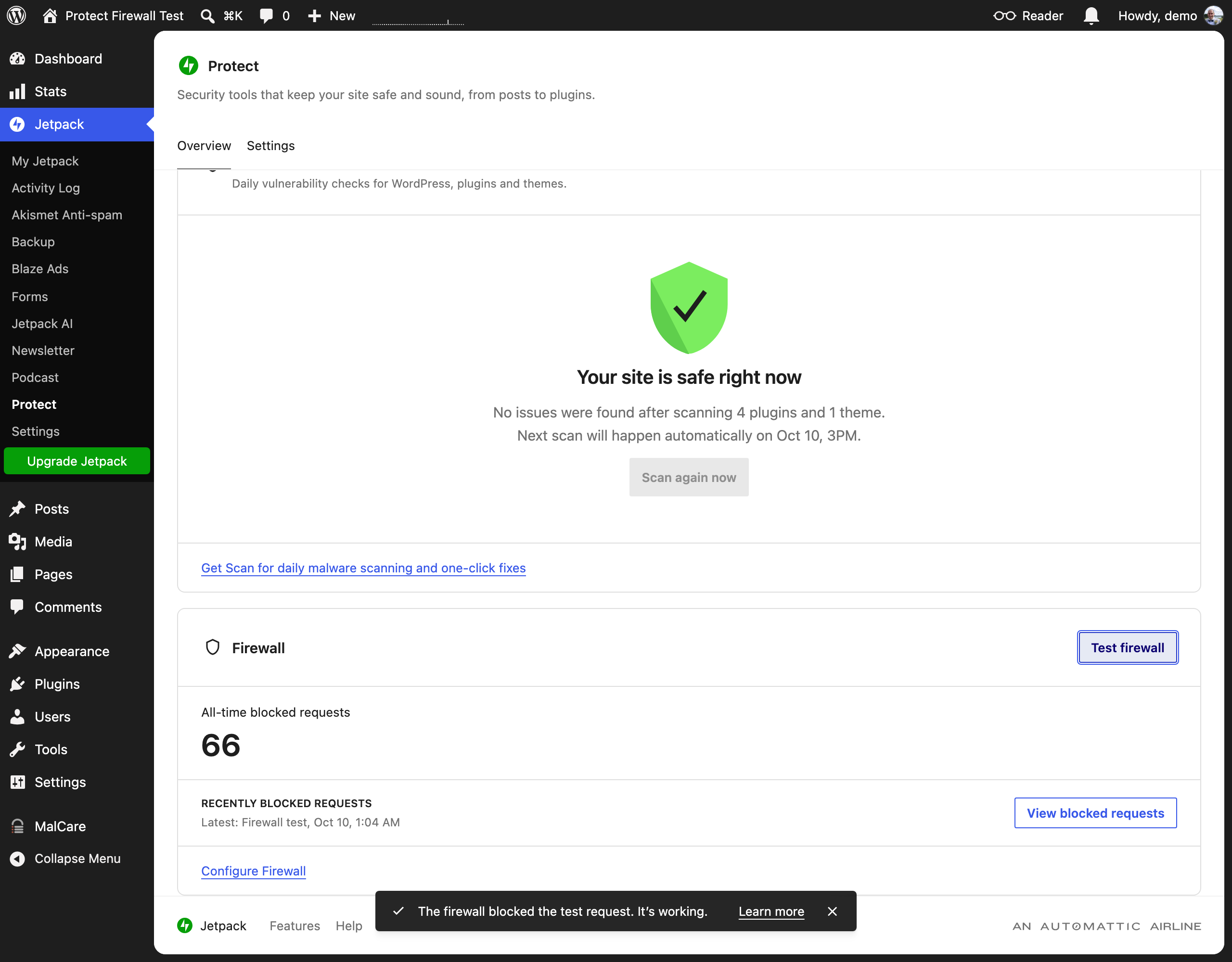
Learn more → how the test works:
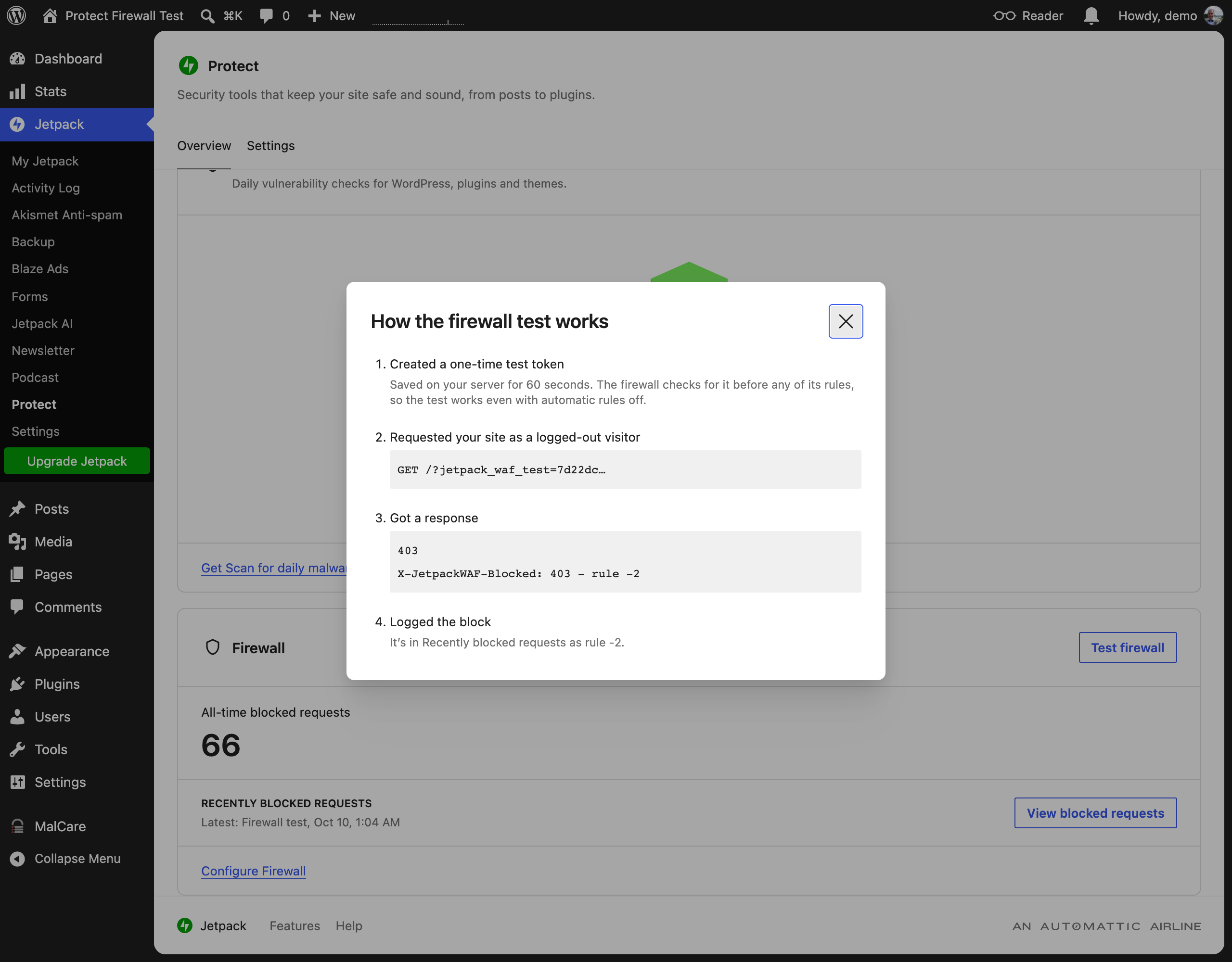
View blocked requests (with "Share basic data" on; rows logged while it was off show "—"):
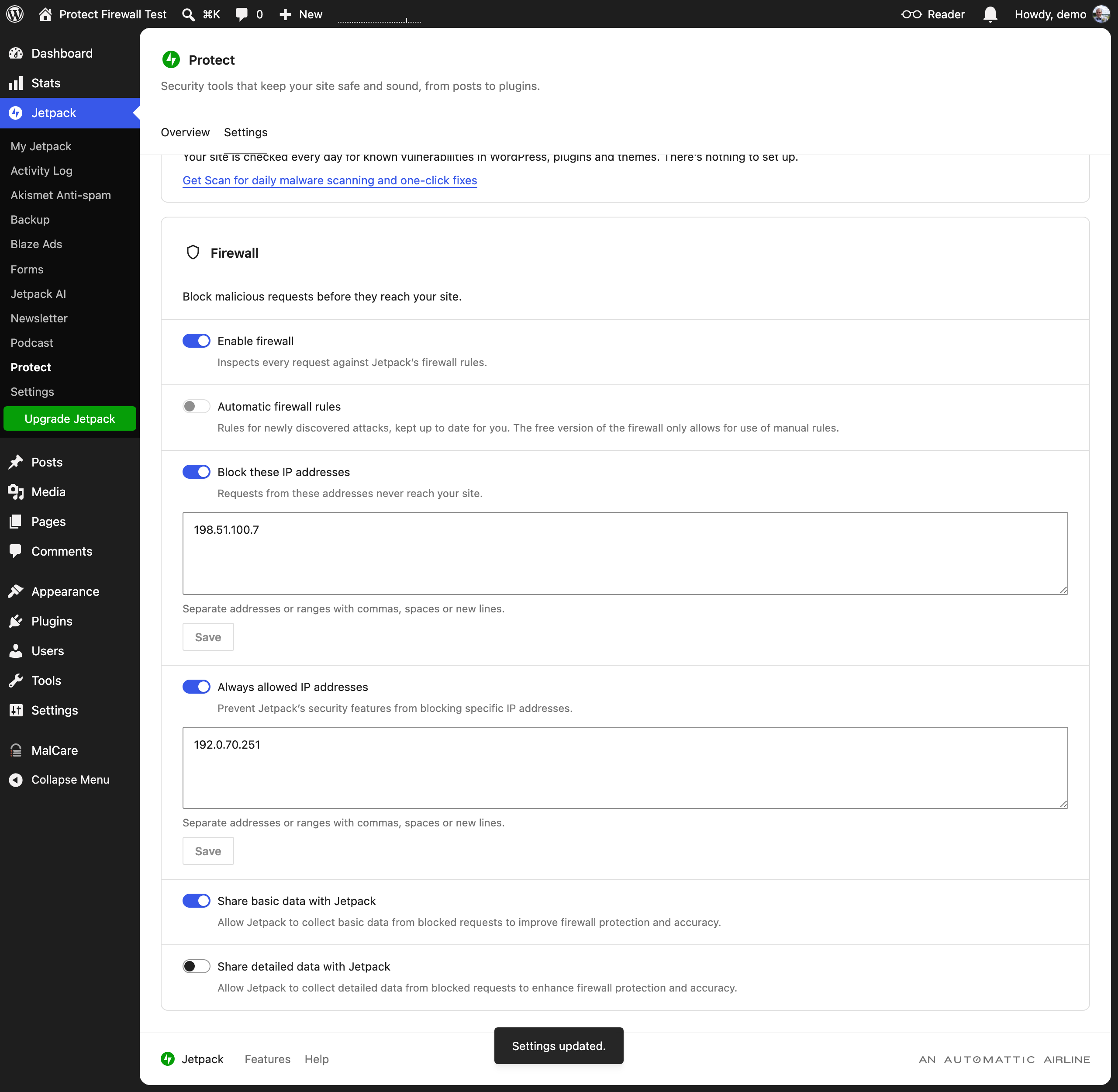
Settings → Firewall card:
Settings → saved snackbar: