



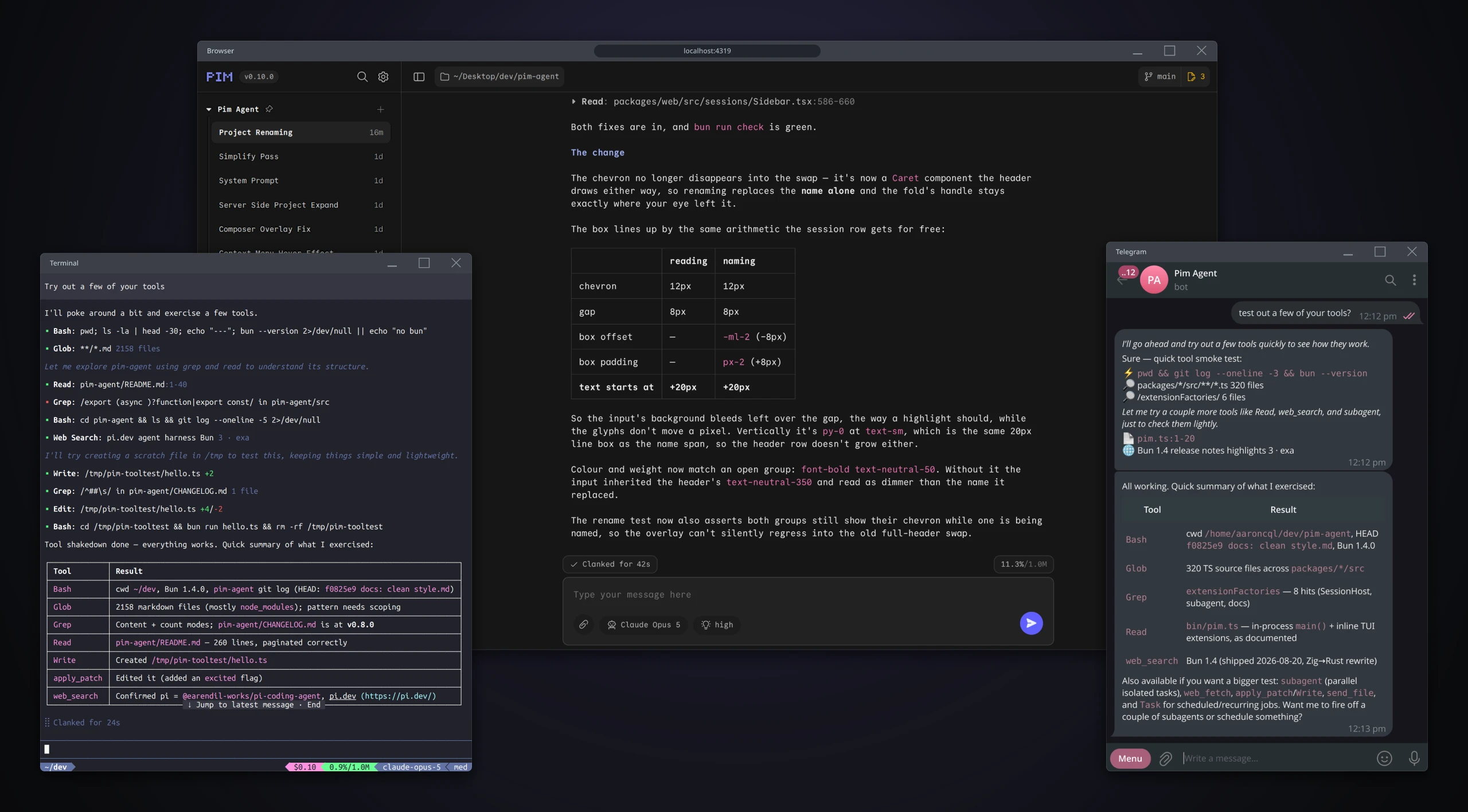
A batteries-included distro of Pi, accessible in your terminal, browser and Telegram.
- For the agent: model-aware editing, web search/fetch, subagents, and more, behind a system prompt under 3K tokens.
- For you: shared terminal/browser sessions, a mobile-friendly web UI, and a Telegram bot.
- Still Pi: your Pi extensions, CLI, sessions and config keep working, while vanilla
pistays untouched.
- Quick Start
- Agent Tools
- Terminal UI
- Web UI
- Telegram Bot
- Configuration
- Why Pim?
- Benchmarks
- Changelog
- Developing
Ensure that you have Bun already installed:
# Install pim:
bun install -g pim-agent

# Launch pim TUI:
pim

# Update pim:
pim updateTo use Pim via your browser or Telegram, the recommended approach is to install the servers as a persistent daemon:
# Supports Linux (systemd) and macOS (launchd)
pim --mode daemon --install

# Tear down
pim --mode daemon --uninstall
Supported arguments:
| Flag | Default |
|---|---|
--surfaces |
web,telegram |
--port (web only) |
4319 |
--hostname (web only) |
127.0.0.1 |
--cwd |
Current working directory |
These are frozen into the daemon's unit file at install time, so re-run --install to change them. Flags you omit keep their installed values, and an older per-surface install is stopped and replaced for you. The daemon auto-restarts on failure, and updates in place from Settings → Update & Restart on the web UI, or /update in Telegram.
After installing with the default settings, the web UI is at http://localhost:4319. Telegram needs a bot token first (see Telegram Bot). Surfaces start in isolation, so an unconfigured bot still leaves the browser served.
Pim revamps Pi's default tools (bash, read, write, edit) so they produce consistent behaviour and output, cross-reference each other where useful, and render uniformly in your UIs. It also adds:
apply_patch- V4A patch editing, dynamically exposed instead ofeditfor OpenAI and select Claude modelsglob- file enumeration by glob pattern, sorted newest-first, respects.gitignoregrep- regex search across files with context lines, multiline matching, respects.gitignoreweb_search- search the web via Exa/Firecrawl/DuckDuckGo with ranked results and snippetsweb_fetch- fetch websites as Markdown via Jina, with browser-rendered fallback viaBun.WebViewsubagent- delegate complex work to isolated sub-sessions with full tool access
Pim also ships with quality of life improvements for the TUI:
- ANSI-compatible themes -
pim-lightandpim-darkthemes which adapt to your terminal's colour scheme - fzf-style autocomplete -
@pathfile picker and/commandpicker with fuzzy search - Git-aware powerline footer - cwd, git branch and states, context usage, model and session cost (run
/pimto disable) - TPS reporting - per-cycle decode/prefill rate, TTFT, and cache read tokens (disabled by default; run
/pimto enable) - Concise tool UI - minimal one-liner title across all tool calls,
Ctrl+Oto toggle full details
Run Pim in the browser, on any device. Hosted on a machine you can reach remotely, this lets you start work at your desk and carry on from your phone.
See Web & Telegram.
Warning
Web mode has no built-in authentication, and the agent runs shell commands as you: anything that can reach the port has full access to the host. Bind it to a private network, never to 0.0.0.0.
Tailscale is the recommended way to do this. Binding to your tailnet IP keeps the server off your LAN and off the public internet, while every device on your tailnet can still reach it:
# Look up this machine's tailnet IP:
tailscale ip -4

# Install with --hostname set to it:
pim --mode daemon --install --hostname=100.115.46.15 # Replace with your actual tailscale IP
The web UI is then at http://<tailnet-ip>:4319 and localhost no longer serves it.
Run Pim as a Telegram bot with full agent capabilities in your DMs or group chats (supports threads).
Create ~/.pim/telegram/config.json with your bot token (from @BotFather) and an allowlist of chat IDs the bot will respond to:
{
  "token": "YOUR_TELEGRAM_BOT_TOKEN",
  "allow": [123456789, 987654321]
}
Then install the daemon, which brings the bot up with it.
Tip
Use /commands on your bot for all commands to show up on your Telegram UI.
| Command | Description |
|---|---|
/cancel |
Cancel the current turn |
/cd |
Show or change the working directory |
/chatid |
Show this chat's numeric ID |
/clear |
Reset chat history and context window |
/commands |
Register all commands with Telegram |
/compact |
Compact the current session context |
/effort |
Show or change thinking effort level |
/logs |
Show or change log verbosity |
/model |
Show or change the AI model |
/temporary |
Toggle temporary chat (fresh session each message) |
/update |
Update the bot to the latest version |
/usage |
Show context window and session cost |
- ⏰ Scheduled tasks - your bot can create one-time, interval, or cron-based tasks that fire automatically; ask your bot to schedule something.
- 👀 Live progress logs - use
/logsto choose what you see while the agent works: final replies, tool use, intermediate text, or thinking. - 📝 Rich Markdown - supports Telegram's rich text formatting with full markdown and LaTeX math support.
- 📎 Rich media - send photos, documents, videos, audio, and voice messages directly in chat; your bot can also send files back to you.
- 🧵 Thread-specific prompts - each chat (or thread) gets its own session and optional instructions; ask your bot to modify its instructions.
Pim ships a collection of features, nearly all enabled by default. To enable or disable specific features, run /pim in the TUI and toggle from the list. The changes apply to the running session immediately.
The web_search tool tries Exa → Firecrawl → DuckDuckGo (via Jina reader), and the web_fetch tool uses Jina with a Bun.WebView fallback. These tools still work without API keys, but are subject to the following keyless rate limits (as of Sept 2026):
- Exa - 1,000 requests per month
- Firecrawl - 1,000 requests per month
- Jina - 20 requests per minute
For heavier usage, add API keys to ~/.pim/settings.json:
{
  "exa": {
    "apiKey": "api_key_here"
  },
  "firecrawl": {
    "apiKey": "api_key_here"
  },
  "jina": {
    "apiKey": "api_key_here"
  }
}
Environment variables take precedence over settings.json when set:
EXA_API_KEY='api_key_here' FIRECRAWL_API_KEY='api_key_here' JINA_API_KEY='api_key_here' pimAdd the following settings to your ~/.pi/agent/settings.json for the best experience with Pim:
{
  "quietStartup": true,
  "editorPaddingX": 1,
  "markdown": {
    "codeBlockIndent": ""
  }
}Pim's philosophy is opinionated but minimal. Its goal is to improve the out-of-the-box experience for both users and agents, without sacrificing composability with other Pi extensions.
Think of Pim as an opinionated, batteries-included distro of Pi (like what Ubuntu is to Linux). Pim uses Pi in its core, and everything Pi does, it continues to do:
- Every Pi extension still works. Pim registers its own extensions in-process, so third-party extensions from your Pi settings load right alongside them, exactly as before.
- Pi's CLI, sessions and config are unchanged. Pim reads and writes pi's own session files, so a conversation started in pi resumes in pim and back again. Only Pim's own settings live separately in
~/.pim/settings.json. - Your vanilla
pikeeps working. Pim never registers itself with Pi and never touches your Pi settings, sopiandpimcan both be used on the same machine.
Pim's system prompt is under 3K tokens despite exposing 10+ tools, far leaner than alternatives like OpenCode (~10K), Hermes (~16K), or Claude Code (~30K).
This is achieved by having tool descriptions focus on how to use each tool instead of prescribing when, since models already appear to internally encode when tools are needed, and prompting them to call tools can suppress both necessary and unnecessary calls.
LLMs are increasingly post-trained for specific agent harnesses, making tool schemas part of the model's learned interface. For text-file editing, Anthropic models are trained to use string replacement operations, while OpenAI models use V4A patch operations.
Pim keeps the active toolset model-aware instead of assuming one tool fits every LLM. It dynamically exposes the tools best suited to the selected model, giving each model the interface that best matches its learned behaviour while keeping the prompt lean.
| ID | Pim Version | LLM / Model | Results |
|---|---|---|---|
| r1 | 21d084d1 |
Qwen3.6-35B-A3B-UD-Q6_K_XL.gguf |
41.6% (37/89) |
| r2 | bfd792cf |
Qwen3.6-35B-A3B-UD-Q6_K_XL.gguf |
36.0% (32/89) |
| r3 | cd52f3a4 |
Qwen3.6-35B-A3B-UD-Q6_K_XL.gguf |
36.0% (32/89) |
Preliminary aggregate score of 37.8% from 3 independent runs. Each ran on an incremental build of Pim, though changes between runs were minor and none were tuned to the benchmark. Pim's subagent tool was disabled for all runs to keep each trial single-agent.
On average, Pim solves ~54% more tasks than little-coder with the same Qwen3.6-35B model (37.8% vs 24.6%). This also places Pim in a similar tier to Claude Code + Sonnet 4.5 (40.1%), and above Codex + GPT-5-Mini (31.9%).
The Qwen3.6-35B model is hosted via llama.cpp on an M4 Pro 48GB MacBook, with the following config:
llama-server \
  -c 131072 \
  -ngl 99 \
  --slot-save-path /tmp/llama-slots \
  --flash-attn on \
  --cache-type-k q8_0 \
  --cache-type-v q8_0 \
  --jinja \
  --temp 0.6 \
  --top-p 0.95 \
  --top-k 20 \
  --min-p 0.0 \
  --presence-penalty 0.0 \
  --repeat-penalty 1.0 \
  --reasoning-budget 16384 \
  --reasoning-budget-message "Alright, I've thought enough. Let me take the next concrete step now — either a tool call or a final answer — and refine based on what I learn." \
  -np 1
Note 1: results are preliminary as only 3 independent full runs were conducted; Terminal-Bench 2.0 requires 5 independent full runs under a fixed configuration for an official score.
Note 2: the gap with little-coder may be partly explained by different inference configs (128K context vs 32K, Q6_K_XL vs Q4_K_M, higher thinking budget, etc.).
Note 3: in r1 and r3, the code-from-image trial was counted as non-passing because Qwen autonomously searched for the answer online after legitimately trying for a while.
Note 4: see the benchmarks/terminal_bench_2 dir for breakdown of results and reproduction steps.
See CHANGELOG.md for release notes.
See AGENTS.md for the developer guide.